



ColumnTypes
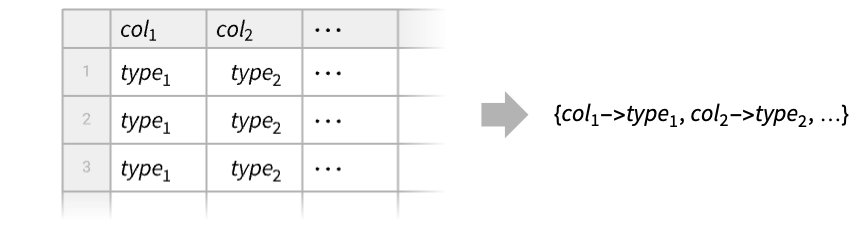
ColumnTypes[tab]
gives the element types of the columns of the Tabular object tab.
ColumnTypes[tab,tsel]
gives the element types of the columns selected by tsel.
Details
- ColumnTypes is typically used to obtain type information either to convert the type or decide what operations can be done. For instance, you cannot do date operations on strings.
- For a Tabular object tab with named columns, ColumnTypes[tab,…] returns a association of pairs coltype.
- For a Tabular object tab with unnamed columns, ColumnTypes[tab,…] returns a list of types.
- The column type selector tsel can have one of these forms:
-
tpatt type pattern tclass named class of types - Possible type patterns tpatt include cases like "String", "Integer*" or "Quantity"::["Real64",_].
- Possible type classes tclass include:
-
"Numbers" number types "MachineNumbers" machine-sized number types "Reals" real-valued types, including integers "MachineReals" machine-sized real-valued types, including integers "Integers" integer types "MachineIntegers" machine-sized integer types "FloatingPoint" numbers with floating-point representation "MachineFloatingPoint" machine-sized real and complex numbers "FloatingPointReals" real numbers with floating-point representation "MachineFloatingPointReals" machine-sized real numbers "FloatingPointComplexes" complex numbers with floating-point representation "Lists" each element is a list "Strings" each element is a string - ColumnTypes can also give the component types of TimeSeries and EventSeries objects.
Examples
open all close allBasic Examples (3)
Find the types that are automatically selected for this Tabular object:
Tabular[{{1, "dog", True}, {2, "cat", False}}, {"col1", "col2", "col3"}]ColumnTypes[%]Find the types of the columns of reals:
Tabular[{{3.1, 4, False}, {2.5, -3, True}}, {"number", "symbol", "boolean"}]ColumnTypes[%, "Real*"]Construct a Tabular object without keys from a numeric matrix:
Tabular[{{1, 2.}, {3, 4.}, {5, 6.}}]Find the list of types of each column:
ColumnTypes[%]Scope (15)
Numeric Types (1)
Take a collection of integers or missing values:
data = ReplacePart[RandomInteger[{-100, 100}, 6], 4 -> Missing[]];ToTabular[<|"col" -> data|>, "Columns"]By default, integers will be interpreted using the "Integer64" type in this machine:
ColumnTypes[%]Construct three columns with the same data but casting to different types of integers:
tab = ToTabular[<|"col8" -> data, "col16" -> data, "col32" -> data|>, "Columns", <|"ElementType" -> {"col8" -> "Integer8", "col16" -> "Integer16", "col32" -> "Integer32"}|>]ColumnTypes[tab]Boolean Type (1)
String Type (1)
Quantity Types (2)
Take a collection of Quantity durations and missing values:
data = {Quantity[3.2, "Minutes"], Quantity[90., "Seconds"], Missing[], Quantity[0., "Seconds"]}tab = ToTabular[<|"col" -> data|>, "Columns"]The values are stored using "Real64" magnitudes and a common unit of "Seconds":
ColumnTypes[%]For small enough Tabular objects, the original input data is cached by default and Normal recovers it:
Normal[tab]Specify the magnitude type and unit to use:
tab = CastColumns[tab, "col" -> "Quantity"::["Real32", "Minutes"]]ColumnTypes[%]The original input was not cached:
Normal[tab]Quantities of different dimensions can be stored using the "InertExpression" type:
data = {Quantity[2, "Years"], Quantity[1, "LightYears"]}tab = ToTabular[<|"col" -> data|>, "Columns"]ColumnTypes[tab]Trying to impose a specific "Quantity" type will result in missing values:
CastColumns[tab, "col" -> "Quantity"::["Integer64", "Years"]]Normal[%]Date & Time Types (3)
data = RandomDate[6]Create a Tabular object with automatic type detection:
tab1 = ToTabular[<|"col" -> data|>, "Columns"]ColumnTypes[tab1]Specify a type to convert to granularity "Day" when dates are extracted:
tab2 = ToTabular[<|"col" -> data|>, "Columns", <|"ElementType" -> {"Date"::["Integer64", "Day"]}|>]ColumnTypes[tab2]Normal[tab2]data = RandomTime[6]Create a Tabular object with automatic type detection:
tab1 = ToTabular[<|"col" -> data|>, "Columns"]ColumnTypes[tab1]Specify a type to convert to granularity "Hour" when times are extracted:
tab2 = ToTabular[<|"col" -> data|>, "Columns", <|"ElementType" -> {"Time"::["Integer64", "Hour"]}|>]ColumnTypes[tab2]Normal[tab2]Specify dates with a different calendar:
data = RandomDate[6, CalendarType -> "Jewish"]tab = ToTabular[<|"col" -> data|>, "Columns"]ColumnTypes[tab]Normal[tab]GeoPosition Type (1)
Take a collection of central geo positions for the countries of South America:
EntityValue[EntityClass["Country", "SouthAmerica"], "Position"]ToTabular automatically interprets the data as a column of "GeoPosition" type:
tab = ToTabular[<|"col" -> %|>, "Columns"]ColumnTypes[tab]GeoGraphics[{Red, PointSize[Large], Point[tab -> "col"]}, GeoBackground -> "Plain"]Lists & Tuples (2)
Take a collection of integer tuples:
data = Tuples[{1, 2, 3}, 3]tab1 = ToTabular[data]ColumnTypes[%]Specify the type of the elements of the tuples:
tab2 = ToTabular[<|"col" -> data|>, "Columns", <|"ElementType" -> {"ListVector"["Integer8", 3]}|>]ColumnTypes[tab2]Take a collection of tuples of objects of various types:
data = Tuples[{{"cat", "dog", "fox"}, {1, 2, 3}, {True, False}}]Create a Tabular object with automatic type detection:
tab1 = ToTabular[<|"col1" -> data|>, "Columns"]ColumnTypes[tab1]Specify the types of the elements of the tuples:
tab2 = ToTabular[<|"col" -> data|>, "Columns", <|"ElementType" -> {"ListTuple"["String", "Integer8", "Boolean"]}|>]ColumnTypes[tab2]General Expressions (1)
data = Region[RegularPolygon[#]]& /@ Range[3, 8]Creating a Tabular object assigns type "Expression" to general Wolfram Language expressions:
ToTabular[<|"col" -> data|>, "Columns"]ColumnTypes[%]Data Forms (2)
Extract the component types of a TimeSeries object:
TimeSeries[{{1, "dog"}, {4, "cat"}, {3, "fox"}}, {Today}, ComponentKeys -> {"number", "animal"}]ColumnTypes[%]The association includes the type of the "Timestamp" column of the corresponding Tabular object:
Tabular[%%]Take a simple TimeSeries object:
TimeSeries[Quantity[{2.5, 3.2, 1.9}, "Volts"], {0}]The timestamp component has numeric or date type, while the value component can be of any type:
ColumnTypes[%]Column Selectors (1)
Get column types for all columns:
tab = Tabular[{{1, 2.3, "dog", True}, {2, 1.8, "cat", False}}, {"col1", "col2", "col3", "col4"}]ColumnTypes[tab]Extract column types for two columns:
ColumnTypes[tab][[{"col1", "col3"}]]Extract columns of Boolean type:
ColumnTypes[tab, "Boolean"]Extract columns of any integer type:
ColumnTypes[tab, "Integer*"]Extract columns that are either string or Boolean:
ColumnTypes[tab, "String" | "Boolean"]Applications (1)
Create a TabularRow with automatic input type detection:
TabularRow[{1, "cat", Today}]ColumnTypes[%]TabularRow[{1, "cat", Today}, <|"ElementType" -> {"Integer8", "Categorical"[{"cat", "dog", "fox"}], Automatic}|>]ColumnTypes[%]Text
Wolfram Research (2025), ColumnTypes, Wolfram Language function, https://reference.wolfram.com/language/ref/ColumnTypes.html (updated 2026).
CMS
Wolfram Language. 2025. "ColumnTypes." Wolfram Language & System Documentation Center. Wolfram Research. Last Modified 2026. https://reference.wolfram.com/language/ref/ColumnTypes.html.
APA
Wolfram Language. (2025). ColumnTypes. Wolfram Language & System Documentation Center. Retrieved from https://reference.wolfram.com/language/ref/ColumnTypes.html