

ToTabular
Details and Options
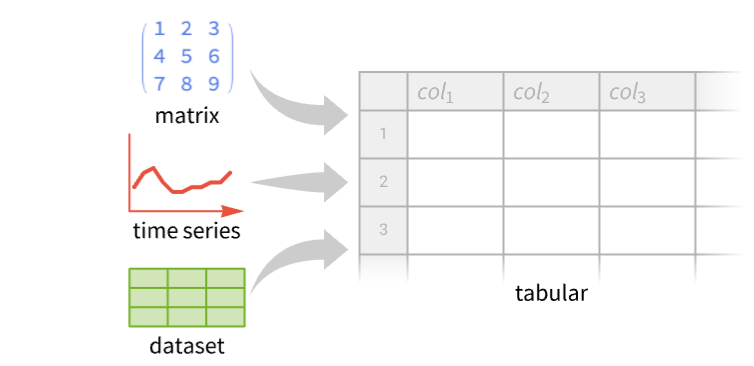
- ToTabular is typically used to provide control over how data objects are converted into Tabular objects.
- The data argument can include:
-
matrix rectangular matrix of data » array array of data, rectangular in the first two levels » {assoc1,assoc2,...} list of associations » Dataset[…] Dataset near-rectangular data of any depth » TimeSeries[…] TimeSeries data with univariate or multivariate values » EventSeries[…] EventSeries data with possibly repeated timestamps TemporalData[…] TemporalData data of any number of paths » SpatialPointData[…] SpatialPointData data » - The structure specification in the "form" argument can include:
-
"Rows" row-oriented 2D data "Columns" column-oriented data "Dataset" multidimensional data "TimeSeries" TimeSeries objects "TemporalData" TemporalData objects "SpatialPointData" SpatialPointData objects - Arrays can be converted with the following additional elements of the association assoc:
-
"ColumnKeys" Automatic names of columns » "ColumnLevels" Automatic levels to flatten into columns » "RowLevels" Automatic levels to flatten into rows "HeaderRows" 0 number of rows to use as column keys » - For array data, a specification {"RowLevels"rlevs,"ColumnLevels"clevs} is effectively equivalent to Flatten[data,{rlevs,clevs}].
- Dataset can be converted with the following additional elements of the assoc:
-
"ColumnKeys" Automatic names of columns "ColumnLevels" Automatic levels to flatten into columns » "RowLevels" Automatic levels to flatten into rows » "LevelNames" Automatic key column names corresponding to levels » - TemporalData can be converted with the following additional elements of the association assoc:
-
"ComponentsToColumns" Automatic whether to split multivariate values into columns » - In addition, the specification assoc can include for any "form" value:
-
"CacheOriginalExpression" True whether to cache a copy of the input »
Examples
open all close allBasic Examples (4)
Construct a Tabular object from a list of rows:
ToTabular[{{1, 2}, {3, 4}, {5, 6}}]Construct a Tabular object from a list of columns:
ToTabular[{{1, 2}, {3, 4}, {5, 6}}, "Columns"]Construct a Tabular object from a matrix, specifying column names:
ToTabular[{{1, 2}, {3, 4}, {5, 6}}, "Rows", <|"ColumnKeys" -> {"a", "b"}|>]Construct a Tabular object from a list of associations of common keys:
ToTabular[{<|"a" -> 1, "b" -> 2|>, <|"a" -> 3, "b" -> 4|>, <|"a" -> 5, "b" -> 6|>}]Scope (19)
Array Data (6)
Construct a Tabular object from a matrix of data:
ToTabular[{{a, b}, {c, d}, {e, f}}, "Rows"]ToTabular[{{a, b}, {c, d}, {e, f}}, "Columns"]Convert an array of depth 3 into a Tabular object:
array = Array[Subscript[x, ##]&, {2, 2, 2}]tab = ToTabular[array]With the default structure, the array is considered as 2D with list elements:
ColumnTypes[tab]Specify "Dataset" form to consider that data as 3D—it will flatten the first two dimensions into rows:
ToTabular[array, "Dataset"]Use the "ColumnLevels" directive to specify which levels get flattened into rows or columns:
ToTabular[array, "Dataset", <|"ColumnLevels" -> {1, 3}|>]Equivalent shape obtained by Flatten:
Flatten[array, {{2}, {1, 3}}]//MatrixFormArrays must be rectangular in the first two levels:
ToTabular[{{{a, b}, {c, d}}, {{A, B, X}, {C, D}}}]Raggedness in the second level is not accepted:
ToTabular[{{a, b}, {c}}]
By default, all rows of the input are interpreted as data rows:
data = {{a, b}, {c, d}, {e, f}};ToTabular[data]Interpret the first row as headers:
ToTabular[data, "Rows", <|"HeaderRows" -> 1|>]The "ColumnKeys" parameter takes precedence over the keys inferred from "HeaderRows":
ToTabular[{{a, b}, {c, d}, {e, f}}, "Rows", <|"HeaderRows" -> 1, "ColumnKeys" -> {"col1", "col2"}|>]Import CSV data with column labels and use it to construct the column keys of a Tabular object:
data = Take[Import["ExampleData/TreesOwnedByTheCityOfChampaign.csv"], 5]MatrixQ[data]Use the "HeaderRows" specification:
ToTabular[data, "Rows", <|"HeaderRows" -> 1|>]List of Associations (2)
Construct a Tabular object from a list of associations of common keys:
ToTabular[{<|"a" -> 1, "b" -> 2|>, <|"a" -> 3, "b" -> 4|>, <|"a" -> 5, "b" -> 6|>}]Keys that do not appear in all rows get assigned Missing["NotAvailable"] values:
ToTabular[{<|"a" -> 1, "c" -> 2|>, <|"a" -> 3, "d" -> 4|>, <|"a" -> 5, "e" -> 6|>}]Normal[%]Dataset (3)
Convert a Dataset object to a Tabular object:
ds = EntityValue[EntityClass["Element", "NobleGas"], {"BoilingPoint", "Density"}, "Dataset"]Using Tabular directly:
Tabular[ds]Using ToTabular allows for better control on column names:
ToTabular[ds, "Dataset", <|"LevelNames" -> {"Gas"}|>]Convert a Dataset object to a Tabular object:
ds = ExampleData[{"Dataset", "Planets"}][[All, ;; 2]]Specify "RowLevels" for which level to use for rows:
ToTabular[ds, "Dataset", <|"RowLevels" -> 1|>]Same result can be obtained using "ColumnLevels":
ToTabular[ds, "Dataset", <|"ColumnLevels" -> 2|>]ToTabular[ds, "Dataset", <|"ColumnLevels" -> 1 ;; 2|>]Take a dataset of information about male and female population in the G7 countries:
ds = Dataset[Association[Entity["Country", "Canada"] ->
   Association["Male" -> Association["Population" -> Quantity[18960006, "People"]],
    "Female" -> Association["Population" -> Quantity[19195006, "People"]]],
  Entity["Country", "France"] -> Association[
    "Male" -> Association["Population" -> Quantity[31195231, "People"]],
    "Female" -> Association["Population" -> Quantity[33336213, "People"]]],
  Entity["Country", "Germany"] -> Association[
    "Male" -> Association["Population" -> Quantity[41153991, "People"]],
    "Female" -> Association["Population" -> Quantity[42254563, "People"]]],
  Entity["Country", "Italy"] -> Association[
    "Male" -> Association["Population" -> Quantity[28873257, "People"]],
    "Female" -> Association["Population" -> Quantity[30367072, "People"]]],
  Entity["Country", "Japan"] -> Association[
    "Male" -> Association["Population" -> Quantity[60567565, "People"]],
    "Female" -> Association["Population" -> Quantity[64044966, "People"]]],
  Entity["Country", "UnitedKingdom"] ->
   Association["Male" -> Association["Population" -> Quantity[33238585, "People"]],
    "Female" -> Association["Population" -> Quantity[34042454, "People"]]],
  Entity["Country", "UnitedStates"] ->
   Association["Male" -> Association["Population" -> Quantity[166941641, "People"]],
    "Female" -> Association["Population" -> Quantity[170055983, "People"]]]]];
By default, the first two levels are converted into key columns of the resulting Tabular object:
ToTabular[ds, "Dataset"]Specify names for the columns of those levels:
ToTabular[ds, "Dataset", <|"LevelNames" -> {"Country", "Sex"}|>]Convert only the first Dataset level into a key column, keeping the other two in extended keys:
ToTabular[ds, "Dataset", <|"RowLevels" -> {1}, "LevelNames" -> {"Country"}|>]ColumnKeys[%]Time Series, Event Series & Temporal Data (5)
Convert to Tabular a univariate time series starting yesterday:
TimeSeries[{1, 2, 3}, {Yesterday}]ToTabular[%, "TimeSeries"]Convert to Tabular an event series with dates:
EventSeries[{1, 2, 3}, {RandomDate[3, DateGranularity -> "Hour"]}]ToTabular[%, "EventSeries"]Take a time series with value components "a" and "b":
TimeSeries[{{1, "dog"}, {2, "cat"}, {3, "fox"}}, {Today}, {"a", "b"}]Convert it to a Tabular object, that now also shows the timestamp column:
ToTabular[%, "TimeSeries"]The same result can be obtain using Tabular directly:
Tabular[%%]Convert univariate multipath TemporalData to Tabular:
td = TemporalData[RandomReal[1, {4, 10}], {{0}, {1, Automatic, 2}, {0, Automatic, 2}, {0}}]ToTabular[td, "TemporalData"]The time stamps are different for each path—a resampling over the union of the time stamps from all the paths with value interpolation can unify the time stamps:
newtd = TimeSeriesResample[td, "Union"]//QuietToTabular[newtd, "TemporalData"]Convert multipath and multicomponent TemporalData to Tabular:
td = TemporalData[RandomReal[1, {3, 5, 2}], {0}, MetaInformation -> {"PathNames" -> {"p1", "p2", "p3"}, "ComponentNames" -> {"c1", "c2"}}]ToTabular[td, "TemporalData"]Do not split vector components into separate columns:
ToTabular[td, "TemporalData", <|"ComponentsToColumns" -> False|>]Spatial Data (3)
Convert simple SpatialPointData into Tabular:
spd = SpatialPointData[RandomReal[1, {5, 2}]]ToTabular[spd]The region is stored in metadata:
%["Metadata"]Convert SpatialPointData with annotations to Tabular:
spd = SpatialPointData[{{{0.09444695691774818, 0.10324149830192852},
   {0.41622627330098694, 0.36584401081515505}, {0.3328231487743414, 0.7051923413939423},
   {0.388758162477264, 0.47809891164548723}, {0.7337996469163739, 0.6289236699638585},
   {0. ... 7, 14.200867933099971, 17.77992876243227,
       4.304672691663825, 3.6480836554859586, 3.8161747947619453, 14.978491936964694,
       13.184851815256309, 15.390766767669575, 15.049596406526753, 5.578425943093968,
13.556457393427898}]}]];Information[spd]ToTabular[spd]Convert multiple point configurations with annotations to Tabular:
spd = SpatialPointData[GeoPosition[{{{4.169, 2.888}, {13.361000000000002, 3.6750000000000003},
    {69.36, 3.808}, {17.23, 5.2170000000000005}, {50.957, 6.050000000000001},
    {21.147000000000002, 8.214}, {29.961000000000002, 8.661}, {56.728, 8.76}, { ... breast height" -> {2.7436496325895057,
       18.822040900824483, 18.923746862171278, 3.4741568263151485, 17.018056014133663,
       2.800253556725753, 17.519656796655546, 2.213355948095174, 16.962540452625788,
4.352739366575445}], {}}]];Information[spd]ToTabular[spd]Options (2)
MissingValuePattern (2)
By default, only explicit Missing[…] expressions are typically interpreted as missing values:
data = {{1, Yesterday}, {3, today}, {Missing[], Tomorrow}};ToTabular[data]Some invalid entries may also be interpreted as missing values to ensure column type homogeneity:
ToTabular[{"times" -> {TimeObject[{8, 35, 21}], TimeObject[{Pi}]}}, "Columns", <|"CacheOriginalExpression" -> False|>]Normal[%]Specify a pattern for the entries that should be additionally interpreted as missing values:
ToTabular[data, MissingValuePattern -> _Symbol]ToTabular[data, "Rows", <|"MissingValuePattern" -> _Symbol|>]Specify multiple MissingValuePattern values:
data = {{1, Yesterday}, {3, today}, {Infinity, Tomorrow}};
ToTabular[data]ColumnTypes[%]Specify patterns for the entries that should be interpreted as missing values:
ToTabular[data, MissingValuePattern -> (Infinity | _Symbol)]ColumnTypes[%]ToTabular[data, "Rows", <|"MissingValuePattern" -> (Infinity | _Symbol)|>]ColumnTypes[%]Applications (2)
Use ToTabular to convert data given as columns to a Tabular object:
year = Range[2020, 2024];
city = {"Atlanta", "Boston", "Chicago", "Detroit", "Houston"};
sales = {198, 220, 204, 231, 250};ToTabular[{year, city, sales}, "Columns"]ToTabular[<|"year" -> year, "city" -> city, "sales" -> sales|>, "Columns"]Use ToTabular to convert TimeSeries to a Tabular object to present the time-value pairs in a readable form:
ts = ExampleData[{"Statistics", "AirlinePassengerMiles"}, "TimeSeries"]ToTabular[ts, "TimeSeries", <|"ColumnKeys" -> {"Year", "Value"}|>]Properties & Relations (2)
For simple data inputs, ToTabular[data] is equivalent to Tabular[data]:
matrix = {{1, 2}, {3, 4}, {5, 6}};ToTabular[matrix]Tabular[matrix]By default, the original expression is cached when a Tabular object is created:
data = {<|"a" -> 1, "b" -> Quantity[2, "Meters"]|>, <|"a" -> 3, "b" -> Quantity[4, "Feet"]|>};tab1 = ToTabular[data]Therefore the original input can be recovered with Normal:
Normal[tab1]Use "CacheOriginalExpression"False to avoid caching the original data:
tab2 = ToTabular[data, "Dataset",
	<|"CacheOriginalExpression" -> False|>]
Then Normal will reconstruct a canonicalized form of the input:
Normal[tab2]Avoiding caching generally produces smaller objects:
ByteCount[tab1]ByteCount[tab2]Possible Issues (2)
Raggedness in the second level is not accepted:
ToTabular[{{a, b}, {c}}]
Arrays must be rectangular in the first two levels:
ToTabular[{{{a, b}, {c, d}}, {{A, B, X}, {C, D}}}]Dataset row labels will become a column "DatasetKey" key when "LevelNames" are not specified:
dataset = EntityValue[EntityClass["Element", "NobleGas"], {"BoilingPoint"}, "Dataset"]ToTabular[dataset]Use "LevelNames" to specify a column key:
ToTabular[dataset, "Dataset", <|"LevelNames" -> {"Gas"}|>]Text
Wolfram Research (2025), ToTabular, Wolfram Language function, https://reference.wolfram.com/language/ref/ToTabular.html.
CMS
Wolfram Language. 2025. "ToTabular." Wolfram Language & System Documentation Center. Wolfram Research. https://reference.wolfram.com/language/ref/ToTabular.html.
APA
Wolfram Language. (2025). ToTabular. Wolfram Language & System Documentation Center. Retrieved from https://reference.wolfram.com/language/ref/ToTabular.html