PLY (.ply)
PLY (.ply)
Background & Context
-
- 3D geometry format.
- ASCII or binary format.
- Used for storage and interchange of 3D graphical objects.
- Known as Stanford Triangle Format.
- PLY is an acronym derived from polygon.
- Stores a 3D object as a collection of line and polygon primitives and their properties.
- Allows user-defined format elements.
Import & Export
- Import["file.ply"] imports a PLY file as a MeshRegion object representing the surface.
- Import["file.ply",elem] imports the specified element from a PLY file.
- The import format can be specified with Import["file","PLY"] or Import["file",{"PLY",elem,…}].
- Export["file.ply",expr] exports a 3D mesh-based geometric region to a binary PLY file. The expr can be any region that is ConstantRegionQ or a Graphics3D object.
- Export["file.ply",expr,{opt1->val1,…}] exports expr with the specified options for the file format.
- The export format can be specified with Export["file",expr,"PLY"] or Export["file",{"PLY",opt1->val1,…}].
- See the following reference pages for full general information:
-
Import, Export import from or export to a file CloudImport, CloudExport import from or export to a cloud object ImportString, ExportString import from or export to a string ImportByteArray, ExportByteArray import from or export to a byte array
Import Elements
- General Import elements:
-
"Elements" list of elements and options available in this file "Summary" summary of the file "Rules" list of rules for all available elements - Data format representation elements:
-
"BinaryFormat" whether the file is a binary or ASCII PLY "Comments" comments "VertexData" list of vertex coordinates "PolygonData" the polygon elements in indexed form "UserExtensions" user-defined data associated with polygon vertices - Geometry representation elements:
-
"BoundaryMeshRegion" boundary mesh representation of a solid "MeshRegion" mesh representation of a surface - Graphics representation elements:
-
"Graphics3D" PLY file represented as a Graphics3D object "GraphicsComplex" PLY file as a GraphicsComplex object "PolygonObjects" list of polygon primitives given in absolute coordinates - Import and Export use the "MeshRegion" element by default for PLY files.
Examples
open all close allBasic Examples (2)
Import a 3D model from PLY as a MeshRegion object:
Import["ExampleData/seashell.ply"]Summary properties of the model:
Import["ExampleData/seashell.ply", "Summary"]Export a 3D model to a PLY file:
Export["model.ply", [image]]Print the raw textual contents of the file:
FilePrint[%]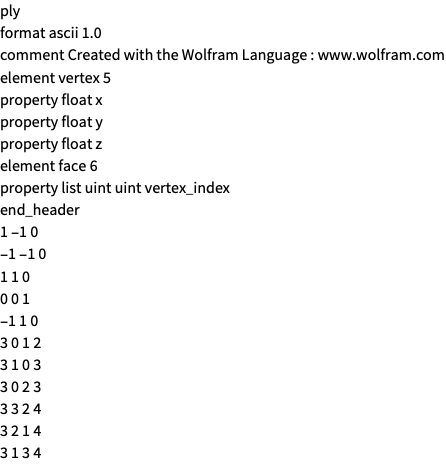
Scope (13)
Import (7)
Import works on an ASCII PLY file:
Import["ExampleData/seashell.ply"]Import["ExampleData/spikey.ply"]Import["http://exampledata.wolfram.com/vase.ply"]str = OpenRead["ExampleData/chain.ply"]Import[str]Close[str]Import automatically detects PLY files:
Import["http://exampledata.wolfram.com/gear.2"]Import provides access to elements in the PLY file:
Import["ExampleData/dodecahedron.ply", "Elements"]Import works on large files:
Import["http://exampledata.wolfram.com/turtle.ply"] // MeshCellCount//AbsoluteTimingExport (6)
Export works on 3D graphics:
Export["model.ply", [image]]Export["sphere.ply", Sphere[]]Export["ball.ply", ImplicitRegion[x ^ 2 + y ^ 2 + z ^ 2 ≤ 1, {x, y, z}]]Export["pyramid.ply", MeshRegion[{{-1, -1, 0}, {1, -1, 0}, {1, 1, 0}, {-1, 1, 0}, {0, 0, 1}}, Pyramid[{1, 2, 3, 4, 5}]]]Export["model.ply", [image]]Export["model.ply", [image], "BinaryFormat" -> True]Import Elements (11)
"BinaryFormat" (1)
"BoundaryMeshRegion" (1)
"Comments" (1)
"CoordinateTransform" (1)
"Graphics3D" (1)
Give the Graphics3D object:
Import["ExampleData/chain.ply", "Graphics3D"]"GraphicsComplex" (1)
Give the GraphicsComplex object:
Import["ExampleData/chain.ply", "GraphicsComplex"]"MeshRegion" (1)
"PolygonData" (1)
"PolygonObjects" (1)
Give the list of Polygon primitives given in absolute coordinates:
Import["ExampleData/chain.ply", "PolygonObjects"]"Summary" (1)
Export Options (2)
By default, an ASCII file is generated when exporting:
Export["model.ply", [image]]Print the raw textual contents of the file:
FilePrint[%]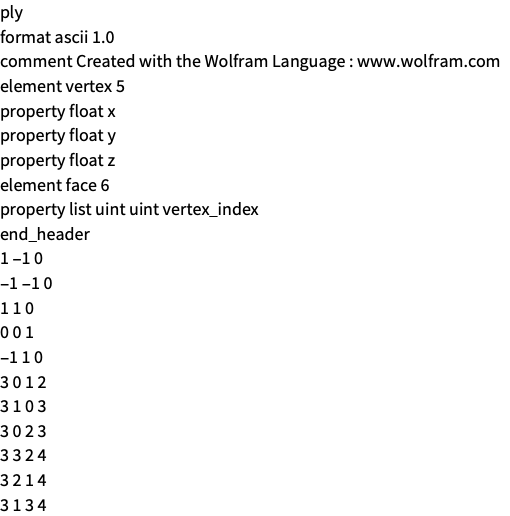
Use "BinaryFormat" True to generate a binary file:
Export["model.ply", [image], {"PLY", "BinaryFormat" -> True}]Print the raw textual contents of the file:
FilePrint[%]