



Texture
Details
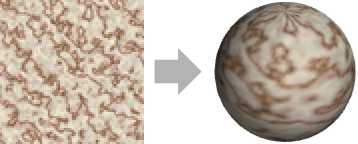
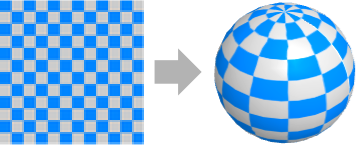
- Texture mapping is also know as UV mapping or diffuse mapping.
- Texture is typically used in modeling to project an image to a 2D polygon or 3D surface.
- Texture can be used in both Graphics and Graphics3D.
- In Texture[obj,…], the object obj can be an image, a graphics or arrays of colors.
- The following forms can be used to explicitly specify the color values for textures:
-
Texture[{c1,c2,…}] a 1D texture of colors Texture[{{c11,c12,…},…}] a 2D texture of colors Texture[{{{c111,c112,…},…},…}] a 3D texture of colors - Each color can be either a list of the form {r,g,b} corresponding to RGBColor[r,g,b] or a list of the form {r,g,b,a} corresponding to RGBColor[r,g,b,a].
- Texture[obj] is equivalent to Texture[Rasterize[obj]] and will rasterize obj at the size and resolution it would normally be displayed in a notebook.
- Texture[obj,map] provides a texture obj that can be applied to faces of polygons and surfaces by assigning coordinates to vertices from the projection mapping map.
- Possible 3D projection mappings for 2D images include:
-
Automatic automatically choose the projection None no projection "Box" box projection "Cubic" cubic projection "Cylindrical" cylindrical projection "Front" planar project on the x–y plane "Planar" planar projection "Spherical" spherical projection - VertexTextureCoordinates can be used to specify a projection mapping for a given graphics primitive.
- Opacity can be used with Texture to specify overall opacity of textures.
- Texture can be used in FaceForm to texture front and back faces differently.
- The colors in Texture are taken to be diffuse colors in their interaction with Lighting.

Examples
open all close allBasic Examples (4)
Apply a texture to a polygon in 2D:
Graphics[{Texture[[image]], Polygon[{{0, 0}, {1, 0}, {0.5, 1}}, VertexTextureCoordinates -> {{0, 0}, {1, 0}, {0.5, 1}}]}]ParametricPlot[{(v + u) Cos[u], (v + u) Sin[u]}, {u, 0, 2 Pi}, {v, 0, 5}, PlotStyle -> {Opacity[1], Texture[[image]]}]Apply a texture to a cube in 3D:
Graphics3D[{Texture[[image], "Cubic"], Cube[]}]Graphics3D[{Texture[[image]], EdgeForm[], Polygon[«3»]}]Scope (20)
Basic Uses (3)
Apply a texture to primitives in 2D:
Graphics[{Texture[[image], "Planar"], #}]& /@ {Triangle[], RegularPolygon[5], Disk[]}Graphics3D[{Texture[[image], "Planar"], #}, Lighting -> "Neutral"]& /@ {Tetrahedron[], Icosahedron[], Sphere[]}Apply a texture to a plot in 2D:
RegionPlot[Sin[x] Sin[y] > 1 / 10, {x, -3, 6}, {y, -3, 6}, PlotStyle -> Texture[[image]]]Plot3D[Sin[x + y ^ 2], {x, -3, 3}, {y, -2, 2}, PlotStyle -> {Texture[[image]]}, Mesh -> False, Lighting -> "Neutral"]Apply a texture to a GraphicsComplex:
coords = CirclePoints[{0, 0}, 2, 20];
vtcoords = CirclePoints[{0.5, 0.5}, 0.5, 20];
Graphics[{Texture[[image]], GraphicsComplex[coords, {Polygon[Range[20], VertexTextureCoordinates -> vtcoords]}]}]
Specification (8)
1D texture using a list of RGB colors:
data = Table[{r, 0, 0}, {r, 0, 1, 1 / 100}];Graphics[{Texture[data], Polygon[{{0, 0}, {1, 0}, {1, 1}, {0, 1}}, VertexTextureCoordinates -> {{0}, {0}, {1}, {1}}]}]1D texture using a gradient ColorData:
data = Table[ColorData["Rainbow", t] /. RGBColor -> List, {t, 0, 1, 1 / 100}];Graphics[{Texture[data], Polygon[{{0, 0}, {1, 0}, {1, 1}, {0, 1}}, VertexTextureCoordinates -> {{0}, {0}, {1}, {1}}]}]1D texture on a polygon in 3D:
Graphics3D[{Texture[data], Polygon[{{{0, 0, 0}, {0, 1, 0}, {1, 1, 0}, {1, 0, 0}}, {{0, 0, 0}, {1, 0, 0}, {1, 0, 1},
   {0, 0, 1}}, {{1, 0, 0}, {1, 1, 0}, {1, 1, 1}, {1, 0, 1}},
  {{1, 1, 0}, {0, 1, 0}, {0, 1, 1}, {1, 1, 1}}, {{0, 1, 0}, {0, 0, 0}, {0, 0, 1}, {0, 1, 1}},
  ... }, VertexTextureCoordinates ->
  {{{0, 0}, {1, 0}, {1, 1}, {0, 1}}, {{0, 0}, {1, 0}, {1, 1}, {0, 1}},
   {{0, 0}, {1, 0}, {1, 1}, {0, 1}}, {{0, 0}, {1, 0}, {1, 1}, {0, 1}},
   {{0, 0}, {1, 0}, {1, 1}, {0, 1}}, {{0, 0}, {1, 0}, {1, 1}, {0, 1}}}]}, Lighting -> "Neutral"]
1D texture on the surface of Plot3D:
Plot3D[Sin[x y], {x, 0, 3}, {y, 0, 3}, PlotStyle -> Texture[data], Lighting -> "Neutral"]2D texture using a matrix of RGB colors:
data = Table[{r, g, 0}, {r, 0, 1, 1 / 100}, {g, 0, 1, 1 / 100}];Graphics[{Texture[data], Polygon[{{0, 0}, {1, 0}, {1, 1}, {0, 1}}, VertexTextureCoordinates -> {{0, 0}, {1, 0}, {1, 1}, {0, 1}}]}]Graphics3D[{Texture[data], Polygon[{{{0, 0, 0}, {0, 1, 0}, {1, 1, 0}, {1, 0, 0}}, {{0, 0, 0}, {1, 0, 0}, {1, 0, 1},
{0, 0, 1}}, {{1, 0, 0}, {1, 1, 0}, {1, 1, 1}, {1, 0, 1}},
{{1, 1, 0}, {0, 1, 0}, {0, 1, 1}, {1, 1, 1}}, {{0, 1, 0}, {0, 0, 0}, {0, 0, 1}, {0, 1, 1}},
... }, VertexTextureCoordinates ->
{{{0, 0}, {1, 0}, {1, 1}, {0, 1}}, {{0, 0}, {1, 0}, {1, 1}, {0, 1}},
{{0, 0}, {1, 0}, {1, 1}, {0, 1}}, {{0, 0}, {1, 0}, {1, 1}, {0, 1}},
{{0, 0}, {1, 0}, {1, 1}, {0, 1}}, {{0, 0}, {1, 0}, {1, 1}, {0, 1}}}]}, Lighting -> "Neutral"]Plot3D[Sin[x y], {x, 0, 3}, {y, 0, 3}, PlotStyle -> Texture[data], Lighting -> "Neutral"]Graphics[{Texture[[image], "Planar"], Polygon[{{0, 0}, {1, 0}, {1 / 2, 1}}]}]Graphics3D[{Texture[[image], "Box"], Cube[]}, Lighting -> "Neutral"]Plot3D[Sin[x y], {x, 0, 3}, {y, 0, 3}, PlotStyle -> Texture[[image]], Mesh -> None, Lighting -> "Neutral"]Graphics[{Texture[[image], "Planar"], Polygon[{{0, 0}, {1, 0}, {1, 1}, {0, 1}}]}, Background -> Black]2D texture using stylized text:
text = Style[" Text ", 300];Graphics[{Texture[text, "Planar"], EdgeForm[Gray], Polygon[{{0, 0}, {1, 0}, {1, 1}, {0, 1}}]}]Graphics3D[{Texture[text, "Box"], Cube[]}, Lighting -> "Neutral"]Plot3D[Sin[x y], {x, 0, 3}, {y, 0, 3}, PlotStyle -> Texture[text], Mesh -> None, Lighting -> "Neutral"]2D texture using 2D and 3D graphics:
{t2, t3} = {Graphics[{Blue, Disk[], Red, Rectangle[]}], Graphics3D[{Sphere[], Cuboid[]}]}Table[Graphics[{Texture[t], EdgeForm[Gray], Polygon[{{0, 0}, {1, 0}, {1 / 2, 1}}, VertexTextureCoordinates -> {{0, 0}, {1, 0}, {1 / 2, 1}}]}], {t, {t2, t3}}]Table[Graphics3D[{Texture[t], Polygon[{{{0, 0, 0}, {0, 1, 0}, {1, 1, 0}, {1, 0, 0}}, {{0, 0, 0}, {1, 0, 0}, {1, 0, 1},
{0, 0, 1}}, {{1, 0, 0}, {1, 1, 0}, {1, 1, 1}, {1, 0, 1}},
{{1, 1, 0}, {0, 1, 0}, {0, 1, 1}, {1, 1, 1}}, {{0, 1, 0}, {0, 0, 0}, {0, 0, 1}, {0, 1, 1}},
... }, VertexTextureCoordinates ->
{{{0, 0}, {1, 0}, {1, 1}, {0, 1}}, {{0, 0}, {1, 0}, {1, 1}, {0, 1}},
{{0, 0}, {1, 0}, {1, 1}, {0, 1}}, {{0, 0}, {1, 0}, {1, 1}, {0, 1}},
{{0, 0}, {1, 0}, {1, 1}, {0, 1}}, {{0, 0}, {1, 0}, {1, 1}, {0, 1}}}]}, Lighting -> "Neutral"], {t, {t2, t3}}]2D texture using plot functions:
t = ContourPlot[Cos[2x] + y, {x, 0, 2Pi}, {y, 0, 2Pi}, ColorFunction -> "Rainbow", Frame -> False, PlotRangePadding -> None]Graphics[{Texture[t], EdgeForm[Gray], Polygon[{{0, 0}, {1, 0}, {1 / 2, 1}}, VertexTextureCoordinates -> {{0, 0}, {1, 0}, {1 / 2, 1}}]}]Graphics3D[{Texture[t], Polygon[{{{0, 0, 0}, {0, 1, 0}, {1, 1, 0}, {1, 0, 0}}, {{0, 0, 0}, {1, 0, 0}, {1, 0, 1},
{0, 0, 1}}, {{1, 0, 0}, {1, 1, 0}, {1, 1, 1}, {1, 0, 1}},
{{1, 1, 0}, {0, 1, 0}, {0, 1, 1}, {1, 1, 1}}, {{0, 1, 0}, {0, 0, 0}, {0, 0, 1}, {0, 1, 1}},
... }, VertexTextureCoordinates ->
{{{0, 0}, {1, 0}, {1, 1}, {0, 1}}, {{0, 0}, {1, 0}, {1, 1}, {0, 1}},
{{0, 0}, {1, 0}, {1, 1}, {0, 1}}, {{0, 0}, {1, 0}, {1, 1}, {0, 1}},
{{0, 0}, {1, 0}, {1, 1}, {0, 1}}, {{0, 0}, {1, 0}, {1, 1}, {0, 1}}}]}, Lighting -> "Neutral"]Plot3D[Cos[x] + y, {x, 0, 4Pi}, {y, 0, 4Pi}, PlotStyle -> Texture[t], Mesh -> None, Lighting -> "Neutral"]3D texture using an array of RGB colors:
data = Table[{r, g, b}, {r, 0, 1, 1 / 20}, {g, 0, 1, 1 / 20}, {b, 0, 1, 1 / 20}];Display the 3D texture by stacking polygons:
Graphics3D[{Opacity[1 / 3], Texture[data], EdgeForm[], Polygon[Table[{{0, 0, z}, {1, 0, z}, {1, 1, z}, {0, 1, z}}, {z, 0, 1, 1 / 20}], VertexTextureCoordinates -> Table[{{0, 0, s}, {1, 0, s}, {1, 1, s}, {0, 1, s}}, {s, 0, 1, 1 / 20}]]}, Lighting -> "Neutral"]Cross sections of the 3D texture:
Graphics3D[{Texture[data], EdgeForm[], Table[With[{pts = RotateRight[#, k]& /@ {{1 / 2, 0, 0}, {1 / 2, 1, 0}, {1 / 2, 1, 1}, {1 / 2, 0, 1}}}, Polygon[pts, VertexTextureCoordinates -> pts]], {k, 3}]}, Lighting -> "Neutral"]Coordinates (5)
Texture coordinates corresponding to each vertex of Polygon can be specified by VertexTextureCoordinates:
data = Table[{c, 0, 1 - c}, {c, 0, 1, 1 / 100}];Graphics[{Texture[data], Polygon[{{0, 0}, {1, 0}, {1, 1}, {0, 1}}, VertexTextureCoordinates -> {{0}, {0}, {1}, {1}}]}]Specify a portion of 1D texture by using coordinates between {0} and {1}:
Graphics[{Texture[data], Polygon[{{0, 0}, {1, 0}, {1, 1}, {0, 1}}, VertexTextureCoordinates -> {{1 / 3}, {1 / 3}, {2 / 3}, {2 / 3}}]}]Repeat 1D texture by using coordinate values outside of {0} and {1}:
Graphics[{Texture[data], Polygon[{{0, 0}, {1, 0}, {1, 1}, {0, 1}}, VertexTextureCoordinates -> {{-1}, {-1}, {2}, {2}}]}]The 2D texture coordinates are assumed to range from {0,0} to {1,1}:
image = [image];Graphics[{Texture[image], EdgeForm[StandardBrown], Polygon[{{0, 0}, {1, 0}, {1, 1}, {0, 1}}, VertexTextureCoordinates -> {{0, 0}, {1, 0}, {1, 1}, {0, 1}}]}]Specify a portion of 2D texture by using coordinates within the range of {0,0} and {1,1}:
Graphics[{Texture[image], EdgeForm[StandardBrown], Polygon[{{0, 0}, {1, 0}, {1, 1}, {0, 1}}, VertexTextureCoordinates -> {{1 / 3, 1 / 3}, {2 / 3, 1 / 3}, {2 / 3, 2 / 3}, {1 / 3, 2 / 3}}]}]Repeat 2D texture by using coordinate values outside of {0,0} and {1,1}:
Graphics[{Texture[image], EdgeForm[StandardBrown], Polygon[{{0, 0}, {1, 0}, {1, 1}, {0, 1}}, VertexTextureCoordinates -> {{0, 0}, {4, 0}, {4, 4}, {0, 4}}]}]The 3D texture coordinates are assumed to range from {0,0,0} to {1,1,1}:
data = Table[{r, g, b}, {r, 0, 1, 1 / 20}, {g, 0, 1, 1 / 20}, {b, 0, 1, 1 / 20}];Graphics3D[{Texture[data], EdgeForm[], Polygon[{{0, 0, 0}, {1, 0, 0}, {1, 1, 1}, {0, 1, 1}}, VertexTextureCoordinates -> {{0, 0, 0}, {1, 0, 0}, {1, 1, 1}, {0, 1, 1}}] }, Lighting -> "Neutral"]FilledCurve components are mapped to sublists of texture coordinates:
a = {{-1, 0}, {0, 1}, {1, 0}}; b = {{0, -2 / 3}, {-1, 0}};Graphics[{Texture[[image]],
FilledCurve[{{BezierCurve[2a], Line[2b]}, {BezierCurve[a], Line[b]}},
VertexTextureCoordinates -> {{{0, 1 / 2}, {1 / 2, 1}, {1, 1 / 2}, {1 / 2, 1 / 12}, {0, 1 / 2}}, {{1 / 4, 1 / 2}, {1 / 2, 3 / 4}, {3 / 4, 1 / 2}, {1 / 2, 7 / 24},
{1 / 4, 1 / 2}}}]}]Texture coordinates of plot functions can be specified by TextureCoordinateFunction:
ParametricPlot[{r t Cos[t], r t Sin[t]}, {t, 0, 2Pi}, {r, 0, 1}, PlotRange -> All, Mesh -> False, Axes -> False, PlotStyle -> {Opacity[1], Texture[ExampleData[{"ColorTexture", "Roof"}]]}]ParametricPlot[{r t Cos[t], r t Sin[t]}, {t, 0, 2Pi}, {r, 0, 1}, PlotRange -> All, Mesh -> False, Axes -> False, PlotStyle -> {Opacity[1], Texture[ExampleData[{"ColorTexture", "Roof"}]]}, TextureCoordinateFunction -> ({#1, #2}&)]Plot3D[Sin[x y], {x, 0, 3}, {y, 0, 3}, PlotStyle -> Texture[ExampleData[{"TestImage", "House"}]], TextureCoordinateFunction -> ({#1, #2}&), Lighting -> "Neutral", Mesh -> None]Styling (4)
Use Opacity to set overall opacity of textures:
Table[Graphics3D[{Opacity[o], Texture[[image]], Polygon[{{{0, 0, 0}, {0, 1, 0}, {1, 1, 0}, {1, 0, 0}}, {{0, 0, 0}, {1, 0, 0}, {1, 0, 1},
   {0, 0, 1}}, {{1, 0, 0}, {1, 1, 0}, {1, 1, 1}, {1, 0, 1}},
  {{1, 1, 0}, {0, 1, 0}, {0, 1, 1}, {1, 1, 1}}, {{0, 1, 0}, {0, 0, 0}, {0, 0, 1}, {0, 1, 1}},
  ... }, VertexTextureCoordinates ->
  {{{0, 0}, {1, 0}, {1, 1}, {0, 1}}, {{0, 0}, {1, 0}, {1, 1}, {0, 1}},
   {{0, 0}, {1, 0}, {1, 1}, {0, 1}}, {{0, 0}, {1, 0}, {1, 1}, {0, 1}},
   {{0, 0}, {1, 0}, {1, 1}, {0, 1}}, {{0, 0}, {1, 0}, {1, 1}, {0, 1}}}]}, Lighting -> "Neutral", Boxed -> False], {o, {1 / 4, 1 / 2, 2 / 3, 1}}]
Use FaceForm to set front and back textures differently:
vtc = {{0, 0}, {1, 0}, {1, 1}, {0, 1}};
coords = {{{0, 0, 0}, {0, 1, 0}, {1, 1, 0}, {1, 0, 0}}, {{0, 0, 0}, {1, 0, 0}, {1, 0, 1}, {0, 0, 1}}, {{1, 0, 0}, {1, 1, 0}, {1, 1, 1}, {1, 0, 1}}, {{1, 1, 0}, {0, 1, 0}, {0, 1, 1}, {1, 1, 1}}, {{0, 1, 0}, {0, 0, 0}, {0, 0, 1}, {0, 1, 1}}};Graphics3D[{FaceForm[Texture[[image]], Texture[[image]]], Polygon[coords, VertexTextureCoordinates -> Table[vtc, {6}]]}, Lighting -> "Neutral"]Specularity of a textured surface can be set by Specularity:
Table[ParametricPlot3D[{Cos[u] (3 + Cos[v]), Sin[u] (3 + Cos[v]), Sin[v]}, {u, 0, 2 π}, {v, 0, 2 π}, TextureCoordinateFunction -> ({2#4, #5}&), PlotStyle -> Directive[Specularity[White, s], Texture[ExampleData[{"ColorTexture", "WhiteMarble"}]]], Axes -> False, Lighting -> "Neutral", Mesh -> None, ImageSize -> Small], {s, {5, 20, 50, 100}}]The colors in textures are taken to be diffuse colors in their interaction with Lighting:
Table[Graphics3D[{Texture[[image]], Polygon[{{{0, 0, 0}, {0, 1, 0}, {1, 1, 0}, {1, 0, 0}}, {{0, 0, 0}, {1, 0, 0}, {1, 0, 1},
   {0, 0, 1}}, {{1, 0, 0}, {1, 1, 0}, {1, 1, 1}, {1, 0, 1}},
  {{1, 1, 0}, {0, 1, 0}, {0, 1, 1}, {1, 1, 1}}, {{0, 1, 0}, {0, 0, 0}, {0, 0, 1}, {0, 1, 1}},
  ... }, VertexTextureCoordinates ->
  {{{0, 0}, {1, 0}, {1, 1}, {0, 1}}, {{0, 0}, {1, 0}, {1, 1}, {0, 1}},
   {{0, 0}, {1, 0}, {1, 1}, {0, 1}}, {{0, 0}, {1, 0}, {1, 1}, {0, 1}},
   {{0, 0}, {1, 0}, {1, 1}, {0, 1}}, {{0, 0}, {1, 0}, {1, 1}, {0, 1}}}]}, Lighting -> {{"Point", c, {4, -4, 4}}}, Boxed -> False], {c, {White, Red, Green, Blue}}]
Generalizations & Extensions (1)
Use a list of the form {r,g,b,a} to specify transparency of individual pixels of texture:
data = Table[{1, 0, 0, a}, {u, 0, 1, 1 / 100}, {a, 0, 1, 1 / 100}];vtc = {{0, 0}, {1, 0}, {1, 1}, {0, 1}};
coords = {{{0, 0, 0}, {0, 1, 0}, {1, 1, 0}, {1, 0, 0}}, {{0, 0, 0}, {1, 0, 0}, {1, 0, 1}, {0, 0, 1}}, {{1, 0, 0}, {1, 1, 0}, {1, 1, 1}, {1, 0, 1}}, {{1, 1, 0}, {0, 1, 0}, {0, 1, 1}, {1, 1, 1}}, {{0, 1, 0}, {0, 0, 0}, {0, 0, 1}, {0, 1, 1}}, {{0, 0, 1}, {1, 0, 1}, {1, 1, 1}, {0, 1, 1}}};Graphics3D[{Texture[data], Polygon[coords, VertexTextureCoordinates -> Table[vtc, {6}]]}, Lighting -> "Neutral", Boxed -> False]Use the transparency values to create texture with holes:
data1 = Table[{1, 2 / 3, 0, If[u^2 + v^2 < 1 / 2, 0, 1]}, {u, -1, 1, 1 / 100}, {v, -1, 1, 1 / 100}];
data2 = Table[{0, 0, 1, If[u^2 + v^2 < 1 / 2, 0, 1]}, {u, -1, 1, 1 / 100}, {v, -1, 1, 1 / 100}];Graphics3D[{FaceForm[Texture[data1], Texture[data2]], Polygon[coords, VertexTextureCoordinates -> Table[vtc, {6}]]}, Lighting -> "Neutral", Boxed -> False]Applications (13)
Basic Applications (1)
Show the corresponding mapping to texture coordinates:
mapPolygon[p : Polygon[_, idx_, VertexTextureCoordinates -> vtc_], img_] :=
Block[...]mapPolygon[Polygon[{{0, 0, 0}, {1, 0, 0}, {0.5, 1, 0}}, {1, 2, 3}, VertexTextureCoordinates ->
{{0.2, 0.2}, {0.8, 0.2}, {0.5, 0.8}}], [image]]mapPolygon[Polygon[{{-100, -100, -100}, {100, -100, -100}, {100, 100, -100}, {-100, 100, -100},
{-100, -100, -100}, {100, -100, -100}, {100, -100, 100}, {-100, -100, 100}, {100, -100, -100},
{100, 100, -100}, {100, 100, 100}, {100, -100, 100}, {100, 100 ... 7525, 0.33666666666666667}, {0.9975, 0.33666666666666667}, {0.9975, 0.6633333333333333},
{0.7525, 0.6633333333333333}, {0.2525, 0.6699999999999999}, {0.4975, 0.6699999999999999},
{0.4975, 0.9966666666666666}, {0.2525, 0.9966666666666666}}], [image]]mapPolygon[Polygon[{{0., 0., 1.}, {-0.2777182317483142, 0.20177410616759886, 0.9392336204772784},
{-0.5554364634966285, 0.4035482123351977, 0.7270757700126067},
{-0.7236067977499789, 0.5257311121191336, 0.44721359549995787},
{0.10607892523233588, 0.3 ... 71705951760442, 0.4450936361588238},
{0.6328294048239558, 0.4450936361588237}, {0.3, 0.43993157242460157},
{0.5, 0.43993157242460157}, {0.7, 0.43993157242460157}, {0.9, 0.43993157242460157},
{0.09999999999999998, 0.43993157242460157}}], [image]]Environment Maps (3)
Create a realistic background using a spherical texture:
env = {Texture[[image], "Spherical"], Black, Sphere[{0, 0, 0}, 100]};Graphics3D[{env, Torus[]}, ViewVector -> {{1, 2, 1}, {0, 0, 0}}, Method -> {"RotationControl" -> "Globe"}]Create a realistic background using a sky box texture:
env = {Texture[[image]], Black, EdgeForm[], Polygon[{{-100, -100, -100}, {100, -100, -100}, {100, 100, -100}, {-100, 100, -100},
  {-100, -100, -100}, {100, -100, -100}, {100, -100, 100}, {-100, -100, 100}, {100, -100, -100},
  {100, 100, -100}, {100, 100, 100}, {100, -100, 100}, {100, 100 ... 7525, 0.33666666666666667}, {0.9975, 0.33666666666666667}, {0.9975, 0.6633333333333333},
   {0.7525, 0.6633333333333333}, {0.2525, 0.6699999999999999}, {0.4975, 0.6699999999999999},
{0.4975, 0.9966666666666666}, {0.2525, 0.9966666666666666}}]};Graphics3D[{env, Torus[]}, ViewVector -> {{-1, -2, 1}, {0, 0, 0}}, Method -> {"RotationControl" -> "Globe"}]Apply sky box textures to the individual sides of a cube:
images = {[image], [image], [image], [image], [image], [image]};
sides = {Polygon[{{-100, -100, -100}, {100, -100, -100}, {100, 100, -100}, {-100, 100, -100}},
 VertexTextureCoordinates -> {{0.01, 0.01}, {0.99, 0.01}, {0.99, 0.99}, {0.01, 0.99}}], Polygon[{{-100, -100, -100}, {100, -100, -100}, {100, -100, 100}, {-100, -100, 100}},
 VertexTextureCoordinates -> {{0.01, 0.01}, {0.99, 0.01}, {0.99, 0.99}, {0.01, 0.99}}], Polygon[{{100, -100, -100}, {100, 100, -100}, {100, 100, 100}, {100, -100, 100}},
 VertexTextureCoordinates -> {{0.01, 0.01}, {0.99, 0.01}, {0.99, 0.99}, {0.01, 0.99}}], Polygon[{{100, 100, -100}, {-100, 100, -100}, {-100, 100, 100}, {100, 100, 100}},
 VertexTextureCoordinates -> {{0.01, 0.01}, {0.99, 0.01}, {0.99, 0.99}, {0.01, 0.99}}], Polygon[{{-100, 100, -100}, {-100, -100, -100}, {-100, -100, 100}, {-100, 100, 100}},
 VertexTextureCoordinates -> {{0.01, 0.01}, {0.99, 0.01}, {0.99, 0.99}, {0.01, 0.99}}], Polygon[{{100, -100, 100}, {100, 100, 100}, {-100, 100, 100}, {-100, -100, 100}},
 VertexTextureCoordinates -> {{0.01, 0.01}, {0.99, 0.01}, {0.99, 0.99}, {0.01, 0.99}}]};
env = {Black, EdgeForm[], Riffle[Texture /@ images, sides]};Graphics3D[{env, Torus[]}, ViewVector -> {{-1, -2, 1}, {0, 0, 0}}, Method -> {"RotationControl" -> "Globe"}]Astronomy (2)
Create realistic planets and moons using texture maps with MaterialShading:
celestialMaterial[entity_Entity] :=
	Block[{albedo, normals},
	albedo = entity["CylindricalEquidistantTexture"];
	normals = Image[ResourceFunction[ResourceObject[Association["Name" -> "NormalTexture",
   "ShortName" -> "NormalTexture", "UUID" -> "5fc5ea7f-f287-4d4c-b400-df80515487af",
   "ResourceType" -> "Function", "Version" -> "1.0.0",
   "Description" -> "Generate a no ... ,
   "SymbolName" -> "FunctionRepository`$faee06013a97443aa16264966d8cbdba`NormalTexture",
   "FunctionLocation" -> CloudObject[
     "https://www.wolframcloud.com/obj/f283570d-7972-41db-bf62-7f0a750d8410"]],
  ResourceSystemBase -> Automatic]][GeoElevationData["World", GeoRange -> All, GeoModel -> entity, GeoZoomLevel -> 2], 0.1]];
	MaterialShading[<|"BaseColor" -> Texture[albedo], "SurfaceNormals" -> Texture[normals], "RoughnessCoefficient" -> 1, "MetallicCoefficient" -> 0|>]
]Graphics3D[{celestialMaterial[#], Sphere[]}, Lighting -> "Accent", Boxed -> False, ViewPoint -> Front]& /@ {Entity["PlanetaryMoon", "Moon"], Entity["Planet", "Mars"], Entity["Planet", "Earth"]}Use the star map as the background:
Graphics3D[{{Texture[[image], "Spherical"], Black, Sphere[{0, 0, 0}, 100]}, Texture[Entity["Planet", "Earth"]["CylindricalEquidistantTexture"], "Spherical"], Sphere[{0, 0, 0}]}, ViewVector -> {{2, -2, 0}, {0, 0, 0}}, Method -> {"RotationControl" -> "Globe"}, Lighting -> "Accent", Boxed -> False]Geography (2)
Display geographical data from GeoGraphics on an interactive globe:
Graphics3D[{Texture[GeoGraphics[GeoBackground -> #, ImageSize -> Large, GeoProjection -> "Equirectangular"], "Spherical"], Black, Sphere[{0, 0, 0}]}, Boxed -> False, ViewPoint -> Front]& /@ {"CountryBorders", "VectorMinimal", "SatelliteWithLabels"}Style countries with their own flag:
countries = With[{coords = Reverse /@ First[CountryData[#, "Coordinates"]]},
	{Texture[#["Flag"]], Polygon[coords, VertexTextureCoordinates -> Transpose[Rescale /@ Transpose[coords]]]}
	]& /@ CountryData["SouthAmerica"];
Graphics[{EdgeForm[StandardGray], #}, ImageSize -> Tiny]& /@ countriesShow[%]Texture Models (1)
Visualizations (2)
ParametricPlot3D[{1.16 ^ v Cos[v](1 + Cos[u]), -1.16 ^ v Sin[v](1 + Cos[u]), -2 1.16 ^ v(1 + Sin[u])}, {u, 0, 2Pi}, {v, -15, 6}, PlotStyle -> Directive[Specularity[White, 100], Texture[ExampleData[{"ColorTexture", "WhiteMarble"}]]], TextureCoordinateFunction -> ({#4, 3#5}&), Lighting -> "ThreePoint", Mesh -> None, PlotRange -> All, Boxed -> False, Axes -> False]Style a ListSurfacePlot3D with a texture:
bunny = MeshCoordinates[ResourceData["Stanford Bunny"]];ListSurfacePlot3D[bunny, MaxPlotPoints -> 35, Mesh -> None, Boxed -> False, Axes -> None, Ticks -> None, TextureCoordinateFunction -> (Normalize[{#1, #2, #3}]&), PlotStyle -> Directive[Specularity[White, 20], Texture[ExampleData[{"ColorTexture", "WhiteMarble"}]]], Lighting -> "Neutral"]Texture Examples (1)
ExampleData includes grayscale and color texture samples:
Short[ExampleData["Texture"]]Short[ExampleData["ColorTexture"]]Use the sample textures with a plot function:
torus[t_] := ParametricPlot3D[{Cos[u] (3 + Cos[v]), Sin[u] (3 + Cos[v]), Sin[v]}, {u, 0, 2 π}, {v, 0, 2 π}, TextureCoordinateFunction -> ({2#4, #5}&), PlotStyle -> Directive[Specularity[White, 50], Texture[ExampleData[{"ColorTexture", t}]]], Axes -> False, Lighting -> "Neutral", Mesh -> None, Boxed -> False, ImageSize -> 120];Table[torus[t], {t, {"Ash", "CheetahFur", "Kingwood", "Metal4", "Vavona", "WhiteMarble"}}]Volume Rendering (1)
Construct a 3D texture from slices of medical images:
slices = {[image], [image], [image], [image], [image], [image], [image], [image], [image], [image], [image], [image], [image], [image], [image], [image], [image], [image], [image], [image], [image], [image], [image], [image], [image], [image], [image], [image], [image], [image], [image], [image], [image], [image], [image], [image], [image], [image], [image], [image], [image], [image], [image], [image], [image], [image], [image], [image], [image], [image], [image], [image], [image], [image], [image], [image], [image], [image], [image], [image], [image], [image], [image], [image], [image], [image], [image], [image], [image], [image], [image], [image], [image], [image], [image], [image], [image], [image], [image], [image], [image], [image], [image], [image], [image], [image], [image], [image], [image], [image], [image], [image], [image], [image], [image]};data = Developer`ToPackedArray[Map[ImageData, slices]];Draw cross-sections of the volumetric data:
Manipulate[Graphics3D[{Opacity[Dynamic[o]], Texture[data], EdgeForm[None],
	Dynamic[{Polygon[{{x, 0, 0}, {x, 1, 0}, {x, 1, 1}, {x, 0, 1}}, VertexTextureCoordinates -> {{x, 0, 0}, {x, 1, 0}, {x, 1, 1}, {x, 0, 1}}], Polygon[{{0, y, 0}, {1, y, 0}, {1, y, 1}, {0, y, 1}}, VertexTextureCoordinates -> {{0, y, 0}, {1, y, 0}, {1, y, 1}, {0, y, 1}}],
	Polygon[{{0, 0, z}, {1, 0, z}, {1, 1, z}, {0, 1, z}}, VertexTextureCoordinates -> {{0, 0, z}, {1, 0, z}, {1, 1, z}, {0, 1, z}}]}]}, Background -> Black, RotationAction -> "Clip"], {{x, 0.5}, 0, 1}, {{y, 0.5}, 0, 1}, {{z, 0.5}, 0, 1}, {{o, 0.75, "opacity"}, 0, 1}]
Properties & Relations (4)
The projection mapping can be specified per object using TextureMapping:
{Graphics3D[{Texture[[image], "Box"], Cube[]}], Graphics3D[{Texture[[image]], Cube[TextureMapping -> "Box"]}]}The "Spherical" mapping transforms Cartesian points on a surface to spherical coordinates:
ℛ1 = GeodesicPolyhedron[3];
vtc = Table[
	{r, θ, ϕ} = ToSphericalCoordinates[c];{Rescale[ϕ - Pi / 2, {-Pi, Pi}], 1 - Rescale[θ, {0, Pi}]}, {c, PolyhedronCoordinates[ℛ1]}];
ℛ2 = Append[ℛ1, VertexTextureCoordinates -> vtc]Graphics3D[{Texture[[image]], EdgeForm[], ℛ2}, Lighting -> "Neutral"]The "Cylindrical" mapping transforms Cartesian points on a surface to cylindrical coordinates:
ℛ1 = BoundaryDiscretizeRegion[Cylinder[]];
vtc = Table[
	{ρ, ϕ, z} = CoordinateTransform["Cartesian" -> "Cylindrical", c];{Rescale[ϕ, {-Pi, Pi}], Rescale[z, {-5, 1}]}, {c, MeshCoordinates[ℛ1]}];
ℛ2 = GraphicsComplex[MeshCoordinates[ℛ1], MeshCells[ℛ1, 2], VertexTextureCoordinates -> vtc];Graphics3D[{Texture[[image]], EdgeForm[], ℛ2}, Lighting -> "Neutral"]The "Planar" mapping projects 3D points to a 2D plane:
ℛ1 = GeodesicPolyhedron[3];
vtc = Table[c[[1 ;; 2]], {c, PolyhedronCoordinates[ℛ1]}];
ℛ2 = Append[ℛ1, VertexTextureCoordinates -> vtc]Graphics3D[{Texture[[image]], EdgeForm[], ℛ2}, Lighting -> "Neutral"]Possible Issues (1)
Texture mapping is preceded by VertexColors:
Graphics3D[{Texture[[image]], Polygon[{{-1, -1, -1}, {1, -1, -1}, {1, 1, -1}, {-1, 1, -1}}, VertexTextureCoordinates -> {{0, 0}, {1, 0}, {1, 1}, {0, 1}},
	VertexColors -> {Red, Green, Blue, Purple}]}, Lighting -> "Neutral"]
Neat Examples (3)
Animated Textures (2)
Create a cube with an animated clock face on each side:
DynamicModule[{}, Graphics3D[{Dynamic[Texture[clock, "Box"], UpdateInterval -> 1], Cube[]}, Lighting -> "Neutral", Boxed -> False], Initialization :> (clock := Module[{hour, min, sec, ht, mt, st}, {hour, min, sec} = Take[DateList[], -3];ht = Pi / 2 - 2 π hour / 12 - (2 π) min / 720;mt = Pi / 2 - 2 π min / 60;st = Pi / 2 - 2 π Floor[sec] / 60;Graphics[{Thick, Arrowheads[Large], Arrow[{{0, 0}, 0.6{Cos[ht], Sin[ht]}}], Arrow[{{0, 0}, 0.9{Cos[mt], Sin[mt]}}], PointSize[Large], Table[Point[0.9{Cos[i], Sin[i]}], {i, 0, 2Pi, π / 6}], Point[{0, 0}], Circle[], Red, Line[{{0, 0}, 0.85{Cos[st], Sin[st]}}]}]])]Display an animation mapped to a polygon:
Graphics[{Dynamic[Texture[frames[[Ceiling[Clock[{1, Length[frames], 1}, 10]]]]], UpdateInterval -> 0.5, Initialization :> (frames = {[image], [image], [image], [image], [image], [image], [image], [image], [image], [image], [image], [image], [image], [image], [image], [image], [image], [image], [image], [image], [image]};
	quad = Polygon[{{0, 0}, {2, 0}, {2, 2}, {0, 2}}, VertexTextureCoordinates -> {{0, 0}, {1, 0}, {1, 1}, {0, 1}}];)], quad}]
Show multiple animations in the same graphic:
DynamicModule[{chickens},
	chickens = Table[Translate[quad, pos], {pos, {{5, 6}, {13, 2}, {10, 4}, {6, 1}, {11, 7}, {2, 5}, {3, 2}, {8, 3}, {5, 4}}}];
	Graphics[Table[{With[{idx = i}, Dynamic[Texture[frames[[Mod[Ceiling[2 * Clock[100]] + idx * 27, Length[frames], 1]]]], UpdateInterval -> 0.5]], chickens[[i]]}, {i, Length[chickens]}]]
	]
Textures on Polyhedra (1)
Manipulate[Graphics3D[{Specularity[White, 20], Texture[ImageCrop[ExampleData[{"ColorTexture", "WhiteMarble"}], {128, 128}]], EdgeForm[Opacity[1 / 10]], (Append[#1, {VertexTextureCoordinates -> With[{n = Length[First[#1]]}, Table[1 / 2 {Cos[2 π i / n], Sin[2 π i / n]} + {1 / 2, 1 / 2}, {i, 0, n - 1}]]}]&) /@ Flatten[PolyhedronData[p, "Faces", "Polygon"]]}, Lighting -> "Neutral"], {{p, "RhombicHexecontahedron", "polyhedron"}, PolyhedronData[]}]
| |

| |
Text
Wolfram Research (2010), Texture, Wolfram Language function, https://reference.wolfram.com/language/ref/Texture.html (updated 2024).
CMS
Wolfram Language. 2010. "Texture." Wolfram Language & System Documentation Center. Wolfram Research. Last Modified 2024. https://reference.wolfram.com/language/ref/Texture.html.
APA
Wolfram Language. (2010). Texture. Wolfram Language & System Documentation Center. Retrieved from https://reference.wolfram.com/language/ref/Texture.html