

DeleteColumns
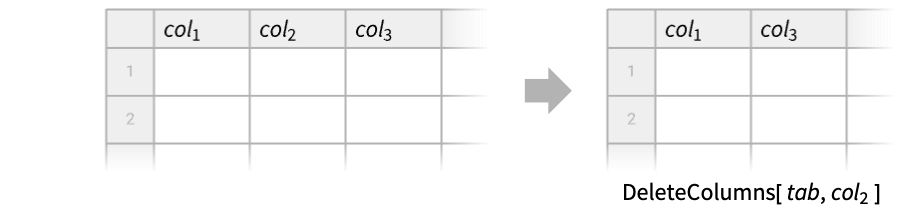
DeleteColumns[tab,cspec]
deletes the columns specified by cspec from the tabular data tab.
DeleteColumns[cspec]
represents an operator form of DeleteColumns that can be applied to tabular data.
Details
- DeleteColumns is also known as remove columns.
- DeleteColumns is typically used to eliminate columns from tabular data to streamline subsequent processing.
- Possible forms of tabular data tab include:
-
Tabular[…] type-consistent tabular data Dataset[…] general hierarchical data {assoc1,assoc2,…} a list of associations of common keys matrix a matrix TimeSeries[…] time series with several components EventSeries[…] event series with several components - Possible column specifications cspec include:
-
name or Key[name] or ExtendedKey[…] named column ind integer indexed column {col1,…} several columns cmin;;cmax;;step a Span of columns
Examples
open all close allBasic Examples (1)
Delete a single column from a Tabular object:
tab = Tabular[{{1, 2, 3}, {4, 5, 6}}, {"a", "b", "c"}]DeleteColumns[tab, "a"]DeleteColumns[tab, {"a", "c"}]Scope (10)
Delete a column from a Tabular object:
tab = Tabular[{{"a", "A", "α"}, {"b", "B", "β"}}, {"lower", "upper", "greek"}]DeleteColumns[tab, "upper"]DeleteColumns[tab, {"upper", "lower"}]DeleteColumns[tab, {1, 2}]Or a Span specification:
DeleteColumns[tab, 1 ;; 2]It is possible to delete all columns from a Tabular object:
Tabular[{{1, 2}, {3, 4}, {5, 6}}]DeleteColumns[%, {1, 2}]The result has the original number of rows and zero columns:
Dimensions[%]Delete a column from a Dataset object:
ds = Dataset[{<|"c1" -> 1, "c2" -> 7.3, "c3" -> True|>, <|"c1" -> 5, "c2" -> 2.8, "c3" -> False|>}]DeleteColumns[ds, "c2"]DeleteColumns[ds, {"c2", "c1"}]Delete a column from a list of associations with common keys:
data = {<|"a" -> 1, "b" -> 2, "c" -> 3|>, <|"a" -> 4, "b" -> 5, "c" -> 6|>};DeleteColumns[data, "a"]DeleteColumns[data, {"a", "c"}]Delete a column from a matrix:
mat = {{1, 2, 3}, {4, 5, 6}, {7, 8, 9}};DeleteColumns[mat, {2}]Delete the first and the last columns:
DeleteColumns[mat, {1, -1}]DeleteColumns[mat, 2 ;; 3]Delete one of the components of a TimeSeries object:
ts = TimeSeries[{{1, "dog"}, {2, "cat"}, {3, "fox"}}, {Today}, ComponentKeys -> {"number", "animal"}]Tabular[ts]DeleteColumns[ts, "number"]Tabular[%]Both value components can be removed:
DeleteColumns[ts, {"number", "animal"}]Tabular[%]Take an EventSeries object with a named component:
es = EventSeries[{"foo", "bar", "baz"}, {{.2, .6, 1.7}}, {"a"}]Tabular[es]Deleting the "Timestamp" component of a time or event series will add automatic timestamps:
DeleteColumns[es, "Timestamp"]Tabular[%]Use the operator form of DeleteColumns:
ToTabular[{{1, 2}, {3, 4}, {5, 6}}, "Columns", <|"ColumnKeys" -> {"a", "b", "c"}|>]%//DeleteColumns["b"]Take a Tabular object:
tab = Tabular[{{"a", "A", "α"}, {"b", "B", "β"}}, {"lower", "upper", "greek"}]Delete one column by specifying its column key:
DeleteColumns[tab, "greek"]Column keys can also be wrapped in Key or ExtendedKey:
DeleteColumns[tab, {Key["lower"], ExtendedKey["upper"]}]Take a Tabular object with extended column keys:
tab = Tabular[{{"a", "A", "α"}, {"b", "B", "β"}}, {ExtendedKey["latin", "lower"], ExtendedKey["latin", "upper"], ExtendedKey["greek", "lower"]}]Delete a column by specifying its complete extended key:
DeleteColumns[tab, ExtendedKey["latin", "upper"]]The last subkey of the extended key can be specified if it uniquely identifies the column:
DeleteColumns[tab, "upper"]Applications (1)
Take a Tabular object with information on Palmer penguins:
data = ResourceData["Sample Tabular Data: Palmer Penguins"]The index column is superfluous and can be deleted, making the data smaller:
DeleteColumns[data, "index"]Properties & Relations (5)
The action of DeleteColumns is equivalent to Part extraction of the remaining columns:
tab = Tabular[RandomReal[10, {3, 5}]]DeleteColumns[tab, {1, 3, 4}]% === Part[tab, All, {2, 5}]Deleting an empty list of columns returns the original object:
mat = RandomColor[RGBColor[_, _, _], {3, 4}]DeleteColumns[mat, {}] === matDeleteColumns is a special version of TransformColumns:
tab = Tabular[{{1, 2, 3}, {3, 4, 7}}, {"a", "b", "c"}]Delete the selected column using DeleteColumns:
DeleteColumns[tab, "b"]Use TransformColumns to set the selected column to Nothing:
TransformColumns[tab, "b" -> Nothing]DeleteColumns is a complementary operation to ConstructColumns:
tab = Tabular[{{1, 2, 3}, {3, 4, 7}, {5, 6, 11}}, {"a", "b", "c"}]DeleteColumns[tab, {"a", "c"}]ConstructColumns[tab, {"b"}]Take a Tabular object and extract a column:
tab = Tabular[{{1, 2, 5}, {3, 4, 7}}, {"a", "b", "c"}]colb = tab[[All, "b"]]Delete the same column from the Tabular object:
DeleteColumns[tab, "b"]Use InsertColumns to insert the column after column "a" again, now using key "B":
InsertColumns[%, {"a", "B" -> colb}]Text
Wolfram Research (2025), DeleteColumns, Wolfram Language function, https://reference.wolfram.com/language/ref/DeleteColumns.html (updated 2026).
CMS
Wolfram Language. 2025. "DeleteColumns." Wolfram Language & System Documentation Center. Wolfram Research. Last Modified 2026. https://reference.wolfram.com/language/ref/DeleteColumns.html.
APA
Wolfram Language. (2025). DeleteColumns. Wolfram Language & System Documentation Center. Retrieved from https://reference.wolfram.com/language/ref/DeleteColumns.html