

InsertColumns
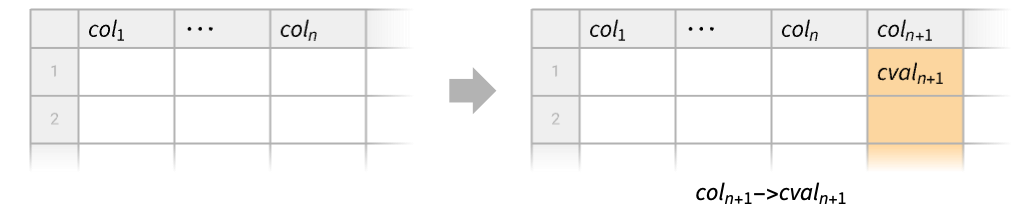
InsertColumns[tab,{col1cval1,…}]
inserts the column cvali with name coli in the tabular object tab.
InsertColumns[cspec]
represents an operator form of InsertColumns that can be applied to a tabular object.
Details
- InsertColumns is typically used to build a Tabular object with additional columns.
- If the column coli already exists, it is replaced with the new column. Otherwise, the new column is added after the existing ones. »
- The inserted columns must have the same number of rows as the original tabular object.
- InsertColumns[tab,{acol,colcval}] adds a new column named col after the existing anchor column named acol, instead of appending it at the end. »
- For tabular data atab without column keys, InsertColumns[atab,{cval1,…,cvaln}] appends n new columns. »
- Possible column specifications cvali to be inserted in a tabular object of n rows include:
-
const equivalent to ConstantArray[const,n] » {v1,…,vn} vector of length n » TabularColumn[…] type-consistent vector of length n » - The syntax colNothing can be used to remove the existing column named col. »
- InsertColumns[cspec][tab] is equivalent to InsertColumns[tab,cspec]. »
- InsertColumns can also insert components in TimeSeries or EventSeries objects.
Examples
open all close allBasic Examples (2)
Insert a new column at the end:
tab = Tabular[{{1, 2}, {3, 4}, {5, 6}}, {"a", "b"}]InsertColumns[tab, "aa" -> {11, 22, 33}]Insert the new column after the first column:
InsertColumns[tab, {"a", "aa" -> {11, 22, 33}}]Use operator form of InsertColumns:
tab = Tabular[{{1, 2}, {3, 4}, {5, 6}}, {"a", "b"}]InsertColumns[{"aa" -> {11, 22, 33}, "bb" -> 0}][tab]Scope (12)
Columns (7)
tab = Tabular[{{1, 2}, {3, 4}, {5, 6}}, {"a", "b"}]InsertColumns[tab, "c" -> 0]tab = Tabular[{{1, 2}, {3, 4}, {5, 6}}, {"a", "b"}]InsertColumns[tab, "c" -> {.1, .2, .3}]tab = Tabular[{{1, 2}, {3, 4}, {5, 6}}, {"a", "b"}]col = TabularColumn[{"cat", "dog", "fox"}, "String"]InsertColumns[tab, "c" -> col]tab = Tabular[{{1, 2}, {3, 4}, {5, 6}}, {"a", "b"}]InsertColumns[tab, "b" -> Nothing]Add multiple columns at the same time:
tab = Tabular[{{1, 2}, {3, 4}, {5, 6}}, {"a", "b"}]InsertColumns[tab, {"c1" -> {"cat", "dog", "fox"}, "c2" -> {.1, .2, .3}}]Columns can be inserted with their key wrapped in Key or ExtendedKey:
tab = Tabular[{{1, 2}, {3, 4}, {5, 6}}, {"a", "b"}]{InsertColumns[tab, "c" -> {.1, .2, .3}],
InsertColumns[tab, Key["c"] -> {.1, .2, .3}],
InsertColumns[tab, ExtendedKey["c"] -> {.1, .2, .3}]}Extended keys can have different depths than in the original:
InsertColumns[tab, ExtendedKey["Up", "c"] -> {.1, .2, .3}]Take a Tabular object with extended keys:
tab = Tabular[{{1, 2}, {3, 4}, {5, 6}}, {ExtendedKey["Up", "a"], ExtendedKey["Up", "b"]}]Insert a column with a standard key:
InsertColumns[tab, "c" -> {.1, .2, .3}]Insert it matching the depth of the extended keys:
InsertColumns[tab, ExtendedKey["Up", "c"] -> {.1, .2, .3}]Input Data (2)
Append a column to a Tabular object:
Tabular[{{1, 2}, {3, 4}, {5, 6}}, {"a", "b"}]InsertColumns[%, "c" -> {.1, .2, .3}]Insert a value component in a TimeSeries object:
ts = TimeSeries[{{1, "dog"}, {2, "cat"}, {3, "fox"}}, {Today}, ComponentKeys -> {"number", "animal"}]InsertColumns[ts, "city" -> {Entity["City", {"London", "GreaterLondon", "UnitedKingdom"}], Entity["City", {"Tokyo", "Tokyo", "Japan"}], Entity["City", {"BuenosAires", "BuenosAires", "Argentina"}]}]%//TabularInsert the new component at a specific position:
InsertColumns[ts, {"number", "city" -> {Entity["City", {"London", "GreaterLondon", "UnitedKingdom"}], Entity["City", {"Tokyo", "Tokyo", "Japan"}], Entity["City", {"BuenosAires", "BuenosAires", "Argentina"}]}}]%//TabularPlacement of Columns (3)
Insert a column before the first one:
tab = Tabular[{{1, 2}, {3, 4}, {5, 6}}, {"a", "b"}]InsertColumns[tab, {"c" -> {11, 12, 13}, "a"}]Insert it after the first column:
InsertColumns[tab, {"a", "c" -> {11, 12, 13}}]tab = Tabular[{{1, 2}, {3, 4}, {5, 6}}, {"a", "b"}]InsertColumns[tab, "b" -> 0]Add multiple columns at the same time:
tab = Tabular[{{1, 2}, {3, 4}, {5, 6}}, {"a", "b"}]col1 = TabularColumn[{"cat", "dog", "fox"}, "String"]col2 = TabularColumn[{.1, .2, .3}, "Real64"]InsertColumns[tab, {"c1" -> col1, "a", "c2" -> col2, "b"}]Applications (4)
Take a Tabular object of numbers:
tab = ToTabular[<|"obs" -> RandomReal[{-10, 10}, 5]|>, "Columns"]Create a vector from the column "obs" that has zero mean and unit standard deviation:
zscore = Standardize[tab[All, "obs"]]Use InsertColumns to add it to the original tabular object:
InsertColumns[tab, "z-score" -> zscore]Take a Tabular object containing medical data:
data = ResourceData["Sample Tabular Data: Cardiac Disease"]ColumnTypes[data]Note that type for some columns is not numeric, despite the columns containing numbers:
TabularStructure[data, {"Fluoro", "Thallium"}]{VectorQ[data[All, "Fluoro"], NumericQ], VectorQ[data[All, "Thallium"], NumericQ]}It is likely the data in these two columns cannot be trusted and needs to be marked to indicate that. Use InsertColumns to convert all the column entries to Missing:
InsertColumns[data, {"Fluoro" -> Missing["Fluoro"], "Thallium" -> Missing["Thallium"]}]TabularStructure[%, {"Fluoro", "Thallium"}]Take a Tabular object of financial time series data:
ts = Tabular[{...}];GraphicsRow@{ts, DateListPlot[ts -> {"Date", "Value"}]}Fit an autoregressive time series model to the data:
tsm = TimeSeriesModelFit[FromTabular[ts, "TimeSeries", <|"TimeColumn" -> "Date", TemporalRegularity -> True|>], "AR"]RandomFunction[Normal[tsm], {1, Length[ts]}]Add the simulation column to the data:
InsertColumns[ts, "Simulation" -> %["Values"]]Visualize the data and the simulation:
DateListPlot[% -> {{"Date", "Value"}, {"Date", "Simulation"}}, PlotLegends -> {"data", "simulation"}]Take a Tabular object with monthly data given in columns:
data = ResourceData["Sample Tabular Data: Los Angeles Ozone"]Insert empty string columns to serve as visual dividers:
InsertColumns[data, {"Year", "Q1 ->" -> "", "Mar", "Q2 ->" -> "", "Jun", "Q3 ->" -> "", "Sep", "Q4 ->" -> ""}]Properties & Relations (5)
Specifying different columns for the same new key will use the last specification:
tab = Tabular[{{1, 3}, {2, 4}, {8, 6}, {5, 7}}, {"a", "b"}]InsertColumns[tab, {"c" -> {t, x, y, z}, "c" -> {S, P, Q, R}}]An empty second argument represents insertion of zero columns:
InsertColumns[Tabular[{{1}, {2}}, {"a"}], {}]Use TransformColumns to append a new column to a Tabular object:
tab = Tabular[{{1, 2}, {3, 4}, {5, 6}}, {"a", "b"}]TransformColumns[tab, "c" -> Function[#a + #b]]Alternatively, first compute the column and then use InsertColumns to append it:
col = tab[All, "a"] + tab[All, "b"]InsertColumns[tab, "c" -> col]Take a Tabular object whose columns are years and months:
data = {{2024, 10}, {2024, 11}, {2024, 12}};tab = Tabular[data]TransformColumns can add a new column by constructing a date for each row:
TransformColumns[tab, DateObject]Alternatively, first construct the column of dates and then use InsertColumns to append it:
InsertColumns[tab, Map[DateObject, data]]Append a column to an anonymous Tabular object:
mat = {{1, 2}, {3, 4}, {5, 6}};
col = {"cat", "dog", "fox"};tab = Tabular[mat]InsertColumns[tab, col]The same result can be achieved by joining matrices at their second level with Join:
Join[mat, List /@ col, 2]//MatrixFormInsertColumns[tab, {col, col}]Append the same columns of the original Tabular object:
InsertColumns[tab, FromTabular[tab, "Columns"]]This is effectively equivalent to a transposition of the original data:
InsertColumns[tab, Transpose[mat]]Text
Wolfram Research (2025), InsertColumns, Wolfram Language function, https://reference.wolfram.com/language/ref/InsertColumns.html (updated 2026).
CMS
Wolfram Language. 2025. "InsertColumns." Wolfram Language & System Documentation Center. Wolfram Research. Last Modified 2026. https://reference.wolfram.com/language/ref/InsertColumns.html.
APA
Wolfram Language. (2025). InsertColumns. Wolfram Language & System Documentation Center. Retrieved from https://reference.wolfram.com/language/ref/InsertColumns.html