DiggleGatesPointProcess[μ,ρ,d]
represents a Diggle–Gates point process with constant intensity μ and interaction radius ρ in  .
.


DiggleGatesPointProcess
DiggleGatesPointProcess[μ,ρ,d]
represents a Diggle–Gates point process with constant intensity μ and interaction radius ρ in  .
.
Details
- DiggleGatesPointProcess models point configurations where the points have a softcore decreasing repulsive pairwise interaction for points within radius ρ of each other and that are otherwise uniformly distributed.
-
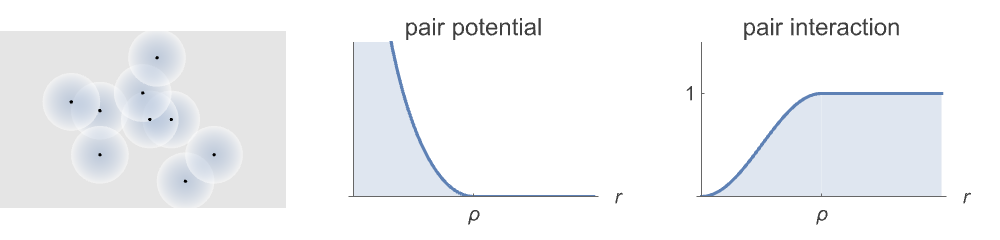
- The Diggle–Gates point process can be defined as a GibbsPointProcess in terms of its intensity μ and the pair potential
 or pair interaction
  , which are both parametrized by ρ as follows:
 -
![phi(r)= 2 log(sin(pi r/(2 rho))) r<rho; 1 TemplateBox[{True, paclet:ref/True}, RefLink, BaseStyle -> {2ColumnTableMod}];](Files/DiggleGatesPointProcess.en/5.png "phi(r)= 2 log(sin(pi r/(2 rho))) r<rho; 1 TemplateBox[{True, paclet:ref/True}, RefLink, BaseStyle -> {2ColumnTableMod}];")
pair potential ![h(r)= sin^2(pi r/(2 rho)) r<rho; 1 TemplateBox[{True, paclet:ref/True}, RefLink, BaseStyle -> {2ColumnTableMod}];](Files/DiggleGatesPointProcess.en/6.png "h(r)= sin^2(pi r/(2 rho)) r<rho; 1 TemplateBox[{True, paclet:ref/True}, RefLink, BaseStyle -> {2ColumnTableMod}];")
pair interaction - A point configuration
 from a Diggle–Gates point process DiggleGatesPointProcess[μ,ρ,d] in an observation region reg has density function
  proportional to
 ![mu^n product_(i!=j)h(TemplateBox[{{{p, _, i}, -, {p, _, j}}}, Norm])](Files/DiggleGatesPointProcess.en/9.png "mu^n product_(i!=j)h(TemplateBox[{{{p, _, i}, -, {p, _, j}}}, Norm])") , with respect to PoissonPointProcess[1,d].
, with respect to PoissonPointProcess[1,d]. - The Papangelou conditional density
 for adding a point
  to a point configuration
  is
is ![mu product_ih(TemplateBox[{{{p, _, i}, -, q}}, Norm])](Files/DiggleGatesPointProcess.en/13.png "mu product_ih(TemplateBox[{{{p, _, i}, -, q}}, Norm])") .
. - DiggleGatesPointProcess allows μ and ρ to be any positive number, and d to be any positive integer.
- DiggleGatesPointProcess is a special case of GibbsPointProcess.
- DiggleGatesPointProcess simplifies to PoissonPointProcess when
 .
. - Possible Method settings in RandomPointConfiguration for StraussPointProcess are:
-
"MCMC" Markov chain Monte Carlo birth and death "Exact" coupling from the past - Possible PointProcessEstimator settings in EstimatedPointProcess for DiggleGatesPointProcess are:
-
Automatic automatically choose the parameter estimator "MaximumPseudoLikelihood" maximize the pseudo-likelihood - DiggleGatesPointProcess can be used with such functions as RipleyK and RandomPointConfiguration.
Examples
open all close allBasic Examples (2)
Sample from a Diggle–Gates point process:
domain = Rectangle[{0, 0}, {10, 10}];pts = RandomPointConfiguration[DiggleGatesPointProcess[10, 2, 2], domain]
Visualize the points in the sample:
Show[RegionPlot[domain], ListPlot[pts]]Sample from a Diggle–Gates point process defined on the surface of the Earth:
reg = Entity["Country", "Denmark"]["Polygon"]pts = RandomPointConfiguration[DiggleGatesPointProcess[Quantity[3/1000, 1/"Kilometers"^2], Quantity[3, "Kilometers"], 2], reg, 1]GeoListPlot[pts]Scope (2)
Generate two realizations from a Diggle–Gates point process:
proc = DiggleGatesPointProcess[50, .1, 2];
reg = Disk[];SeedRandom[1];
pts = RandomPointConfiguration[proc, reg, 2]ListPlot[pts]Clear[μ, ρ, d];
EstimatedPointProcess[pts, DiggleGatesPointProcess[μ, ρ, d]]Generate two realizations from a Diggle–Gates point process on the surface of the Earth:
μ = Quantity[.3, "Kilometers" ^ -2];
ρ = Quantity[10., "Kilometers"];proc = DiggleGatesPointProcess[μ, ρ, 2];
reg = GeoDisk[Entity["City", {"BuenosAires", "BuenosAires", "Argentina"}], Quantity[30, "Kilometers"]];pts = RandomPointConfiguration[proc, reg, 2]Visualize the point configurations:
GeoListPlot[pts]Clear[μ, ρ, d];
EstimatedPointProcess[pts, DiggleGatesPointProcess[μ, ρ, d]]Options (3)
Method (3)
Use the Markov chain Monte Carlo simulation method:
proc = DiggleGatesPointProcess[10, .1, 2];
reg = Disk[];RandomPointConfiguration[proc, reg, Method -> "MCMC"]Specify the number of recursive calls to the sampler:
RandomPointConfiguration[proc, reg, Method -> {"MCMC", MaxRecursion -> 6}]Specify the length of the run:
RandomPointConfiguration[proc, reg, Method -> {"MCMC", "LengthOfRun" -> 5000}]Provide an initial state for the simulation:
proc = DiggleGatesPointProcess[10, .1, 2];
reg = Disk[];RandomPointConfiguration[proc, reg, Method -> {"MCMC", "InitialState" -> RandomPoint[reg, 100]}]proc = DiggleGatesPointProcess[10, .1, 2];reg = Rectangle[{0, 0}, {10, 10}];pts = RandomPointConfiguration[proc, reg, Method -> {"Exact", MaxRecursion -> 20}]Visualize the points in the sample:
Show[RegionPlot[reg], ListPlot[pts]]Possible Issues (1)
By default, the simulation will run until the number of points converges to a steady state, or until the default number of iterations is reached:
proc = DiggleGatesPointProcess[10000, .04, 2];
reg = Disk[];RandomPointConfiguration[proc, reg]
Raise the number of recursive calls to the sampler:
RandomPointConfiguration[proc, reg, Method -> {"MCMC", MaxRecursion -> 6}]Specify a larger length of run:
RandomPointConfiguration[proc, reg, Method -> {"MCMC", "LengthOfRun" -> 5 * 10 ^ 4}]Text
Wolfram Research (2020), DiggleGatesPointProcess, Wolfram Language function, https://reference.wolfram.com/language/ref/DiggleGatesPointProcess.html.
CMS
Wolfram Language. 2020. "DiggleGatesPointProcess." Wolfram Language & System Documentation Center. Wolfram Research. https://reference.wolfram.com/language/ref/DiggleGatesPointProcess.html.
APA
Wolfram Language. (2020). DiggleGatesPointProcess. Wolfram Language & System Documentation Center. Retrieved from https://reference.wolfram.com/language/ref/DiggleGatesPointProcess.html