

ShellRegion
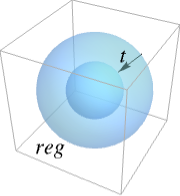
ShellRegion[reg]
gives a solid shell of a 3D region reg.
ShellRegion[reg,t]
gives a solid shell of reg with minimal thickness t.
Details
- ShellRegion is typically used to hollow out a solid to save material when printing a 3D object.
- ShellRegion preserves the outer surface of an object.
Examples
open all close allBasic Examples (2)
𝒮 = ShellRegion[Ball[]]Graphics3D[{Opacity[0.4], 𝒮}, Boxed -> False]Find the shell of a mesh region:
ℛ = ConvexHullMesh[RandomReal[1, {100, 3}]];𝒮 = ShellRegion[ℛ];BoundaryMeshRegion[𝒮, BaseStyle -> Opacity[0.4]]𝒮 = ShellRegion[ℛ, 0.25];BoundaryMeshRegion[𝒮, BaseStyle -> Opacity[0.4]]Scope (16)
Basic Uses (3)
ShellRegion works on solid regions:
ShellRegion[Ball[]]ShellRegion[Sphere[]]Specify a thickness for a shell:
ShellRegion[Ball[], 3 / 4]Special Regions (8)
Find the shell of a Ball:
𝒮 = ShellRegion[Ball[]]Graphics3D[{Opacity[0.4], 𝒮}, Boxed -> False]𝒮 = ShellRegion[Cuboid[]];Graphics3D[{Opacity[0.4], 𝒮}, Boxed -> False]𝒮 = ShellRegion[Hexahedron[{{0, 0, 0}, {1, 0, 0}, {2, 1, 0}, {1, 1, 0}, {0, 0, 1}, {1, 0, 1}, {2, 1, 1}, {1, 1, 1}}]];Graphics3D[{Opacity[0.4], 𝒮}, Boxed -> False]𝒮 = ShellRegion[Parallelepiped[]];Graphics3D[{Opacity[0.4], 𝒮}, Boxed -> False]𝒮 = ShellRegion[Prism[]];Graphics3D[{Opacity[0.4], 𝒮}, Boxed -> False]𝒮 = ShellRegion[Pyramid[]];Graphics3D[{Opacity[0.4], 𝒮}, Boxed -> False]𝒮 = ShellRegion[Simplex[{{0, 0, 0}, {1, 1, 1}, {2, 1, 0}, {1, 0, 0}}]];Graphics3D[{Opacity[0.4], 𝒮}, Boxed -> False]𝒮 = ShellRegion[Tetrahedron[]];Graphics3D[{Opacity[0.4], 𝒮}, Boxed -> False]Formula Regions (2)
Find the shell of an ImplicitRegion:
ℛ = ImplicitRegion[x^2 + y^2 + z^2 ≤ 1, {x, y, z}];𝒮 = ShellRegion[ℛ, 1 / 4]RegionPlot3D[𝒮, Boxed -> False, PlotStyle -> Opacity[0.4], PlotPoints -> 40]A Boolean combination of inequalities:
ℛ = ImplicitRegion[x^2 + y^2 + z^2 ≤ 1 || (0 ≤ x ≤ 1 && 0 ≤ y ≤ 1 && 0 ≤ z ≤ 1) || (x^2 + y^2 ≤ 1 / 9 && -2 ≤ z ≤ 2), {x, y, z}];𝒮 = ShellRegion[ℛ];RegionPlot3D[𝒮, Boxed -> False, PlotStyle -> Opacity[0.4], PlotPoints -> 40]Mesh Regions (3)
Find the shell of a BoundaryMeshRegion:
ℛ = BoundaryMeshRegion[{{0, 0, 0}, {1, 0, 0}, {0, 1, 0}, {0, 0, 1}},
Polygon[{{3, 2, 1}, {2, 3, 4}, {3, 1, 4}, {1, 2, 4}}]];𝒮 = ShellRegion[ℛ];BoundaryMeshRegion[𝒮, BaseStyle -> Opacity[0.4]]ℛ = MeshRegion[{{0, 0, 0}, {1, 0, 0}, {0, 1, 0}, {0, 0, 1}},
Tetrahedron[{1, 2, 3, 4}]];𝒮 = ShellRegion[ℛ];BoundaryMeshRegion[𝒮, BaseStyle -> Opacity[0.4]]A closed surface MeshRegion:
ℛ = MeshRegion[{{0, 0, 0}, {1, 0, 0}, {0, 1, 0}, {0, 0, 1}},
Polygon[{{3, 2, 1}, {2, 3, 4}, {3, 1, 4}, {1, 2, 4}}]];𝒮 = ShellRegion[ℛ];BoundaryMeshRegion[𝒮, BaseStyle -> Opacity[0.4]]Applications (5)
model = ExampleData[{"Geometry3D", "Triceratops"}, "BoundaryMeshRegion"];𝒮 = ShellRegion[model];BoundaryMeshRegion[𝒮, BaseStyle -> Opacity[0.4]]model = ExampleData[{"Geometry3D", "Torus"}, "BoundaryMeshRegion"];𝒮 = ShellRegion[model];BoundaryMeshRegion[𝒮, BaseStyle -> Opacity[0.4]]model = ChemicalData["Water", "BoundaryMeshRegion"];𝒮 = ShellRegion[model];BoundaryMeshRegion[𝒮, BaseStyle -> Opacity[0.4]]Find a shell with roughly one quarter the original volume:
ℛ = PolyhedronData["Dodecahedron", "BoundaryMeshRegion"];Sample points in the region to create a distribution of distances to the boundary:
dists = -SignedRegionDistance[ℛ, RandomPoint[ℛ, 2000]];𝒟 = SmoothKernelDistribution[dists];Find the distance where one quarter of the sampled points are closer to the boundary:
t = Quantile[𝒟, 0.25]𝒮 = BoundaryMeshRegion[ShellRegion[ℛ, t], BaseStyle -> Opacity[0.4]]Volume[𝒮] / Volume[ℛ]Use ShellRegion to save material when printing a 3D object:
ℛ = ConvexHullMesh[RandomReal[1, {100, 3}]];𝒮 = ShellRegion[ℛ];The shell requires less material:
Volume[𝒮] / Volume[ℛ]Properties & Relations (3)
ShellRegion preserves the outer surface of an object:
ℛ = ExampleData[{"Geometry3D", "Triceratops"}, "BoundaryMeshRegion"];𝒮 = ShellRegion[ℛ];outer = SortBy[ConnectedMeshComponents[RegionBoundary[𝒮]], Area][[-1]]RegionBounds[ℛ] == RegionBounds[outer]Area[RegionBoundary[ℛ]] == Area[outer]Typically, the thickness of the shell is roughly uniform:
ℛ = ExampleData[{"Geometry3D", "Triceratops"}, "BoundaryMeshRegion"];𝒮 = ShellRegion[ℛ, 0.25];Extract the inner and outer surfaces:
{inner, outer} = SortBy[ConnectedMeshComponents[RegionBoundary[𝒮]], Area]Compute distances to the outer surface with RegionDistance:
RegionDistance[outer, MeshCoordinates[inner]]//ShortThe shell of Ball is SphericalShell:
Graphics3D[{Opacity[0.4], SphericalShell[]}, Boxed -> False]Use ShellRegion to compute the shell of other regions:
Graphics3D[{Opacity[0.4], ShellRegion[Ball[]]}, Boxed -> False]Graphics3D[{Opacity[0.4], ShellRegion[Cuboid[]]}, Boxed -> False]Possible Issues (2)
The thickness of a shell may not be uniform:
𝒮 = ShellRegion[ImplicitRegion[x^2 + y^2 - z^3(1 - z) ≤ 0, {x, y, z}], 1 / 10];RegionPlot3D[𝒮, Boxed -> False, PlotStyle -> Opacity[0.4], PlotPoints -> 100]Different representations of a region can give different shells:
ShellRegion[Ball[]]A Ball as an ImplicitRegion:
ShellRegion[ImplicitRegion[x^2 + y^2 + z^2 ≤ 1, {x, y, z}]]Text
Wolfram Research (2016), ShellRegion, Wolfram Language function, https://reference.wolfram.com/language/ref/ShellRegion.html.
CMS
Wolfram Language. 2016. "ShellRegion." Wolfram Language & System Documentation Center. Wolfram Research. https://reference.wolfram.com/language/ref/ShellRegion.html.
APA
Wolfram Language. (2016). ShellRegion. Wolfram Language & System Documentation Center. Retrieved from https://reference.wolfram.com/language/ref/ShellRegion.html