

TimeSeriesRescale
TimeSeriesRescale[tes,{tmin,tmax}]
rescales the times in time or event series data tes to run from tmin to tmax.
TimeSeriesRescale[tes,{tmin,tmax,tu}]
rescales times in units of tu including "Month", "Quarter" or "Year".
Details
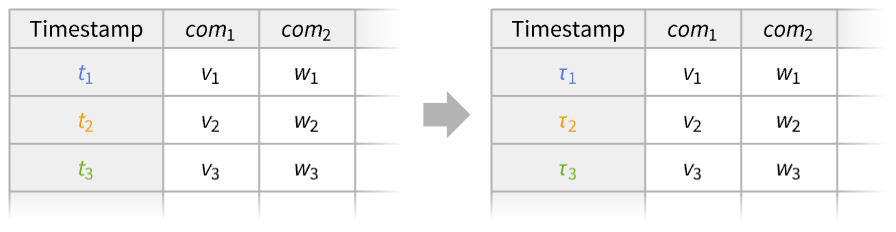
- TimeSeriesRescale is typically used to expand or contract the time range for a time series while preserving the ratios of the distances between times.
- With timestamps
 , the rescaled time series will have timestamps
  , where τi=Rescale[ti,{t1,tn},{tmin,tmax}].
 - Possible forms of time or event series data tes include:
-
TimeSeries[…] continuous time-ordered sampled data EventSeries[…] collection of temporal events with values TemporalData[…] one or more paths composed of time-value pairs {{t1,x1},{t2,x2},…} list of time-value pairs {x1,x2,…} list of values with implied integer times starting at 0 - TimeSeriesRescale works on a multipath TemporalData as a whole, preserving the ratios of the distances between times across the paths.
- The values tmin<tmax can be given as numbers or dates of any granularity.
- Time unit tu can be any valid offset to DatePlus, as well as any purely numeric quantity.
- The rescaled time series have timestamps
 , where
  and
and  refer to timestamps of tes and where
  is the distance between
  and
and  in units of
  .
. - For numeric times,
 . For dates,
  is implicitly given by
 ![t_2=DatePlus[t_1,rho(t_1,t_2,t_u)t_u]](Files/TimeSeriesRescale.en/13.png "t_2=DatePlus[t_1,rho(t_1,t_2,t_u)t_u]") .
.
Examples
open all close allBasic Examples (3)
Rescale a regular time series with times from 1 to 5 to run from 0 to 20:
data = {{1, Subscript[x, 1]}, {2, Subscript[x, 2]}, {3, Subscript[x, 3]}, {4, Subscript[x, 4]}, {5, Subscript[x, 5]}};TimeSeriesRescale[data, {0, 20}]Rescale an irregular time series:
data = {{0, Subscript[x, 1]}, {3, Subscript[x, 2]}, {4, Subscript[x, 3]}, {6, Subscript[x, 4]}, {7, Subscript[x, 5]}};TimeSeriesRescale[data, {10, 45}]Ratios of distances between timestamps are preserved:
Ratios[Differences[data[[All, 1]]]] === Ratios[Differences[%[[All, 1]]]]Rescale dates in a time series over a week to numbers from 1 to 7:
ts = TimeSeries[{"M", "Tu", "W", "Th", "F", "Sa", "Su"}, {DateObject[{2026, 1, 26}]}]ts//NormalTimeSeriesRescale[ts, {1, 7}]//NormalScope (10)
Basic Uses (3)
Expand or contract the time range of a time series:
data = TimeSeries[RandomFunction[ARIMAProcess[(1/10), {.1}, 1, {.2}, 1], {0, 50}]];expdata = TimeSeriesRescale[data, {0, 300}];condata = TimeSeriesRescale[data, {0, 20}];{ListLinePlot[data], ListLinePlot[expdata], ListLinePlot[condata]}Rescale date-valued times to be numeric:
ts = FinancialData["BUSE", "Close", {{2013}, {2013}, "Month"}]DateListPlot[ts, Joined -> True]Number of days between the first and last points of a time series:
days = 1 + QuantityMagnitude[DateDifference[ts["FirstDate"], ts["LastDate"]]]Rescale date‐valued times to be integers:
r = TimeSeriesRescale[ts, {1, days}]Rescale a time series with numeric times to run through days of a business week:
data = {{1, Subscript[x, 1]}, {2, Subscript[x, 2]}, {3, Subscript[x, 3]}, {4, Subscript[x, 4]}, {5, Subscript[x, 5]}};TimeSeriesRescale[data, {DateObject[{2026, 1, 26}], DateObject[{2026, 1, 30}]}]Data Types (7)
Rescale the times for a vector to run from 0 to 8:
v = {a, b, c, d, e};TimeSeriesRescale[v, {0, 8}]Rescale the times for a series of time-value pairs to run from 10 to 50:
v = {{2, a}, {3, b}, {7, c}, {14, d}, {15, e}};TimeSeriesRescale[v, {10, 50}]//NRescale the times of a TimeSeries to run from 0 to 399:
ts = TemporalData[TimeSeries, {{{0.4948076687033609, -0.49167253739690864, -1.1692407506834863,
    -0.25256398166927063, -1.0324595217335713, -1.5365451139092143, -2.0662926057486564,
    -1.7443987109156156, -2.6969884040577115, -3.663349952028885,  ... 13,
    -5.365194518466113, -5.614668108914484, -6.477246191853266, -7.461704439607946,
    -6.79657593242878, -5.864937981765857, -6.27785271209235, -5.841962111797332}}, {{0, 99, 1}},
1, {"Discrete", 1}, {"Discrete", 1}, 1, {}}, False, 10.];d = TimeSeriesRescale[ts, {0, 399}]ListLinePlot[{ts, d}]Rescale the times of an EventSeries to run from 5 to 49:
es = TemporalData[EventSeries, {{{1, -1, 1, 1, -1, 1, -1, -1, 1, -1, -1, -1, 1, -1, 1, -1, 1, -1, 1,
    -1}}, {{0, 19, 1}}, 1, {"Discrete", 1}, {"Discrete", 1}, 1, {ResamplingMethod -> None}}, False,
10.];d = TimeSeriesRescale[es, {5, 49}]ListPlot[{es, d}, Filling -> Axis]Rescale a time series to run from 1 to 100:
ts = RandomFunction[BrownianBridgeProcess[], {0, 1, .01}];ListLinePlot[ts]r = TimeSeriesRescale[ts, {1, 100}];ListLinePlot[r]Rescale to a 100-day span, starting at today's date:
r2 = TimeSeriesRescale[ts, {Today, DatePlus[Today, 100]}];DateListPlot[r2, Joined -> True]Rescale the times of TemporalData to run from 10 to 100:
td = RandomFunction[WienerProcess[], {0, 5, 0.1}, 3]d = TimeSeriesRescale[td, {10, 100}]{ListLinePlot[td["Paths"]], ListLinePlot[d["Paths"]]}Rescale a time series involving quantities:
ts = TimeSeries[Quantity[{0, 16, 9, 3, 7, 2, 17, 10, 6, 12}, "Meters"]];rts = TimeSeriesRescale[ts, {0, 19}];ListLinePlot[{ts, rts}, PlotLegends -> {"original time series", "rescaled time series"}, Filling -> Axis, AxesLabel -> Automatic]Applications (2)
Create a series with increasing variance and rescale to calendar time:
ts = TimeSeries[RandomReal[{-1, 1}, 10 ^ 3], {1}];ListPlot[ts]ncv = TimeSeriesMapThread[RandomReal[NormalDistribution[#2, #1]]&, ts];ListPlot[ncv]Rescale to begin on May 24, 1982, and step by week:
rscl = TimeSeriesRescale[ncv, {"May 24th, 1982", "Nov 21st, 2012"}];DateListPlot[rscl, Joined -> True]Rescale a time series with logical timestamps to calendar times in months:
td = RandomFunction[ARMAProcess[1 / 2, {2 / 3, -1 / 4}, {1 / 5}, 2], {0, 23}, 5]tdrescale = TimeSeriesRescale[td, {"Jan 2012", "Dec 2013", "Month"}]DateListPlot[tdrescale]Properties & Relations (2)
Take a time series of irregular timestamps from 5 to 30:
times = {5, 7, 9, 20, 30};data = TimeSeries[Range[5], {times}]Rescale it to the range 0 to 100:
rdata = TimeSeriesRescale[data, {0, 100}]rdata["Timestamps"]//NormalThey can be also be computed using Rescale:
Rescale[times, MinMax[times], {0, 100}]TimeSeriesRescale rescales the timestamps in agreement with a temporal regularity assumption:
ts1 = TemporalData[TimeSeries, {{{13.619999885559082, 13.5, 13.710000038146973, 12.899999618530273,
    13.140000343322754, 13.5, 14.970000267028809, 14.279999732971191, 15.630000114440918,
    15.510000228881836, 18., 17.399999618530273}},
  {{{35685 ...
     3586809600, 3589488000, 3592166400, 3594672000, 3597436800}}}, 1, {"Continuous", 1},
  {"Discrete", 1}, 1, {ValueDimensions -> 1, DateFunction -> Automatic,
ResamplingMethod -> {"Interpolation", InterpolationOrder -> 1}}}, True, 314.1];RegularlySampledQ[ts1]Define a copy with assumed temporal regularity:
ts2 = TimeSeries[ts1, TemporalRegularity -> True]RegularlySampledQ[ts2]Rescale from 1 to 12 (where 12 is the length of the path):
res1 = TimeSeriesRescale[ts1, {1, 12}]res2 = TimeSeriesRescale[ts2, {1, 12}]TimeSeriesRescale preserves the proportional distances between the timestamps:
res1["Times"]res2["Times"]Text
Wolfram Research (2014), TimeSeriesRescale, Wolfram Language function, https://reference.wolfram.com/language/ref/TimeSeriesRescale.html.
CMS
Wolfram Language. 2014. "TimeSeriesRescale." Wolfram Language & System Documentation Center. Wolfram Research. https://reference.wolfram.com/language/ref/TimeSeriesRescale.html.
APA
Wolfram Language. (2014). TimeSeriesRescale. Wolfram Language & System Documentation Center. Retrieved from https://reference.wolfram.com/language/ref/TimeSeriesRescale.html