

TimeSeriesInsert
TimeSeriesInsert[tes,{t,val}]
inserts a value val at time t in the time or event series data tes.
TimeSeriesInsert[tes1,tes2]
inserts the time-value pairs from tes2 into tes1.
Details
- TimeSeriesInsert is typically used to add a value to a time series, to concatenate two time series, or to replace erroneous or missing values.
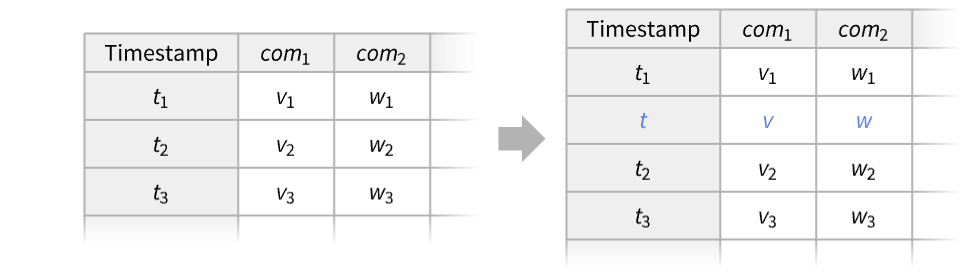
- Inserting {t,<com1v,com2w,…>} into a time or event series object with components comi.
- Possible forms of time or event series data tes include:
-
TimeSeries[…] continuous time-ordered sampled data EventSeries[…] collection of temporal events with values TemporalData[…] one or more paths composed of time-value pairs {{t1,x1},{t2,x2},…} list of time-value pairs {x1,x2,…} list of values with implied integer times starting at 0 - The time t can be given as a number or a date.
- Dates of granularity not matching that of the input data tes will be converted. »
- If t is an existing timestamp in tes, its corresponding value will be replaced by val.
Examples
open all close allBasic Examples (4)
Insert a value into a time series at time 2.5:
ts = TimeSeries[{{1, Subscript[x, 1]}, {2, Subscript[x, 2]}, {3, Subscript[x, 3]}}]TimeSeriesInsert[ts, {2.5, Subscript[x, 2.5]}]//NormalReplace the value at time 2 with a:
TimeSeriesInsert[ts, {2, a}]//NormalInsert multiple time-value pairs:
TimeSeriesInsert[ts, {{2.2, a}, {2.7, b}}]//Normalts1 = TimeSeries[{{1, Subscript[x, 1]}, {2, Subscript[x, 2]}, {3, Subscript[x, 3]}}];ts2 = TimeSeries[{{4, Subscript[x, 4]}, {5, Subscript[x, 5]}}];TimeSeriesInsert[ts1, ts2]Normal[%]Insert a value into a financial time series:
ts = TimeSeries[FinancialData["GOOGL", {"2023", "2024"}]]DateListPlot[ts]Insert the value 900 on June 1, 2023:
TimeSeriesInsert[ts, {DateObject[{2023, 6, 1}], 900}];DateListPlot[%]Replace a missing value in a time series:
ts = TimeSeries[{6, 11, 17, 22, Missing[], 34, 35, 36, 44, 48}, {1}]ts[5]Replace the missing value at time 5 with 27:
TimeSeriesInsert[ts, {5, 27}]{ListLinePlot[ts], ListLinePlot[%]}Scope (10)
Basic Uses (4)
Add a value to the start of a time series:
ts = TemporalData[TimeSeries, {{{5., 9., 8., 10., 6.1, 10.4, 9.1, 11.6, 7.5, 12.1, 10.4, 13.5, 9., 14.1,
    11.9, 15.7, 10.8, 16.4, 13.7, 18.3, 12.9, 19., 15.8, 21.2, 15.3, 22.1, 18.3, 24.6}},
{{1, 28, 1}}, 1, {"Discrete", 1}, {"Discrete", 1}, 1, {}}, False, 10.];ListLinePlot[ts, AxesOrigin -> {0, 0}]Insert the value 20 at time 0:
ListLinePlot[TimeSeriesInsert[ts, {0, 20}], AxesOrigin -> {0, 0}]ts1 = RandomFunction[PoissonProcess[5], {0, 1}];
ts2 = RandomFunction[PoissonProcess[5], {0, 1}];ListPlot[{ts1, ts2}]ListLinePlot[TimeSeriesInsert[ts1, ts2]]Concatenate a time series and forecast:
proc = ARMAProcess[1.2, {.3, .2}, {.8}, .1];
data = RandomFunction[proc, {1, 20}];tsf = TimeSeriesInsert[data, TimeSeriesForecast[proc, data, {0, 10}]];ListLinePlot[{tsf, data}]Replace an erroneous value with Missing[]:
ts = TemporalData[TimeSeries, {{{0.5, -0.3, 0.27, 999, 0.18, -0.8}}, {{1, 6, 1}}, 1, {"Discrete", 1},
{"Discrete", 1}, 1, {ValueDimensions -> 1}}, False, 10.];ListLinePlot[ts]ListLinePlot[TimeSeriesInsert[ts, {4, Missing[]}]]Data Types (6)
data = {Subscript[x, 1], Subscript[x, 2], Subscript[x, 3], Subscript[x, 4], Subscript[x, 5]};TimeSeriesInsert[data, {1.5, Subscript[x, 2.5]}]A time series given as time-value pairs:
data = {{1, Subscript[x, 1]}, {2, Subscript[x, 2]}, {3, Subscript[x, 3]}, {4, Subscript[x, 4]}, {5, Subscript[x, 5]}};TimeSeriesInsert[data, {2.5, Subscript[x, 2.5]}]Insert a value into a TimeSeries:
data = TimeSeries[{{1, Subscript[x, 1]}, {2, Subscript[x, 2]}, {3, Subscript[x, 3]}, {4, Subscript[x, 4]}, {5, Subscript[x, 5]}}];TimeSeriesInsert[data, {2.5, Subscript[x, 2.5]}]["Path"]Insert a value into an EventSeries:
data = EventSeries[{{1, Subscript[x, 1]}, {2, Subscript[x, 2]}, {3, Subscript[x, 3]}, {4, Subscript[x, 4]}, {5, Subscript[x, 5]}}];TimeSeriesInsert[data, {2.5, Subscript[x, 2.5]}]["Path"]Multiple paths given as TemporalData:
data = TemporalData[{{Subscript[x, 1], Subscript[x, 2], Subscript[x, 3], Subscript[x, 4], Subscript[x, 5]}, {Subscript[y, 1], Subscript[y, 2], Subscript[y, 3], Subscript[y, 4], Subscript[y, 5]}}, {1}];TimeSeriesInsert[data, {2.5, Subscript[x, 2.5]}]["Paths"]Insert a Quantity:
data = TimeSeries[Quantity[{0, 16, 9, 3, 7}, "Meters"]];new = TimeSeriesInsert[data, {2.5, Quantity[12, "Meters"]}];new["Path"]Applications (1)
Personal fitness step data for weekdays and weekends:
weekdays = TemporalData[TimeSeries, {{{10785, 11753, 7092, 5290, 5022, 11195, 12499, 12495, 12004, 11833,
    10280, 11947, 12699, 15634, 12332, 10034, 9173, 5309, 9552, 5605, 2417, 0, 1315, 9066, 11624,
    12435, 11258, 12576, 12802, 15451, 12119, 11379,  ... 00, 3586118400, 3586204800,
     3586464000, 3586550400, 3586636800, 3586723200, 3586809600}}}, 1, {"Continuous", 1},
  {"Discrete", 1}, 1, {ValueDimensions -> 1, ResamplingMethod ->
{"Interpolation", InterpolationOrder -> 1}}}, True, 10.1];weekends = TemporalData[TimeSeries, {{{7438, 13386, 4097, 14270, 8399, 4680, 13294, 7600, 4703, 11021, 5764,
11299, 7039, 4718, 13799, 8328, 6807, 11644, 14789, 4855, 17460, 8868, 3492, 6720, 14342, 2362,
9778, 15688, 5421, 10900, 4012, 12945, 4023, ... 81600, 3585168000, 3585686400, 3585772800,
3586291200, 3586377600, 3586896000, 3586982400}}}, 1, {"Continuous", 1}, {"Discrete", 1}, 1,
{ValueDimensions -> 1, ResamplingMethod -> {"Interpolation", InterpolationOrder -> 1}}}, True,
10.1];DateListPlot[#, Joined -> False, Filling -> Axis]& /@ {weekdays, weekends}Combine the two time series to analyze the complete fitness routine:
all = TimeSeriesInsert[weekdays, weekends]Plot the daily step counts together with a healthy goal of 10,000 steps per day:
tenKlevel = {{{2013, 04, 01}, 10 ^ 4}, {{2013, 09, 01}, 10 ^ 4}};DateListPlot[{all, tenKlevel}, Joined -> {False, True}, Filling -> 0]Histogram[all, 10, ImageSize -> 300]Properties & Relations (2)
Take an event series with timestamps of "Day" granularity:
dates = {DateObject[{2026, 1, 1}], DateObject[{2026, 4, 3}], DateObject[{2026, 6, 8}]};es = EventSeries[{1, 2, 3}, {dates}]Use Options to find a property of the event series, such as the date granularity:
Options[es, DateGranularity]Inserting a finer granularity date will project to the original granularity:
TimeSeriesInsert[es, {DateObject[{2026, 2, 5, 12}], 0}]Normal[%]Inserting a coarser granularity date will instantiate it to the beginning of the original granularity:
TimeSeriesInsert[es, {DateObject[{2026, 3}], 0}]Normal[%]Take two TimeSeries objects of different date granularity:
ts1 = TimeSeries[{2, 3, 4}, {Yesterday}];
ts2 = TimeSeries[{40, 50, 60, 62}, {DateObject[Now, "Minute"] + Quantity[1, "Weeks"]}];
TimeSeriesInsert creates a new time series with the granularity of its first input:
TimeSeriesInsert[ts1, ts2]Normal[%]Reversing the order of arguments creates a different time series:
TimeSeriesInsert[ts2, ts1]Normal[%]This result is equivalent to using Join, which chooses the finer granularity independently of argument order:
Join[ts1, ts2]Join[ts2, ts1]% === %%Text
Wolfram Research (2014), TimeSeriesInsert, Wolfram Language function, https://reference.wolfram.com/language/ref/TimeSeriesInsert.html (updated 2026).
CMS
Wolfram Language. 2014. "TimeSeriesInsert." Wolfram Language & System Documentation Center. Wolfram Research. Last Modified 2026. https://reference.wolfram.com/language/ref/TimeSeriesInsert.html.
APA
Wolfram Language. (2014). TimeSeriesInsert. Wolfram Language & System Documentation Center. Retrieved from https://reference.wolfram.com/language/ref/TimeSeriesInsert.html