

TimeSeriesShift
TimeSeriesShift[tes,δ]
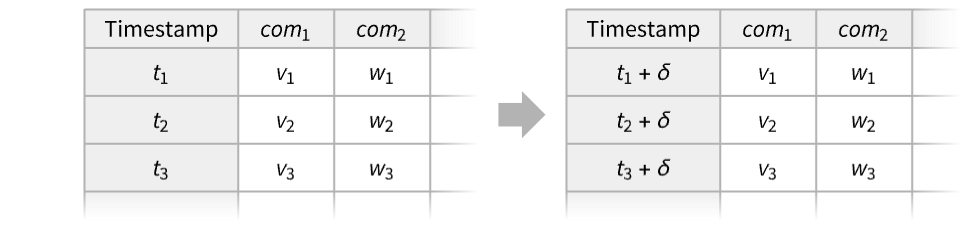
shifts the timestamps by δ in the time or events series tes.
Details and Options
- TimeSeriesShift is typically used to align the start of a time series with a particular time.
- Shifting the timestamps by δ.
- Possible forms of time or event series data tes include:
-
TimeSeries[…] continuous time-ordered sampled data EventSeries[…] collection of temporal events with values TemporalData[…] one or more paths composed of time-value pairs {{t1,x1},{t2,x2},…} list of time-value pairs {x1,x2,…} list of values with implied integer times starting at 0 - Settings for the shift δ include:
-
τ shift by any real number or a time Quantity {k,step} shift k steps, such as "Year", "Month", "Day", etc. {k} shift by {k,MinimumTimeIncrement[tes]} {{tmin}} set t1=tmin - TimeSeriesShift takes the following options:
-
CalendarType Automatic calendar system to interpret the dates HolidayCalendar Automatic holiday calendar schedule for business days TimeZone Automatic time zone specification for dates - TimeSeriesShift threads pathwise for TemporalData objects with multiple paths.
Examples
open all close allBasic Examples (3)
Shift a time series ahead 2.5:
ts = TimeSeries[{-0.03, 1.96, 0.33, 0.18, -0.45, 0.55, 0.37, 1.22}, {5}]TimeSeriesShift[ts, 2.5]TimeSeriesShift[ts, -2.5]{ListLinePlot[{ts, %%}], ListLinePlot[{ts, %}]}Shift a time series ahead 30 days:
ts = FinancialData["GOOGL", {DateObject[{2024, 1}, "Month"], DateObject[{2025, 1}, "Month"]}]TimeSeriesShift[ts, Quantity[30, "Days"]];DateListPlot[{ts, %}]Set the starting time for a time series to 3:
ts = TimeSeries[{0.03, -1.96, -0.33, 0.28, -0.45, 0.55, 0.37, 1.22}, {0}]TimeSeriesShift[ts, {{3}}]ListLinePlot[{ts, %}]Scope (13)
Basic Uses (7)
Shift a time series forward by 3.5:
td = TimeSeries[{Subscript[x, 1], Subscript[x, 2], Subscript[x, 3], Subscript[x, 4], Subscript[x, 5]}, {1}];TimeSeriesShift[td, 3.5]["Path"]Shift a time series backward by 3.5:
td = TimeSeries[{Subscript[x, 1], Subscript[x, 2], Subscript[x, 3], Subscript[x, 4], Subscript[x, 5]}, {1}];TimeSeriesShift[td, -3.5]["Path"]td = TimeSeries[Range[5], {"December 29, 2012"}];shift = TimeSeriesShift[td, Quantity[2, "Days"]];DateListPlot[{td, shift}]Use business days as an increment:
td = TimeSeries[Range[5], {"December 29, 2012"}];shift = TimeSeriesShift[td, {4, "BusinessDay"}];TimelinePlot[{td["Dates"], shift["Dates"]}]DateListPlot[{td, shift}]Shift ahead one week and three days:
td = TemporalData[TimeSeries, {{{-0.7300936468626915, -1.4519910060028738, -0.5169470600446475,
    -0.5865073582473852, -0.3877452738596685, -1.1268832613089939, -1.573832025824792,
    -1.513287567214887, -0.9281089897453407, -1.51062273515126, -1.1 ... 90256942794819,
    -0.2908415274027569, -1.1815264644646835}},
  {TemporalData`DateSpecification[{2013, 9, 23, 13, 34, 42.7383033},
    {2013, 10, 17, 13, 34, 42.7383033}, {1, "Day"}]}, 1, {"Discrete", 1}, {"Discrete", 1}, 1, {}},
True, 10.];shift = TimeSeriesShift[td, {{1, "Week"}, {3, "Day"}}];DateListPlot[{td, shift}]td = TimeSeries[Accumulate@RandomReal[{-1, 1}, 25], {1}];shift = TimeSeriesShift[td, {{5}}];ListLinePlot[{td, shift}]Shift the dates in a time series to begin on today's date:
ts = TimeSeries[Accumulate@RandomReal[{-1, 1}, 25], {Now - Quantity[1, "Weeks"], Automatic, Quantity[1, "Days"]}]TimeSeriesShift[ts, {{DateList[]}}]DateListPlot[{ts, %}]Data Types (6)
Shift the times for a vector forward 2:
vals = {a, b, c, d, e};TimeSeriesShift[vals, 2]Shift the times for a series of time-value pairs backward by 2:
vals = {{2, a}, {3, b}, {7, c}, {14, d}, {15, e}};TimeSeriesShift[vals, -1]Shift the values from a TimeSeries forward by 10:
ts = TemporalData[TimeSeries, {{{0.4948076687033609, -0.49167253739690864, -1.1692407506834863,
    -0.25256398166927063, -1.0324595217335713, -1.5365451139092143, -2.0662926057486564,
    -1.7443987109156156, -2.6969884040577115, -3.663349952028885,  ... 13,
    -5.365194518466113, -5.614668108914484, -6.477246191853266, -7.461704439607946,
    -6.79657593242878, -5.864937981765857, -6.27785271209235, -5.841962111797332}}, {{0, 99, 1}},
1, {"Discrete", 1}, {"Discrete", 1}, 1, {}}, False, 10.];ts1 = TimeSeriesShift[ts, 10]ListLinePlot[{ts, ts1}]Shift the values of an EventSeries forward by 5:
es = TemporalData[EventSeries, {{{1, -1, -1, -1, -1, 1, -1, 1, 1, 1, 1, 1, -1, -1, 1, -1, 1, 1, 1, -1}},
{{0, 19, 1}}, 1, {"Discrete", 1}, {"Discrete", 1}, 1, {ResamplingMethod -> None}}, False, 10.];es1 = TimeSeriesShift[es, 5]ListPlot[{es, es1}, Filling -> Axis]Shift the paths of TemporalData ahead 10:
td = RandomFunction[WienerProcess[], {0, 5, 0.1}, 3]td1 = TimeSeriesShift[td, 10]Show[ListLinePlot /@ {td["Paths"], td1["Paths"]}, PlotRange -> {{0, 15}, All}]Shift a time series involving quantities:
ts = TimeSeries[Quantity[{0, 16, 9, 3, 7, 2, 17, 10, 6, 12}, "Meters"]];ts1 = TimeSeriesShift[ts, 1];ListLinePlot[{ts, ts1}, PlotLegends -> {"original time series", "shifted time series"}, Filling -> Axis, AxesLabel -> Automatic]Options (3)
CalendarType (1)
data = TimeSeries[{{DateObject[{2016, 11, 10}], 1}, {DateObject[{2016, 11, 14}], 2}, {DateObject[{2016, 11, 15}], 3}}];Shift the data by one day and express the result using the Jewish calendar:
TimeSeriesShift[data, {1, "Day"}, CalendarType -> "Jewish"]//NormalHolidayCalendar (2)
Shift a time series by a business day using the default HolidayCalendar:
data = TimeSeries[{{DateObject[{2016, 11, 10}], 1}, {DateObject[{2016, 11, 14}], 2}, {DateObject[{2016, 11, 15}], 3}}];TimeSeriesShift[data, {1, "BusinessDay"}]//NormalUse the NYSE holiday calendar:
TimeSeriesShift[data, {1, "BusinessDay"}, HolidayCalendar -> {"UnitedStates", "NYSE"}]//NormalUse a holiday calendar of a given country:
data = TimeSeries[Range[7], {DateObject[{2017, 4, 13}]}];TimeSeriesShift[data, {1, "BusinessDay"}, HolidayCalendar -> "Germany"]//NormalTimeSeriesShift[data, {1, "BusinessDay"}, HolidayCalendar -> "UnitedStates"]//NormalApplications (1)
Specify rates for TimeValue:
ts = TemporalData[TimeSeries, {{{0.04, 0.05, 0.06, 0.07, 0.08}}, {{4, 8, 1}}, 1, {"Continuous", 1},
  {"Discrete", 1}, 1, {ResamplingMethod -> {"Interpolation", InterpolationOrder -> 1}}}, False,
 10.1];
Note that the first time step must be 0 to define the initial rate. Shift the time series:
rates = TimeSeriesShift[ts, {{0}}]TimeValue[1, rates, 10]Possible Issues (2)
TimeSeriesShift may break temporal regularity:
data = TimeSeries[Range[7], {DateObject[{2017, 4, 13}], Automatic, "BusinessDay"}, HolidayCalendar -> "Germany"];ts1 = TimeSeriesShift[data, {1, "Day"}]RegularlySampledQ[ts1]The next day in Germany is not a business day:
DayMatchQ[DatePlus[data["FirstDate"], {1, "Day"}], "BusinessDay", HolidayCalendar -> "Germany"]Preserve temporal regularity by shifting by a business day:
ts2 = TimeSeriesShift[data, {1, "BusinessDay"}]RegularlySampledQ[ts2]DateListPlot[{data, ts1, ts2}, PlotLegends -> {"data", "ts1", "ts2"}]Specifying a new HolidayCalendar overrides that option in the input:
data = TimeSeries[Range[7], {DateObject[{2017, 4, 13}], Automatic, "BusinessDay"}, HolidayCalendar -> "UnitedStates"];Shift by one business day with the same HolidayCalendar:
res1 = TimeSeriesShift[data, {1, "BusinessDay"}]Specify a new HolidayCalendar:
res2 = TimeSeriesShift[data, {1, "BusinessDay"}, HolidayCalendar -> "Germany"]TimelinePlot[{res1["Dates"], res2["Dates"]}, PlotLegends -> Placed[{"United States", "Germany"}, Below]]Text
Wolfram Research (2014), TimeSeriesShift, Wolfram Language function, https://reference.wolfram.com/language/ref/TimeSeriesShift.html (updated 2026).
CMS
Wolfram Language. 2014. "TimeSeriesShift." Wolfram Language & System Documentation Center. Wolfram Research. Last Modified 2026. https://reference.wolfram.com/language/ref/TimeSeriesShift.html.
APA
Wolfram Language. (2014). TimeSeriesShift. Wolfram Language & System Documentation Center. Retrieved from https://reference.wolfram.com/language/ref/TimeSeriesShift.html