

CastColumns
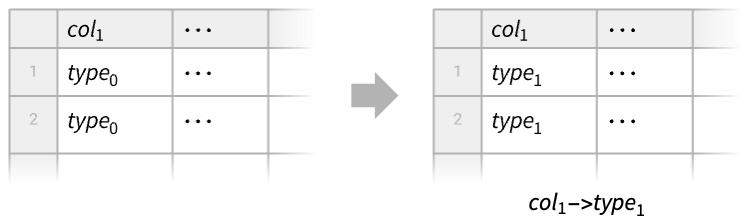
CastColumns[tab,{col1type1,…}]
changes the type of coli to typei in the Tabular object tab.
Details
- CastColumns is typically used to convert the types of the columns of a Tabular object, for example, converting strings into numbers or dates.
- The types typei refer to the type of the elements of coli represented as a TabularColumn. Element types include:
-
"MachineInteger" machine-sized integers "MachineReal" machine-sized reals "Around"::[…] numbers with uncertainty "Boolean" Boolean (True or False) "ByteArray"::[…] ByteArray elements representing binary data "Date"::[…] calendar date of any granularity (day, month, μs, etc.) "Entity"::[…] entity of a given domain "GeoPosition"::[…] geo position of any datum and any geo projection "InertExpression" general expressions that do not get evaluated until used "ListVector"::[type] list of elements of the given type "ListVector"::[type,n] list length n of elements of the given type "ListTuple"::[type1,type2,…] list of elements of types type1, type2, … "Null" Missing expression "Quantity"::[type,unit] quantities of type magnitude and common unit "String" strings "Time"::[…] time of day, as in TimeObject - Numerical element types can be given more specifically and include:
-
"Integer8" signed 8-bit integers from  through 127
"UnsignedInteger8" integers 0 through 255 "Integer16" signed 16-bit integers from  through
"UnsignedInteger16" integers 0 through 65535 "Integer32" signed 32-bit integers from  through
"UnsignedInteger32" integers 0 through 
"Integer64" signed 64-bit integers from  through
"UnsignedInteger64" integers 0 through 
"Real32" single-precision real (32-bit) "Real64" double-precision real (64-bit) "ComplexReal32" single-precision complex "ComplexReal64" double-precision complex
Examples
open all close allBasic Examples (1)
Change numeric column type to another numeric column type:
tab = ToTabular[<|"a" -> {1, 2, 3}, "b" -> {1., 4., 8.}|>, "Columns"]ColumnTypes[tab]Cast the "Integer64" column to "Real64":
CastColumns[tab, "a" -> "Real64"]ColumnTypes[%]Scope (4)
Take blood sugar measurements on a list of days:
tab = Tabular[{{"2024Nov12", 100}, {"2024Nov13", 102}, {"2024Nov14", 99}}, {"date", "blood sugar"}]ColumnTypes[tab]Cast the "date" column to "Date" type:
CastColumns[tab, "date" -> "Date"]ColumnTypes[%]Take a Tabular object where numeric data has been recorded as strings:
tab = Tabular[Association["RawSchema" -> Association["ColumnProperties" ->
     Association["date" -> Association["ElementType" -> TypeSpecifier["Date"]["Integer64", "Day",
          "Gregorian", -6.]], "val" -> Association["ElementType" -> "String"]],
    "KeyColumns" -> None, "Backend" -> "WolframKernel"], "Options" -> {},
  "BackendData" -> Association["ColumnData" -> DataStructure["ColumnTable",
      {{TabularColumn[Association["Data" -> {6, {{{1230789600000, 1230876000000, 1230962400000,
               1231048800000, 1231135200000, 1231221600000}, {}, None}}, None},
          "ElementType" -> "Date"["Integer64", "Day", "Gregorian", -6.],
          "CachedOriginalExpression" -> {DateObject[{2009, 1, 1}, "Day", "Gregorian", -6.],
            DateObject[{2009, 1, 2}, "Day", "Gregorian", -6.], DateObject[{2009, 1, 3}, "Day",
             "Gregorian", -6.], DateObject[{2009, 1, 4}, "Day", "Gregorian", -6.],
            DateObject[{2009, 1, 5}, "Day", "Gregorian", -6.], DateObject[{2009, 1, 6}, "Day",
             "Gregorian", -6.]}]], TabularColumn[Association[
          "Data" -> {{3, {0, 5, 10, 15, 19, 24, 29}, "-6.06-2.83-4.221.28-7.17-4.83"}, {}, None},
"ElementType" -> "String"]]}}]]]];ColumnTypes[tab]Cast the "val" column to a numeric type:
CastColumns[tab, "val" -> "Real64"]ColumnTypes[%]Change the vector type of a column in a Tabular object:
tab = ToTabular[<|"a" -> {1, 2, 3}, "b" -> {{4, 5}, Missing[], {6, 7}}, "c" -> {1., 4., 8.}|>, "Columns"]ColumnTypes[tab]CastColumns[tab, "b" -> "ListVector"::["Real64", 2]]ColumnTypes[%]Cast several columns to the same type simultaneously:
Tabular[{{1, 2, 3}, {4, 5, 6}}, {"a", "b", "c"}]CastColumns[%, {"a", "c"} -> "Real64"]Applications (2)
Sales Data (2)
Get retail data from "tsv" format into a Tabular object:
data = Import["ExampleData/RetailSales.tsv", "Tabular", "HeaderLines" -> 1]All the dates came as strings:
ColumnTypes[data]Recast "Date" into a "Date" format:
CastColumns[data, "Date" -> "Date"]Select the data for a given city:
Select[%, SameQ[#City, "Paris"]&]Create a TimeSeries object with "Date" used as the "TimeColumn":
FromTabular[%, "TimeSeries", <|"TimeColumn" -> "Date"|>]Visualize the sales time series:
DateListPlot[% -> "Sales"]Take a large dataset of US COVID data:
data = ResourceData["Sample Tabular Data: US Covid"];Dimensions[data]Show only the first five rows:
data[[ ;; 5]]The FIPS code is a number uniquely identifying a US county, but "fips" column has string type:
ColumnTypes[data]["fips"]Efficiently recast the "fips" column into integers:
RepeatedTiming[newdata = CastColumns[data, "fips" -> "Integer"];]Take[newdata, 5]ColumnTypes[newdata]["fips"]Properties & Relations (4)
Use CastColumns[tab,typerules] to change the types of the columns of a Tabular object tab:
tab = Tabular[Association["RawSchema" -> Association["ColumnProperties" ->
     Association["date" -> Association["ElementType" -> "String"],
      "blood sugar" -> Association["ElementType" -> "Integer64"]], "KeyColumns" -> None,
    "Backend" -> "WolframKernel"], "Options" -> {},
  "BackendData" -> Association["ColumnData" -> DataStructure["ColumnTable",
      {{TabularColumn[Association["Data" -> {{3, {0, 9, 18}, "2024Nov122024Nov13"}, {}, None},
          "ElementType" -> "String"]], TabularColumn[Association["Data" -> {{100, 102}, {}, None},
"ElementType" -> "Integer64"]]}}]]]];CastColumns[tab, {"date" -> "Date", "blood sugar" -> "Real"}]The same result can be achieved using Tabular[tab,<"ElementType"typerules>]:
Tabular[tab, <|"ElementType" -> {"date" -> "Date", "blood sugar" -> "Real"}|>]Or using ToTabular[tab,"Rows",<"ElementType"typerules>]:
ToTabular[tab, "Rows", <|"ElementType" -> {"date" -> "Date", "blood sugar" -> "Real"}|>]Take a Tabular object with string columns:
tab = Tabular[Association["RawSchema" -> Association["ColumnProperties" ->
     Association["date" -> Association["ElementType" -> "String"],
      "blood sugar" -> Association["ElementType" -> "String"]], "KeyColumns" -> None,
    "Backend" -> "WolframKernel"], "Options" -> {},
  "BackendData" -> Association["ColumnData" -> DataStructure["ColumnTable",
      {{TabularColumn[Association["Data" -> {{3, {0, 9, 18}, "2024Nov122024Nov13"}, {}, None},
          "ElementType" -> "String"]], TabularColumn[Association[
          "Data" -> {{3, {0, 3, 6}, "100102"}, {}, None}, "ElementType" -> "String"]]}}]]]];
Instead of using CastColumns, a new schema can be constructed with the new column types:
schema = TabularSchema[<|"ColumnProperties" -> <|"date" -> <|"ElementType" -> "Date"|>, "blood sugar" -> <|"ElementType" -> "Real64"|>|>|>]Impose the schema on the Tabular object:
Tabular[tab, schema]The action of CastColumns can be reproduced using TransformColumns with appropriate functions:
tab = Tabular[Association["RawSchema" -> Association["ColumnProperties" ->
     Association["date" -> Association["ElementType" -> "String"],
      "blood sugar" -> Association["ElementType" -> "Integer64"]], "KeyColumns" -> None,
    "Backend" -> "WolframKernel"], "Options" -> {},
  "BackendData" -> Association["ColumnData" -> DataStructure["ColumnTable",
      {{TabularColumn[Association["Data" -> {{3, {0, 9, 18}, "2024Nov122024Nov13"}, {}, None},
          "ElementType" -> "String"]], TabularColumn[Association["Data" -> {{100, 102}, {}, None},
          "ElementType" -> "Integer64"]]}}]]]];
String column keys containing spaces require the use of explicit quotation marks:
TransformColumns[tab, {"date" -> (Cast[#date, "Date"]&), "blood sugar" -> (N[#"blood sugar"]&)}]Take a Tabular object with a column of real-valued levels of blood sugar:
tab = Tabular[Association["RawSchema" -> Association["ColumnProperties" ->
     Association["date" -> Association["ElementType" -> "String"],
      "blood sugar" -> Association["ElementType" -> "Real64"]], "KeyColumns" -> None,
    "Backend" -> "WolframKernel"], "Options" -> {},
  "BackendData" -> Association["ColumnData" -> DataStructure["ColumnTable",
      {{TabularColumn[Association["Data" -> {{3, {0, 9, 18}, "2024Nov122024Nov13"}, {}, None},
          "ElementType" -> "String"]], TabularColumn[Association[
"Data" -> {{100., 102.3}, {}, None}, "ElementType" -> "Real64"]]}}]]]];bsugar = tab[All, "blood sugar"]CastColumns effectively uses the Automatic conversion method for each column:
CastColumns[tab, "blood sugar" -> "Integer32"]Such conversion fails in this case because reals cannot always be faithfully projected into integers:
TabularColumn[bsugar, "Integer32"]Use TabularColumn with an explicit conversion method that includes rounding of reals when converting to integers:
ibsugar = TabularColumn[bsugar, "Integer32", <|"ConversionMethod" -> "Round"|>]ibsugar//NormalUse InsertColumns to reinsert the new column:
InsertColumns[tab, "blood sugar" -> ibsugar]Text
Wolfram Research (2025), CastColumns, Wolfram Language function, https://reference.wolfram.com/language/ref/CastColumns.html (updated 2026).
CMS
Wolfram Language. 2025. "CastColumns." Wolfram Language & System Documentation Center. Wolfram Research. Last Modified 2026. https://reference.wolfram.com/language/ref/CastColumns.html.
APA
Wolfram Language. (2025). CastColumns. Wolfram Language & System Documentation Center. Retrieved from https://reference.wolfram.com/language/ref/CastColumns.html