

CircularArcThrough
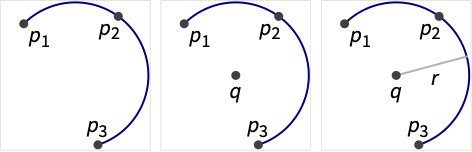
CircularArcThrough[{p1,p2,…}]
represents a circular arc passing through the points pi.
CircularArcThrough[{p1,p2,…},q]
represents a circular arc with center q.
CircularArcThrough[{p1,p2,…},q,r]
represents a circular arc with radius r.
Details
- CircularArcThrough is typically used to specify point constraints in GeometricScene.
- CircularArcThrough gives an explicit Circle object when possible.
- The pi in CircularArcThrough[{p1,p2,…},…] can be lists of coordinates or explicit Point objects.
- CircularArcThrough can be used with symbolic points and quantities in GeometricScene to constrain points on a circular arc.
Examples
open all close allBasic Examples (2)
A circular arc passing through three points:
pts = {{Sqrt[2], 0}, {1, 1}, {0, Sqrt[2]}};CircularArcThrough[pts]Graphics[{%, Red, Point[pts]}]ArcLength of an arc passing through a set of points:
ArcLength[CircularArcThrough[{{(1/2), (Sqrt[3]/2)}, {-(1/2), (Sqrt[3]/2)}, {-1, 0}}]]Scope (3)
CircularArcThrough works on coordinates:
CircularArcThrough[{{1, 0}, {1, 1 / Sqrt[2]}, {0, 1}}]CircularArcThrough[Point[{{0, 0}, {1, 0}, {0, 1}}]]Specify constraints for the center of the circular arc:
CircularArcThrough[{{0, 0}, {1, 0}, {0, 1}}, {1 / 2, 1 / 2}]CircularArcThrough[{{0, 0}, {1, 0}, {0, 1}}, {1 / 2, 1 / 2}, 1]CircularArcThrough works with points in 2D:
CircularArcThrough[{{0, 0}, {1, 0}, {0, 1}}]Applications (3)
Basic Applications (3)
Visualize the arc passing through three points:
pts = {{Sqrt[2], 0}, {1, 1}, {0, Sqrt[2]}};Graphics[{CircularArcThrough[pts], Red, Point[pts]}]Find the implicit representation of the arc passing through three points:
RegionConvert[CircularArcThrough[{{Sqrt[2], 0}, {1, 1}, {0, Sqrt[2]}}], "Implicit"]The parametric representation:
RegionConvert[CircularArcThrough[{{Sqrt[2], 0}, {1, 1}, {0, Sqrt[2]}}], "Parametric"]Find the circumcircle of a triangle:
pts = {{Sqrt[2], 0}, {1, 1}, {0, Sqrt[2]}};CircularArcThrough[pts]Graphics[{%, Red, Triangle[pts]}]Properties & Relations (5)
CircularArcThrough returns a Circle:
pts = RandomPoint[Circle[{0, 0}, 1, {0, Pi / 2}], 20];CircularArcThrough[pts]Use RegionMember to test point membership:
reg = CircularArcThrough[{{Sqrt[2], 0}, {1, 1}, {0, Sqrt[2]}}]RegionMember[reg, {1, 1} ]RegionMember[reg, {-1, 1} ]CircularArcThrough gives a circular arc passing through points:
pts = {{Sqrt[2], 0}, {1, 1}, {0, Sqrt[2]}};CircularArcThrough[pts]CircleThrough[pts]Use RegionFit to find a circle that fits a set of points:
points = CirclePoints[5];RegionFit[points, "Circle"]The arc passing the first 3 points:
CircularArcThrough[Take[points, 3]]Use CirclePoints to generate equally spaced points on the unit circle:
pts = CirclePoints[3]An arc passing through points on the unit circle:
CircularArcThrough[pts]Text
Wolfram Research (2022), CircularArcThrough, Wolfram Language function, https://reference.wolfram.com/language/ref/CircularArcThrough.html.
CMS
Wolfram Language. 2022. "CircularArcThrough." Wolfram Language & System Documentation Center. Wolfram Research. https://reference.wolfram.com/language/ref/CircularArcThrough.html.
APA
Wolfram Language. (2022). CircularArcThrough. Wolfram Language & System Documentation Center. Retrieved from https://reference.wolfram.com/language/ref/CircularArcThrough.html