



RegionMember
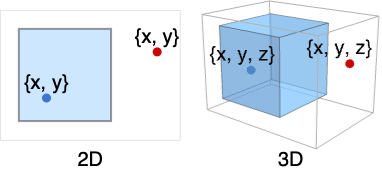
RegionMember[reg,{x,y,…}]
gives True if the numeric point {x,y,…} is a member of the constant region reg and False otherwise.
RegionMember[reg,{x,y,…}]
gives conditions for the point {x,y,…} to be a member of reg.
RegionMember[reg]
returns a RegionMemberFunction[…] that can be applied repeatedly to different points.
Details
- RegionMember is also known as point in region test, membership test, and membership conditions.
- A constant region is a region where ConstantRegionQ[reg] gives True.
Examples
open all close allBasic Examples (3)
Test whether a particular point is in a region:
RegionMember[Polygon[{{0, 0}, {1, 0}, {0, 1}}], {1 / 3, 1 / 3}]Get conditions for point membership:
RegionMember[Disk[], {x, y}]Create RegionMemberFunction to apply to different points:
mf = RegionMember[Disk[{0, 0}, 3]]mf[RandomReal[4, {7, 2}]]Scope (23)
Basic Uses (4)
Directly test whether a point is in a region:
ℛ = Rectangle[{0, 0}, {2, 2}];{RegionMember[ℛ, {1, 1}], RegionMember[ℛ, {3, 3}]}Directly test whether a list of points is in a region:
ℛ = Ball[{0, 0, 0}, 2];RegionMember[ℛ, RandomReal[2, {7, 3}]]Get conditions for point membership by using variables {x,y}:
ℛ = Rectangle[{0, 0}, {2, 2}];RegionMember[ℛ, {x, y}]Create RegionMemberFunction to apply to different points:
ℛ = Disk[{0, 0}, 2];mf = RegionMember[ℛ]mf[RandomReal[3, {7, 2}]]Special Regions (6)

RegionMember[Point[{1}], {x}]RegionMember[Interval[{1, 5}], {x}]RegionMember[Interval[{1, 5}], {6}]
RegionMember[Point[{1, 2}], {x, y}]RegionMember[Circle[{0, 0}, 2], {x, y}]RegionMember[Disk[{1, 2}, {3, 4}], {x, y}]RegionMember[Circle[{0, 0}, 2], {3, 3}]Visualize region membership in  :
:
ℛ = Triangle[{{0, 0}, {1, 2}, {2, 1}}];bounds = RegionBounds[ℛ]Uniformly sample over the bounding box for the region:
pts = RandomVariate[UniformDistribution[bounds], 10 ^ 4];col = RegionMember[ℛ, pts] /. {False -> Gray, True -> Red};
Graphics[{AbsolutePointSize[1], {col, Point /@ pts}}]
RegionMember[Point[{1, 2, 3}], {x, y, z}]RegionMember[Line[{{1, 2, 3}, {4, 5, 6}}], {x, y, z}]RegionMember[Polygon[{{1, 0, 0}, {0, 1, 0}, {0, 0, 1}}], {x, y, z}]RegionMember[Cylinder[{{0, 0, 0}, {1, 1, 1}}, 2], {x, y, z}]RegionMember[Ball[{0, 0, 0}, 2], {3, 3, 3}]Visualize region membership in  :
:
ℛ = Cuboid[{-1, -1, -1}, {1, 1, 1}];
in = RegionCentroid[ℛ];
out = {2, 0, 0};{RegionMember[ℛ, in], RegionMember[ℛ, out]}Graphics3D[{{Opacity[0.2], ℛ}, PointSize[Large], {Green, Point[in]}, {Red, Point[out]}}, Boxed -> False]
RegionMember[Simplex[{{1, 0, 0, 0}, {0, 1, 0, 0}, {0, 0, 1, 0}, {0, 0, 0, 1}}], {x, y, z, t}]RegionMember[Cuboid[{1, 2, 3, 4, 5}, {6, 7, 8, 9, 10}], {x, y, z, t, u}]RegionMember[Ball[{0, 0, 0, 0, 0, 0, 0}, 8], {1, 2, 3, 4, 5, 6, 7}]Formula Regions (3)
RegionMember[ImplicitRegion[x^2 + y^2 ≤ 1, {x, y}], {x, y}]RegionMember[ImplicitRegion[x^2 + y^2 ≤ 1, {x, y, {z, 0, 2}}], {x, y, z}]Visualize region membership in  :
:
ℛ = ImplicitRegion[x ^ 2 - 2y ^ 2 <= 1, {{x, -3, 3}, {y, -4, 4}}];bounds = RegionBounds[ℛ]Uniformly sample over the bounding box for the region:
pts = RandomVariate[UniformDistribution[bounds], 10 ^ 4];col = RegionMember[ℛ, pts] /. {False -> Gray, True -> Red};
Graphics[{AbsolutePointSize[1], {col, Point /@ pts}}]RegionMember[ParametricRegion[{(1 - t ^ 2) / (1 + t ^ 2), 2t / (1 + t ^ 2)}, {t}], {x, y}]RegionMember[ParametricRegion[{{u + v + w, u + v - w, u - v - w, -u - v - w}, -1 ≤ u ≤ 1 && -1 ≤ v ≤ 1 && -1 ≤ w ≤ 1}, {u, v, w}], {x, y, z, t}]Mesh Regions (4)
MeshRegion in 2D:
ℛ = DelaunayMesh[RandomReal[8, {100, 2}]];
in = RegionCentroid[ℛ];
out = {9, 9};{RegionMember[ℛ, in], RegionMember[ℛ, out]}Show[ℛ, Graphics[{PointSize[Large], {Green, Point[in]}, {Red, Point[out]}}]]ℛ = DelaunayMesh[RandomReal[8, {100, 3}]];
in = RegionCentroid[ℛ];
out = {9, 9, 9};{RegionMember[ℛ, in], RegionMember[ℛ, out]}Show[HighlightMesh[RegionBoundary[ℛ], Style[2, Opacity[0.1]]], Graphics3D[{PointSize[Large], {Green, Point[in]}, {Red, Point[out]}}]]BoundaryMeshRegion in 2D:
ℛ = ConvexHullMesh[RandomReal[8, {100, 2}]];
in = RegionCentroid[ℛ];
out = {9, 9};{RegionMember[ℛ, in], RegionMember[ℛ, out]}Show[ℛ, Graphics[{PointSize[Large], {Green, Point[in]}, {Red, Point[out]}}]]BoundaryMeshRegion in 3D:
ℛ = ConvexHullMesh[RandomReal[8, {1000, 3}]];
in = RegionCentroid[ℛ];
out = {9, 9, 9};{RegionMember[ℛ, in], RegionMember[ℛ, out]}Show[HighlightMesh[ℛ, Style[2, Opacity[0.2]]], Graphics3D[{PointSize[Large], {Green, Point[in]}, {Red, Point[out]}}]]Derived Regions (4)
RegionIntersection of two regions:
ℛ = RegionIntersection[Disk[{0, 0}, 1], Disk[{0, 1}, 1]];RegionMember[ℛ, {x, y}]bounds = RegionBounds[ℛ]Uniformly sample over the bounding box for the region:
pts = RandomVariate[UniformDistribution[bounds], 10 ^ 4];col = RegionMember[ℛ, pts] /. {False -> Gray, True -> Red};
Graphics[{AbsolutePointSize[1], {col, Point /@ pts}}]RegionUnion of mixed-dimensional regions:
ℛ = RegionUnion[Circle[{1, 0}, 1], Disk[{0, 0}, 1]];
Region[ℛ]RegionMember[ℛ, {x, y}]ℛ = TransformedRegion[Disk[{0, 0}, 1], ShearingTransform[θ, {1, 0}, {0, 1}]];RegionMember[ℛ, {x, y}]ℛ = RegionBoundary[Disk[{0, 0}, 1]];
Region[ℛ]RegionMember[ℛ, {x, y}]CSG Regions (1)
CSGRegion in 2D:
ℛ = CSGRegion["Difference", {Disk[], Disk[{1 / 2, 1 / 2}]}];
in = {-1 / 2, -1 / 2};
out = {0, 0};{RegionMember[ℛ, in], RegionMember[ℛ, out]}Show[ℛ, Graphics[{PointSize[Large], {StandardGreen, Point[in]}, {StandardRed, Point[out]}}]]ℛ = CSGRegion["Difference", {Cube[2], Cylinder[{{1, 1, 1}, {1, -1, 1}}]}];
in = {0, 0, 0};
out = {1, 1, 1};{RegionMember[ℛ, in], RegionMember[ℛ, out]}Show[Region[BoundaryDiscretizeRegion[ℛ], BaseStyle -> Opacity[0.2]], Graphics3D[{Opacity[1], PointSize[Large], {StandardGreen, Point[in]}, {StandardRed, Point[out]}}]]Subdivision Regions (1)
SubdivisionRegion in 2D:
ℛ = SubdivisionRegion[Rectangle[]];
in = {1 / 2, 1 / 2};
out = {1, 1};{RegionMember[ℛ, in], RegionMember[ℛ, out]}Show[ℛ, Graphics[{PointSize[Large], {StandardGreen, Point[in]}, {StandardRed, Point[out]}}]]ℛ = SubdivisionRegion[Tetrahedron[]];
in = {0, 0, 0};
out = {1 / 10, 1 / 10, 1 / 10};{RegionMember[ℛ, in], RegionMember[ℛ, out]}Show[Region[BoundaryDiscretizeRegion[ℛ], BaseStyle -> Opacity[0.2]], Graphics3D[{Opacity[1], PointSize[Large], {StandardGreen, Point[in]}, {StandardRed, Point[out]}}]]Applications (6)
Basic (2)
Convert polygon data for the given country to a MeshRegion:
ℛ = DiscretizeGraphics[CountryData["Austria", {"FullPolygon", "Mercator"}]]Determine membership of a city:
city = GeoGridPosition[GeoPosition[Entity["City", {"Vienna", "Vienna", "Austria"}]], "Mercator"]["Data"]RegionMember[ℛ, city]Show[ℛ, Epilog -> {Red, Point@city}]For a parameterized region, RegionMember can give conditions on the parameters to determine when a given point is a member:
ℛ = Disk[{0, 0}, {Subscript[r, x], Subscript[r, y]}];
RegionMember[ℛ, {3, 4}]
Find an instance where the region includes the point:
FindInstance[%, {Subscript[r, x], Subscript[r, y]}]Graphics[{LightGray, ℛ /. %, Red, Point[{3, 4}]}]Random Points in a Region (2)
Generate points on a region by filtering a uniform set of points:
ℛ = ImplicitRegion[1 < x ^ 2 + y ^ 2 < 3, {x, y}];bounds = RegionBounds[ℛ];Uniformly sample over the bounding box of the region:
pts = RandomVariate[UniformDistribution[bounds], 10 ^ 4];mpts = Select[pts, RegionMember[ℛ]];Graphics[{AbsolutePointSize[1], Point[mpts]}]Convert polygon data for the given country to a MeshRegion:
ℛ = [image];bounds = RegionBounds[ℛ]Uniformly sample over the bounding box of the region:
pts = RandomVariate[UniformDistribution[bounds], 10 ^ 4];col = RegionMember[ℛ, pts] /. {False -> Gray, True -> Red};
Graphics[{AbsolutePointSize[1], {col, Point /@ pts}}]Monte Carlo Integration (2)
Perform Monte Carlo integration to estimate the area of a unit disk:
ℛ = Disk[{0, 0}, 1];
Region[ℛ]bounds = RegionBounds[ℛ]Uniformly sample over the bounding box of the region:
pts = RandomVariate[UniformDistribution[bounds], 10 ^ 4];col = RegionMember[ℛ, pts] /. {False -> Gray, True -> Red};
Graphics[{ℛ, AbsolutePointSize[1], {col, Point /@ pts}}]Count the number of samples inside the region:
inside = Count[RegionMember[ℛ, pts], True]Get the ratio of samples inside the region to the total number of sample points:
ratio = N[(inside/Length[pts])]area = Area[Cuboid@@(bounds)]Get the approximate area of the region:
area * ratioUse random points in a region to perform Monte Carlo integration:
ℛ = ImplicitRegion[2 ≤ x^2 + y^2 ≤ 4, {x, y}];
pts = Select[RandomVariate[UniformDistribution[RegionBounds[ℛ]], 10 ^ 5], RegionMember[ℛ, #]&];
Evaluate a function at each sample point and take their average:
f[x_, y_] := x^3 + y^4;
intVal = Mean[f@@@pts]RegionMeasure[ℛ]Integrate[f[x, y], {x, y}∈ℛ]%//NProperties & Relations (5)
Element can be used to test region membership for constant regions:
ℛ = Disk[{0, 0}, 2];{RegionMember[ℛ, {0, 0}], {0, 0}∈ℛ}RegionDistance is 0 for a member:
ℛ = Disk[{0, 0}, 2];{RegionMember[ℛ, {0, 0}], RegionDistance[ℛ, {0, 0}]}SignedRegionDistance is non-positive for a member:
ℛ = Disk[{0, 0}, 1];{RegionMember[ℛ, {0, 0}], SignedRegionDistance[ℛ, {0, 0}]}SignedRegionDistance is positive for a non-member:
{RegionMember[ℛ, {-2, 0}], SignedRegionDistance[ℛ, {-2, 0}]}Use RegionNearest to find the nearest member:
ℛ = Disk[{0, 0}, 2];{RegionMember[ℛ, RegionNearest[ℛ, {3, 3}]], RegionMember[ℛ, {3, 3}]}Graphics[{{LightBlue, ℛ}, {Green, Point[RegionNearest[ℛ, {3, 3}]]}, {Red, Point[{3, 3}]}}]Use FindInstance to find multiple instances for special and formula regions:
ℛ = ImplicitRegion[x ^ 2 - 2y ^ 2 <= 1, {{x, -3, 3}, {y, -4, 4}}];Region[ℛ]Find points that are in both regions:
pts = FindInstance[{x, y}∈ℛ, {x, y}, 100];RegionPlot[ℛ, Epilog -> {Red, Point[{x, y} /. pts]}]Text
Wolfram Research (2014), RegionMember, Wolfram Language function, https://reference.wolfram.com/language/ref/RegionMember.html.
CMS
Wolfram Language. 2014. "RegionMember." Wolfram Language & System Documentation Center. Wolfram Research. https://reference.wolfram.com/language/ref/RegionMember.html.
APA
Wolfram Language. (2014). RegionMember. Wolfram Language & System Documentation Center. Retrieved from https://reference.wolfram.com/language/ref/RegionMember.html