

Cylinder
Details and Options
- Cylinder can be used as a geometric region and a graphics primitive.
- Cylinder[] is equivalent to Cylinder[{{0,0,-1},{0,0,1}}]. »
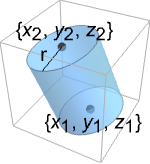
- Cylinder represents a filled cylinder region
 where
where  and the vectors
  are orthogonal with
 ![TemplateBox[{{v, _, 1}}, Norm]=TemplateBox[{{v, _, 2}}, Norm]=1](Files/Cylinder.en/5.png "TemplateBox[{{v, _, 1}}, Norm]=TemplateBox[{{v, _, 2}}, Norm]=1") , and
, and  and
and  .
. - Cylinder can be used in Graphics3D.
- In graphics, the points pi and radii r can be Scaled and Dynamic expressions.
- Graphics rendering is affected by directives such as EdgeForm, FaceForm, Specularity, Opacity, and color.
- Cylinder[{spec1,spec2,…},{r1,r2,…}] represents a collection of cylinders with specifications speci and radii ri.
Examples
open all close allBasic Examples (4)
A unit radius and two units height cylinder:
Graphics3D[Cylinder[]]A cylinder from the origin to {1,1,1} with radius 1/2:
Graphics3D[Cylinder[{{0, 0, 0}, {1, 1, 1}}, 1 / 2]]{Graphics3D[{Yellow, Cylinder[]}], Graphics3D[{EdgeForm[Thick], Cylinder[]}], Graphics3D[{EdgeForm[Dashed], Cylinder[]}], Graphics3D[{EdgeForm[Directive[Thick, Dashed, Blue]], Yellow, Cylinder[]}]}Volume[Cylinder[{{Subscript[x, 1], Subscript[y, 1], Subscript[z, 1]}, {Subscript[x, 2], Subscript[y, 2], Subscript[z, 2]}}, r]]RegionCentroid[Cylinder[{{Subscript[x, 1], Subscript[y, 1], Subscript[z, 1]}, {Subscript[x, 2], Subscript[y, 2], Subscript[z, 2]}}, r]]Scope (23)
Graphics (13)
Specification (5)
If no radius is specified, it is assumed to be 1:
Graphics3D[Cylinder[{{0, 0, 0}, {0, 0, 1}}]]Cylinders with different radii:
Graphics3D[{Cylinder[{{0, 0, 3}, {0, 0, -3}}, 1], Cylinder[{{5, 0, 3}, {5, 0, -3}}, 3]}]Cylinders with different directions:
Graphics3D[{Cylinder[{{0, 0, 0}, {1, 0, 0}}], Cylinder[{{1, 1, 1}, {2, 3, 1}}]}]Short form for a cylinder centered at the origin with a radius 1:
Graphics3D[Cylinder[], Axes -> True]s = {{0, 0, 0}, {0, 0, 2}};Graphics3D[Cylinder[{s, s + 2}]]Styling (5)
Color directives specify the face colors of cylinders:
Table[Graphics3D[{c, Cylinder[]}], {c, {Red, Green, Blue, Yellow}}]FaceForm and EdgeForm can be used to specify the styles of the faces and edges:
Graphics3D[{FaceForm[Pink], EdgeForm[Directive[Dashed, Thick, Blue]], Cylinder[]}]Different properties can be specified for the front and back faces using FaceForm:
Graphics3D[{FaceForm[Yellow, Blue], Cylinder[]}, PlotRange -> {{-1, 1}, {-.8, 1}, {-1, 1}}]Cylinders with different specular exponents:
Table[Graphics3D[{Orange, Specularity[White, n], Cylinder[]}, Lighting -> {{"Point", White, Scaled[{2, -1, 1.2}]}}], {n, {5, 20, 100}}]Black cylinder that glows red:
Graphics3D[{Glow[Red], Black, Cylinder[]}]Opacity specifies the face opacity:
Table[Graphics3D[{Opacity[o], Cylinder[]}], {o, {0.3, 0.5, 0.9}}]Coordinates (3)
Use Scaled coordinates:
Graphics3D[Cylinder[{Scaled[{.5, .5, .2}], Scaled[{.5, .5, .8}]}, 3], PlotRange -> {{0, 10}, {0, 10}, {0, 10}}, Axes -> True]Use Scaled radius:
Graphics3D[Cylinder[{{0, 0, -1}, {0, 0, 1}}, Scaled[0.25]], Axes -> True, PlotRange -> 1]Points can be Dynamic:
DynamicModule[{x}, {VerticalSlider[Dynamic[x], {0, 1}], Graphics3D[Cylinder[{Dynamic[x{0, 0, 1}], {0, 0, -1}}, 1]]}]Regions (10)
Embedding dimension is the dimension of the space in which the cylinder lives:
ℛ = Cylinder[{{0, 0, 0}, {1, 1, 1}}, 2];RegionEmbeddingDimension[ℛ]Geometric dimension is the dimension of the shape itself:
RegionDimension[ℛ]ℛ = Cylinder[{{0, 0, 0}, {1, 1, 1}}, 2];{RegionMember[ℛ, {(1/3), (1/3), (1/3)}], RegionMember[ℛ, {5, 5, 5}]}Get conditions for membership:
RegionMember[ℛ, {x, y, z}]ℛ = Cylinder[{{0, 0, 0}, {1, 1, 1}}, 2];{Volume[ℛ], RegionMeasure[ℛ]}c = RegionCentroid[ℛ]Graphics3D[{{Opacity[0.5], LightBlue, ℛ}, {PointSize[Large], Red, Point[c]}}]ℛ = Cylinder[{{0, 0, 0}, {1, 1 / 2, 1}}, 2];{RegionDistance[ℛ, {1., 2, 3}], RegionDistance[ℛ, {(1/3), (1/4), (1/5)}]}The equidistance contours for a cylinder:
ContourPlot3D[Evaluate@RegionDistance[ℛ, {x, y, z}], {x, -3, 4}, {y, -3, 4}, {z, -3, 4}, Mesh -> None, Contours -> {0.25, 0.5, 1}, ContourStyle -> ColorData[94, "ColorList"], Lighting -> "Neutral", BaseStyle -> Opacity[0.5], BoxRatios -> Automatic]ℛ = Cylinder[{{0, 0, 0}, {1, 1, 1}}, 2];{SignedRegionDistance[ℛ, {1, 2, 3}], SignedRegionDistance[ℛ, {(1/3), (1/4), (1/5)}]}ℛ = Cylinder[{{0, 0, 0}, {1, 1, 1}}, 2];{RegionNearest[ℛ, {1, 2, 3}], RegionNearest[ℛ, {(1/3), (1/4), (1/5)}]}Nearest points to an enclosing sphere:
spherePoints[{n_, m_}, c_, r_] :=
Flatten[Table[c + r{Cos[k 2π / n]Sin[l π / m], Sin[k 2π / n]Sin[l π / m], Cos[l π / m]}, {k, 0., n - 1}, {l, 0., m - 1}], 1];pl = spherePoints[{16, 8}, RegionCentroid[ℛ], 3];
npl = Table[RegionNearest[ℛ, p], {p, pl}];Legended[Graphics3D[{ℛ, {Thin, Gray, Line[Transpose[{pl, npl}]]}, {Red, Point[pl]}, {PointSize[Medium], Blue, Point[npl]}}, Lighting -> "Neutral", Boxed -> False], PointLegend[{Red, Blue}, {"start", "nearest"}]]ℛ = Cylinder[{{0, 0, 0}, {1, 1, 1}}, 2];BoundedRegionQ[ℛ]r = RegionBounds[ℛ]Graphics3D[{{EdgeForm[White], Opacity[0.2, Yellow], Cuboid@@Transpose[r]}, ℛ}, Boxed -> False]Integrate over a cylinder region:
ℛ = Cylinder[{{0, 0, 0}, {1, 1, 1}}, 2];Integrate[x + y + z, {x, y, z}∈ℛ]Optimize over a cylinder region:
ℛ = Cylinder[{{0, 0, 0}, {1, 1, 1}}, 2];MinValue[{x y z - x y, {x, y, z}∈ℛ}, {x, y, z}]Solve equations in a cylinder region:
ℛ = Cylinder[{{0, 0, 0}, {1, 1, 1}}, 2];Reduce[x^2 + y^2 + z^2 == 1 && x - y - z == -1 && z^2 == x y && {x, y, z}∈ℛ, {x, y, z}]Applications (6)
Find the minimum surface area for a cylinder with volume  :
:
ℛ = Cylinder[{{0, 0, 0}, {0, 0, h}}, r];Minimize[{Area[RegionBoundary[ℛ]], Volume[ℛ] == 2π && r > 0 && h > 0}, {r, h}]Compare with some other cylinders of the same volume:
Graphics3D[#, PlotLabel -> Area[RegionBoundary[#]]]& /@ Diagonal@Table[ℛ, {r, {1 / 2, 1, 2}}, {h, {8, 2, 1 / 2}}]{v, e} = Transpose[PolyhedronData["Platonic", {"Vertices", "Edges"}]];Row@MapThread[Graphics3D[{Specularity[White, 30], EdgeForm[], Orange, GraphicsComplex[#1, {Table[Sphere[i, .2], {i, Length[#1]}], (Cylinder[#, .1]& /@ #2)}]}, Boxed -> False, Method -> {"ShrinkWrap" -> True}]&, {v, e}]data = RandomReal[{1, 10}, {12, 4}];Graphics3D[MapIndexed[{Hue[(Last[#2] - 1) / 4], Cylinder[{Append[{1, 2}#2, 0], Append[{1, 2}#2, #1]}, .4]}&, data, {2}], Axes -> {False, False, True}, Lighting -> "Neutral"]Use Cylinder to render edges in a GraphPlot3D:
GraphPlot3D[Table[i -> Mod[i ^ 2, 50], {i, 0, 50}], EdgeShapeFunction -> ({Cylinder[#1[[{1, -1}]], 0.1]}&), VertexShapeFunction -> ({Sphere[#, 0.3]}&)]Define a ChartElementFunction based on Cylinder:
CylinderBar[{{xmin_, xmax_}, {ymin_, ymax_}, {zmin_, zmax_}}, ___] :=
Cylinder[{{(xmin + xmax) / 2, (ymin + ymax) / 2, zmin}, {(xmin + xmax) / 2, (ymin + ymax) / 2, zmax}}, Min[(xmax - xmin) / 2, (ymax - ymin) / 2]]data = RandomReal[1, {2, 5}];BarChart3D[data, ChartElementFunction -> CylinderBar]BarChart3D uses Cylinder to produce 3D bar charts:
BarChart3D[data, ChartElementFunction -> "Cylinder"]Histogram3D can similarly use Cylinder:
Histogram3D[RandomReal[NormalDistribution[0, 1], {500, 2}], 10, ChartElementFunction -> "Cylinder"]Use Cylinder to display bubbles in BubbleChart3D:
BubbleChart3D[RandomReal[1, {3, 10, 4}], ChartElements -> Graphics3D[Cylinder[]]]Properties & Relations (5)
Use Scale to get elliptical cylinders:
Graphics3D[Scale[Cylinder[], {2, 4, 3}, {0, 0, 0}], Axes -> True]A parametric specification of a cylinder shell generated using ParametricPlot3D:
ParametricPlot3D[{Cos[θ], Sin[θ], z}, {θ, 0, 2π}, {z, -1, 1}, Mesh -> None]An implicit specification of a cylinder shell generated by ContourPlot3D:
ContourPlot3D[x ^ 2 + y ^ 2 == 1, {x, -1, 1}, {y, -1, 1}, {z, -1, 1}, Mesh -> None]ChemicalData plots a molecule using spheres and cylinders:
ChemicalData["Acridone", "MoleculePlot"]ImplicitRegion can represent any Cylinder region:
Subscript[ℛ, 1] = ImplicitRegion[0 ≤ Subscript[t, 1] + Subscript[t, 2] + Subscript[t, 3] ≤ 3 && Subsuperscript[t, 1, 2] + Subsuperscript[t, 2, 2] + Subsuperscript[t, 3, 2] ≤ 6 + Subscript[t, 2]Subscript[t, 3] + Subscript[t, 1](Subscript[t, 2] + Subscript[t, 3]), {Subscript[t, 1], Subscript[t, 2], Subscript[t, 3]}];
Subscript[ℛ, 2] = Cylinder[{{0, 0, 0}, {1, 1, 1}}, 2];RegionEqual[Subscript[ℛ, 1], Subscript[ℛ, 2]]Neat Examples (3)
Graphics3D[Table[{EdgeForm[Opacity[.3]], Hue[RandomReal[]], Cylinder[RandomReal[10, {2, 3}]]}, {20}]]Sweep a cylinder around an axis:
Graphics3D[{Opacity[0.3], EdgeForm[], Table[{ColorData["Rainbow"][Rescale[c, {0, 2Pi}]], GeometricTransformation[Cylinder[], RotationTransform[c, {-3, 2, -1}, {2, -1, 1}]]}, {c, 0, 2Pi, 2Pi / 18}]}]Graphics3D[{Opacity[.3], EdgeForm[Opacity[.3]], Table[Cylinder[{{0, 0, 0}, {0, 0, 2r}}, r], {r, 1, 5}]}, Boxed -> False]
 An Elementary Introduction to the Wolfram Language
Text
Wolfram Research (2007), Cylinder, Wolfram Language function, https://reference.wolfram.com/language/ref/Cylinder.html (updated 2014).
CMS
Wolfram Language. 2007. "Cylinder." Wolfram Language & System Documentation Center. Wolfram Research. Last Modified 2014. https://reference.wolfram.com/language/ref/Cylinder.html.
APA
Wolfram Language. (2007). Cylinder. Wolfram Language & System Documentation Center. Retrieved from https://reference.wolfram.com/language/ref/Cylinder.html