

RenameColumns
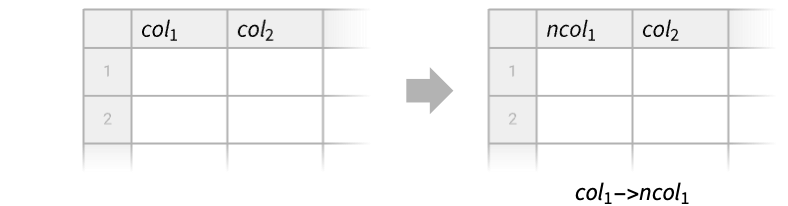
RenameColumns[tab,{col1newcol1,…}]
renames column coli to newcoli in a Tabular object tab.
RenameColumns[tab,{newcol1,newcol2,…}]
renames column i to newcoli in tab.
RenameColumns[renamings]
represents an operator form of RenameColumns that can be applied to a Tabular object.
Details
- RenameColumns is typically used to change the names used for columns, e.g. to avoid name conflicts or for clarity of communication. It can also be used to attach column keys to a Tabular object without them.
- Possible column specifications coli in coli… include:
-
name or Key[name]or ExtendedKey[…] column name ind integer column index - If RenameColumns[tab,{newcol1,newcol2,…}] does not specify enough new column keys, then the string "Column4" will be used for the fourth column, and similarly for the rest.
- RenameColumns[tab,None] removes the column keys of tab.
- RenameColumns[tab,colnewcol] is equivalent to RenameColumns[tab,{colnewcol}].
- RenameColumns[renamings][tab] is equivalent to RenameColumns[tab,renamings].
- RenameColumns can also rename the component keys of TimeSeries and EventSeries objects. »
Examples
open all close allBasic Examples (3)
Rename two columns of a Tabular object:
tab = Tabular[{{1, 2, 3}, {4, 5, 6}}, {"a", "b", "c"}]RenameColumns[tab, {"a" -> "first", "c" -> "last"}]Alternatively, use indices to specify which columns to rename:
RenameColumns[tab, {1 -> "first", -1 -> "last"}]Rename the first two columns of a Tabular object:
Tabular[{{"a", 1, True}, {"d", 2, False}}, {"col1", "col2", "col3"}]RenameColumns[%, {"first", "second"}]Rename two columns of a Tabular object using operator form:
Tabular[{{"a", 1, True}, {"d", 2, False}}, {"col1", "col2", "col3"}]RenameColumns[{1 -> "first", "col3" -> "third"}][%]Scope (8)
Take a Tabular object:
tab = Tabular[{{1, 2, 3}, {4, 5, 6}}, {"col1", "col2", "col3"}]Rename some of its columns by using rules oldkeynewkey:
RenameColumns[tab, {"col3" -> "ColC", "col1" -> "ColA"}]Alternatively, use indices on the left-hand side of the rules:
RenameColumns[tab, {3 -> "ColC", 1 -> "ColA"}]RenameColumns[tab, {3 -> "ColC", "col1" -> "ColA"}]Take a Tabular object without column keys:
tab = Tabular[RandomInteger[10, {2, 4}]]Add respective column keys, using "ColumnN" for the 
 column if not specified:
RenameColumns[tab, {"a", "b", "c"}]Use RenameColumns[tab,None] to remove all column keys from a Tabular object:
Tabular[{{"a", "b"}, {"c", "d"}}, {"col1", "col2"}]RenameColumns[%, None]Take a Tabular object with integer keys:
tab = Tabular[{{"a2", "a1", "a3"}, {"b2", "b1", "b3"}}, {2, 1, 3}]ColumnKeys[tab]RenameColumns interprets the left-hand sides of the rules as Part specifications:
RenameColumns[tab, 2 -> "col2"]Use Key to look up an integer key:
RenameColumns[tab, Key[2] -> "col2"]Take a Tabular object with ExtendedKey column keys:
tab = Tabular[...]ColumnKeys[tab]RenameColumns[tab, ExtendedKey["male", "name"] -> ExtendedKey["male", "FirstName"]]Renaming a single outer key may change the spanning:
RenameColumns[tab, ExtendedKey["male", "name"] -> ExtendedKey["Male", "name"]]newkeys = Map[# /. ExtendedKey["male", a_] -> ExtendedKey["Male", a]&, ColumnKeys[tab]]RenameColumns[tab, newkeys]Rename columns to eliminate ExtendedKey:
RenameColumns[tab, {"male_name", "age", "female_name", "city"}]Rename the component keys of a TimeSeries object with multiple components:
TimeSeries[{{1, "dog"}, {2, "cat"}, {3, "fox"}}, {Today}, ComponentKeys -> {"number", "animal"}]RenameColumns[%, {"number" -> "a", "animal" -> "b"}]Tabular[%]A simple TimeSeries object has two components with names "Timestamp" and "Value":
ts = TimeSeries[{True, False, True}, {Today}]ColumnKeys[ts]The values are stored as a TabularColumn object:
Values[ts]RenameColumns[ts, "Value" -> "com"]The new time series is not simple anymore, and its values are stored as a Tabular object:
Values[%]Take an EventSeries object wit a named component:
es = EventSeries[{"foo", "bar"}, {{.2, .6}}, {"a"}]Tabular[es]The "Timestamp" component of a time or event series cannot be renamed while keeping its role:
RenameColumns[es, "Timestamp" -> "t"]Tabular[%]Applications (3)
Take data for monthly ozone readings in Los Angeles:
data = ResourceData["Sample Tabular Data: Los Angeles Ozone"]Rename the months to Roman numerals:
newkeys = RomanNumeral[Range[12]]RenameColumns[data, Rest[ColumnKeys[data]] -> newkeys]Take data for monthly ozone readings in Los Angeles:
data = ResourceData["Sample Tabular Data: Los Angeles Ozone"]Rename columns to introduce division of months to quarters:
mnths = Rest@ColumnKeys[data];
qs = {"Q1", "Q2", "Q3", "Q4"};newkeys = Flatten@Table[Map[ExtendedKey[qs[[q]], #]&, Partition[mnths, 3][[q]]], {q, 4}]RenameColumns[data, mnths -> newkeys]Take data containing information about new mothers:
data = Tabular[{...}]Create a pivot table counting how many new mothers smoked, depending on if they used or did not use alcohol, for each mother age group:
pt = PivotTable[data, (Count[#smoke, True] &), "motherage", "alcohol"]The column keys of the pivot table were created automatically, based on the values from the "alcohol" column, and can be renamed to be more informative:
RenameColumns[pt, {False -> ExtendedKey["smoked", "no alcohol use"], True -> ExtendedKey["smoked", "used alcohol"]}]Properties & Relations (4)
Renaming rules that do not correspond to any existing column are ignored:
ToTabular[<|"col" -> {1, 2, 3}|>, "Columns"]RenameColumns[%, {"col" -> "COL", "foo" -> "bar"}]With repeated renamings of the same column key, only the last one is used:
ToTabular[<|"col" -> {1, 2, 3}|>, "Columns"]RenameColumns[%, {"col" -> "COL", "col" -> "COLUMN"}]New names and old names can overlap, effectively implementing a permutation of column names:
tab = Tabular[{{"foo", "1"}, {"bar", "2"}}, {"column", "COL"}]RenameColumns[tab, {"column" -> "COL", "COL" -> "column"}]A permutation of the columns themselves can be implemented with Part:
tab[[All, {2, 1}]]tab[[All, {"COL", "column"}]]Tabular[tab,newcols] is equivalent to using RenameColumns to rename all column keys:
tab = Tabular[{{1, 2, 3}, {4, 5, 6}}, {"a", "b", "c"}]Tabular[tab, {"A", "B", "C"}]RenameColumns[tab, {"A", "B", "C"}]RenameColumns[tab, {"a" -> "A", "b" -> "B", "c" -> "C"}]Possible Issues (1)
Take a Tabular object:
tab = Tabular[{{1, 2}, {3, 4}}, {"a", "b"}]Each rule is interpreted here as a column renaming, not as a new column name:
RenameColumns[tab, {"A" -> "AA", "B" -> "BB"}]Use another rule to have rules as column keys:
rtab = RenameColumns[tab, {"a" -> "A" -> "AA", "b" -> "B" -> "BB"}]ColumnKeys[rtab]Normal[rtab]However, using rules in keys requires a more complicated Slot construction, so it is not recommended:
ConstructColumns[rtab, "new" -> Function[Slot[Key["B" -> "BB"]] ^ 2]]Text
Wolfram Research (2025), RenameColumns, Wolfram Language function, https://reference.wolfram.com/language/ref/RenameColumns.html (updated 2026).
CMS
Wolfram Language. 2025. "RenameColumns." Wolfram Language & System Documentation Center. Wolfram Research. Last Modified 2026. https://reference.wolfram.com/language/ref/RenameColumns.html.
APA
Wolfram Language. (2025). RenameColumns. Wolfram Language & System Documentation Center. Retrieved from https://reference.wolfram.com/language/ref/RenameColumns.html