

ConicGradientFilling
ConicGradientFilling[{col1,col2,…,coln}]
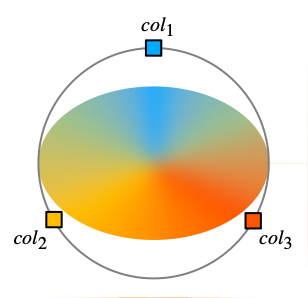
is a two-dimensional graphics directive specifying that faces of polygons and other filled graphics objects are to be drawn using a progressive transition between colors coli along a circle.
ConicGradientFilling[{θ1,θ2,…,θn}{col1,col2,…,coln}]
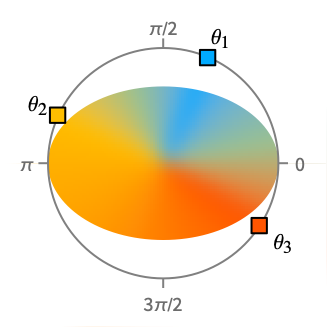
uses the colors coli at angles θi.
ConicGradientFilling[{θ1,θ2,…,θn}{col1,col2,…,coln},{x,y}]
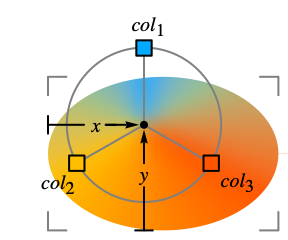
rotates from the center point {x,y}.
Details
- ConicGradientFilling is also known as conic gradient.
- ConicGradientFilling is typically used to fill a region with a range of position-dependent colors.
- ConicGradientFilling[{col1,col2,…,coln}] specifies a progressive transition between coli along circles around the center of the bounding box of a graphic object.
- ConicGradientFilling[] is effectively equivalent to ConicGradientFilling[{Black,White}].
- ConicGradientFilling["scheme"] uses the specified color scheme in ColorData.
- ConicGradientFilling[{θ1,θ2,…,θn}{col1,col2,…,coln}] specifies colors coli to use at the angle θi from
 to
to  .
. - ConicGradientFilling[{θ1col1,θ2col2,…}] is equivalent to ConicGradientFilling[{θ1,θ2,…}{col1,col2,…}].
- ConicGradientFilling[{{θ1,θ2},{col1,col2},…}] is equivalent to ConicGradientFilling[{θ1,θ2,…}{col1,col2,…}].
- ConicGradientFilling[…,{x,y}] specifies the center point {x,y} of rotation and is taken to be coordinates scaled to run from 0 to 1 across the bounding box of a graphic object.
- ImageScaled can be used to specify the center point {x,y} and is taken to be fractions of the whole image region.
- ConicGradientFilling[colors] is equivalent to ConicGradientFilling[colors,{0.5,0.5}].
- ConicGradientFilling[{θ1,…,θn}{col1,…,coln},center,padding] specifies the padding to use when drawing beyond the original range of angles between θ1 and θn.
Examples
open all close allBasic Examples (2)
Scope (12)
Basic Uses (6)
Apply gradient filling to graphics primitives:
Graphics[{ConicGradientFilling[{RGBColor[0.6705882352941176, 0.8627450980392157, 1.], RGBColor[0.011764705882352941, 0.5882352941176471, 1.]}], #}]& /@ {RegularPolygon[5], Disk[], Polygon[{{3, 1}, {9, 8}, {0, 5}, {9, 3}, {4, 9}}]}Apply gradient filling to a plot:
Plot[2Sin[x] + x, {x, 0, 15}, Filling -> Bottom, FillingStyle -> ConicGradientFilling[{RGBColor[0.85359477124183, 0.9389978213507625, 1.], RGBColor[0.011764705882352941, 0.5882352941176471, 1.]}]]Apply gradient filling to a chart:
SectorChart[Tuples[{1, 2}, 2], ChartStyle -> ConicGradientFilling[{RGBColor[0.85359477124183, 0.9389978213507625, 1.], RGBColor[0.011764705882352941, 0.5882352941176471, 1.]}, ImageScaled[{0.5, 0.5}]], ...]Region[Style[ImplicitRegion[y^2 < x (-1 + x^3), {x, y}], ConicGradientFilling[{RGBColor[0.85359477124183, 0.9389978213507625, 1.], RGBColor[0.011764705882352941, 0.5882352941176471, 1.]}]]]GeoGraphics[{GeoStyling["OutlineMap", ConicGradientFilling[{RGBColor[0.85359477124183, 0.9389978213507625, 1.], RGBColor[0.011764705882352941, 0.5882352941176471, 1.]}]], Polygon[["austria"]]}]ConicGradientFilling[{RGBColor[0.85359477124183, 0.9389978213507625, 1.], RGBColor[0.011764705882352941, 0.5882352941176471, 1.]}]Specifications (6)
ConicGradientFilling with no arguments draws a progressive transition from Black to White:
Graphics[{ConicGradientFilling[], RegularPolygon[30]}]Graphics[{ConicGradientFilling[#], RegularPolygon[20]}] & /@ {{GrayLevel[0], GrayLevel[0.85]}, {RGBColor[1, 0, 0], RGBColor[1, 0.5, 0.5], RGBColor[1, 0.85, 0.85]}, {RGBColor[0.5, 0, 0.5], RGBColor[0, 0, 1], RGBColor[0, 1, 0], RGBColor[1, 1, 0], RGBColor[1, 0.5, 0], RGBColor[1, 0, 0]}}Specify the colors at given angles:
Graphics[{ConicGradientFilling[# -> {RGBColor[0.7803921568627451, 0.9084967320261438, 1.], RGBColor[0.011764705882352941, 0.5882352941176471, 1.]}], RegularPolygon[20]}]& /@ {{0, Pi / 2}, {Pi / 2, Pi}, {Pi, 3Pi / 2}}Graphics[{ConicGradientFilling[{30°, 60°} -> {RGBColor[0.7803921568627451, 0.9084967320261438, 1.], RGBColor[0.011764705882352941, 0.5882352941176471, 1.]}], RegularPolygon[20]}]Use predefined color scheme from ColorData:
Graphics[{ConicGradientFilling[#], RegularPolygon[20]}]& /@ {"SunsetColors", "BlueGreenYellow", "DeepSeaColors"}Use LightDarkSwitched to specify different colors for light and dark modes:
graphic = Graphics[{ConicGradientFilling[{LightDarkSwitched[RGBColor[0.7803921568627451, 0.9084967320261438, 1.], Hue[0.11, 0.22, 1]], LightDarkSwitched[RGBColor[0.011764705882352941, 0.5882352941176471, 1.], Hue[0.105, 0.988, 1]]}], RegularPolygon[40]}];{LightModePane[graphic], DarkModePane[graphic]}Specify center points relatively to the width of the graphic objects:
Graphics[{ConicGradientFilling[ {RGBColor[0.7803921568627451, 0.9084967320261438, 1.], RGBColor[0.011764705882352941, 0.5882352941176471, 1.]}, {0.5, 0.5}], RegularPolygon[40], RegularPolygon[{1, 1}, 1, 20]}]Center points by fractions of the whole image:
Graphics[{ConicGradientFilling[{RGBColor[0.7803921568627451, 0.9084967320261438, 1.], RGBColor[0.011764705882352941, 0.5882352941176471, 1.]}, ImageScaled[{0.5, 0.5}]], RegularPolygon[40], RegularPolygon[{1, 1}, 1, 40]}]Properties & Relations (5)
Basic Applications (2)
Show gradient colors with different angles:
gradient[angles_ -> colors_] := Graphics[{ConicGradientFilling[angles -> colors], Disk[]}]gradient[# -> {RGBColor[0., 2/3, 1.], RGBColor[1., 3/4, 0.]}] & /@ {{0, Pi / 4}, {0, Pi / 2}, {0, Pi}}Show gradient colors with different center points:
gradient[colors_, pts_] := Graphics[{{ConicGradientFilling[colors, pts], Disk[]}}]

gradient[{RGBColor[0., 2/3, 1.], RGBColor[1., 3/4, 0.]}, #] & /@ {{0, 1 / 2}, {1 / 3, 1 / 2}, {2 / 3, 1 / 2}, {1, 1 / 2}}

gradient[{RGBColor[0., 2/3, 1.], RGBColor[1., 3/4, 0.]}, #] & /@ {{1 / 2, 0}, {1 / 2, 1 / 3}, {1 / 2, 2 / 3}, {1 / 2, 1}}gradient[{RGBColor[0., 2/3, 1.], RGBColor[1., 3/4, 0.]}, #] & /@ {{1 / 3, 1 / 3}, {1 / 2, 1 / 2}, {2 / 3, 2 / 3}, {1, 1}}Gradient Colors (3)
Collection of gradient colors in ColorData:
ColorData["Gradients"]//Shortdisplay[scheme_] := Graphics[{ConicGradientFilling[scheme], Disk[]}]display /@ Take[ColorData["Gradients"], -30]Collection of gradient colors in the Wolfram Data Repository:
uigradients = ResourceData["UI Color Gradients"];Keys[uigradients]//Shortdisplay[name_ -> color_] := Graphics[{ConicGradientFilling[color], Disk[]}]display /@ Normal[Take[uigradients, 60]]Collection of hue colors in the Wolfram Data Repository:
hues = ResourceData["Hue Color Gradients"];hues//Shortdisplay[color_] := Graphics[{ConicGradientFilling[color], Disk[]}]display /@ huesText
Wolfram Research (2020), ConicGradientFilling, Wolfram Language function, https://reference.wolfram.com/language/ref/ConicGradientFilling.html.
CMS
Wolfram Language. 2020. "ConicGradientFilling." Wolfram Language & System Documentation Center. Wolfram Research. https://reference.wolfram.com/language/ref/ConicGradientFilling.html.
APA
Wolfram Language. (2020). ConicGradientFilling. Wolfram Language & System Documentation Center. Retrieved from https://reference.wolfram.com/language/ref/ConicGradientFilling.html