

RadialGradientFilling
RadialGradientFilling[{col1,col2,…,coln}]
is a two-dimensional graphics directive specifying that faces of polygons and other filled graphics objects are to be drawn using concentric circles of colors coli.
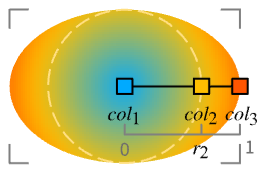
RadialGradientFilling[{r1,r2,…,rn}{col1,col2,…,coln}]
uses the colors coli at radii ri.
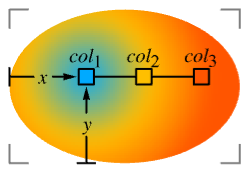
RadialGradientFilling[{r1,r2,…,rn}{col1,col2,…,coln},{x,y}]
radiates from the center point {x,y}.
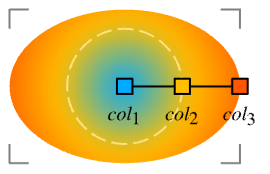
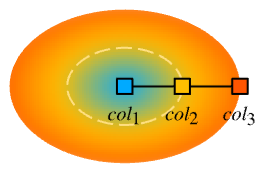
RadialGradientFilling[{r1,r2,…,rn}{col1,col2,…,coln},{{x,y},{r1,r2}}]
radiates from the center point {x,y} in concentric axis-aligned ellipsoids with semiaxes length proportional to ri.
RadialGradientFilling[{r1,r2,…,rn}{col1,col2,…,coln},{{x,y},{r1,r2}},padding]
uses the specified padding when drawing beyond the boundary radii r1 and rn.
Details
- RadialGradientFilling is also known as radial gradient.
- RadialGradientFilling is typically used to fill a region with a range of position-dependent colors.
- RadialGradientFilling[{col1,col2,…,coln}] specifies a progressive transition between coli using concentric circles from the center of the bounding box of a graphic object.
- RadialGradientFilling[] is effectively equivalent to RadialGradientFilling[{Black,White}].
- RadialGradientFilling["scheme"] uses the specified color scheme in ColorData.
- RadialGradientFilling[{r1,r2,…,rn}{col1,col2,…,coln}] specifies colors coli to use at the scaled radius ri taken to be relative to the width of the graphic object.
- ImageScaled can be used to specify the radii ri and is taken to be fractions of the whole image region.
- RadialGradientFilling[{r1col1,r2col2,…}] is equivalent to RadialGradientFilling[{r1,r2,…}{col1,col2,…}].
- RadialGradientFilling[{{r1,col1},{r2,col2},…}] is equivalent to RadialGradientFilling[{r1,r2,…}{col1,col2,…}].
- RadialGradientFilling[…,{x,y}] specifies the center point {x,y} of the concentric circles and it is taken to be coordinates scaled to run from 0 to 1 across the bounding box of a graphic object.
- RadialGradientFilling[…,{{x,y},{r1,r2}}] specifies the semiaxes length proportional to ri of the concentric axis-aligned ellipsoids.
- RadialGradientFilling[colors] is equivalent to RadialGradientFilling[colors,{{0.5,0.5},{0.5,0.5}}].
- RadialGradientFilling[{r1,…,rn}{col1,…,coln},center,padding] specifies the padding to use when drawing beyond the original range of radii between r1 and rn.
- Possible settings for padding include:
-
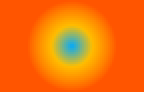
"Fixed" repetitions of the colors 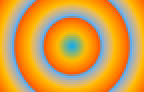
"Periodic" cyclic repetitions of all the colors 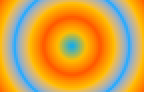
"Reflected" reflections of the colors - RadialGradientFilling[colors,center] is effectively equivalent to RadialGradientFilling[colors,center,"Fixed"].
Examples
open all close allBasic Examples (3)
Apply a radial gradient filling to a disk:
Graphics[{RadialGradientFilling[{Red, Blue}], Disk[]}]Plot a vector field with background gradient color indicating the vector magnitude:
VectorPlot[{y, -x}, {x, -3, 3}, {y, -3, 3}, Prolog -> {RadialGradientFilling[{RGBColor[0.3333333333333333, 0.33333444516101063, 0.7999993899776093], RGBColor[0.7333334647852516, 0.4666657489994649, 0.7333327996289224], RGBColor[1., 0.6199986160387776, 0.3333351332181643], RGBColor[1., 0.8333326141376257, 0.3333348899233049]}, ImageScaled[{0.5, 0.5}]], Rectangle[ImageScaled[{0, 0}], ImageScaled[{1, 1}]]}, FrameTicks -> False]A radial gradient filling of the US map:
GeoGraphics[{RadialGradientFilling[{RGBColor[0.6705882352941176, 0.8627450980392157, 1.], RGBColor[0.011764705882352941, 0.5882352941176471, 1.]}], Polygon[["United States"]]}, GeoBackground -> None]Scope (14)
Basic Uses (6)
Apply gradient filling to graphics primitives:
Graphics[{RadialGradientFilling[{RGBColor[0.6705882352941176, 0.8627450980392157, 1.], RGBColor[0.011764705882352941, 0.5882352941176471, 1.]}], #}]& /@ {Rectangle[], Disk[], Polygon[{{3, 1}, {9, 8}, {0, 5}, {9, 3}, {4, 9}}]}Apply gradient filling to a plot:
Plot[2Sin[x] + x, {x, 0, 15}, Filling -> Bottom, FillingStyle -> RadialGradientFilling[{RGBColor[0.85359477124183, 0.9389978213507625, 1.], RGBColor[0.011764705882352941, 0.5882352941176471, 1.]}]]Apply gradient filling to a chart:
BarChart[{1, 2, 3, 4}, ChartStyle -> RadialGradientFilling[{RGBColor[0.85359477124183, 0.9389978213507625, 1.], RGBColor[0.011764705882352941, 0.5882352941176471, 1.]}]]Region[Style[ImplicitRegion[y^2 < x (-1 + x^3), {x, y}], RadialGradientFilling[{RGBColor[0.85359477124183, 0.9389978213507625, 1.], RGBColor[0.011764705882352941, 0.5882352941176471, 1.]}]]]GeoGraphics[{GeoStyling["OutlineMap", RadialGradientFilling[{RGBColor[0.85359477124183, 0.9389978213507625, 1.], RGBColor[0.011764705882352941, 0.5882352941176471, 1.]}]], Polygon[["austria"]]}]RadialGradientFilling[{RGBColor[0.85359477124183, 0.9389978213507625, 1.], RGBColor[0.011764705882352941, 0.5882352941176471, 1.]}]Specifications (8)
RadialGradientFilling with no arguments draws a progressive transition from Black to White:
Graphics[{RadialGradientFilling[], RegularPolygon[4]}]Graphics[{RadialGradientFilling[#], RegularPolygon[20]}] & /@ {{GrayLevel[0], GrayLevel[0.85]}, {RGBColor[1, 0, 0], RGBColor[1, 0.5, 0.5], RGBColor[1, 0.85, 0.85]}, {RGBColor[0.5, 0, 0.5], RGBColor[0, 0, 1], RGBColor[0, 1, 0], RGBColor[1, 1, 0], RGBColor[1, 0.5, 0], RGBColor[1, 0, 0]}}Specify the scaled position of each color:
Graphics[{RadialGradientFilling[# -> {RGBColor[0.7803921568627451, 0.9084967320261438, 1.], RGBColor[0.011764705882352941, 0.5882352941176471, 1.]}], RegularPolygon[20]}]& /@ {{0, 1}, {0.25, 1}, {0.75, 1}}Scaled positions are taken to be relative to the width of the graphic objects:
Graphics[{RadialGradientFilling[{0, 1} -> {RGBColor[0.7803921568627451, 0.9084967320261438, 1.], RGBColor[0.011764705882352941, 0.5882352941176471, 1.]}], RegularPolygon[40], RegularPolygon[{1, 1}, 1, 20]}]Specify color positions by fractions of the whole image:
Graphics[{RadialGradientFilling[{ImageScaled[0], ImageScaled[1]} -> {RGBColor[0.7803921568627451, 0.9084967320261438, 1.], RGBColor[0.011764705882352941, 0.5882352941176471, 1.]}], RegularPolygon[40], RegularPolygon[{1, 1}, 1, 40]}]Use predefined color scheme from ColorData:
Graphics[{RadialGradientFilling[#], RegularPolygon[20]}]& /@ {"SunsetColors", "BlueGreenYellow", "DeepSeaColors"}Use LightDarkSwitched to specify different colors for light and dark modes:
graphic = Graphics[{RadialGradientFilling[{LightDarkSwitched[RGBColor[0.7803921568627451, 0.9084967320261438, 1.], Hue[0.11, 0.22, 1]], LightDarkSwitched[RGBColor[0.011764705882352941, 0.5882352941176471, 1.], Hue[0.105, 0.988, 1]]}], RegularPolygon[40]}];{LightModePane[graphic], DarkModePane[graphic]}Specify the center of the concentric circles:
Graphics[{RadialGradientFilling[{RGBColor[1, 0.75, 0], GrayLevel[0]}, #], RegularPolygon[4]}]& /@ {{0, 0}, {0.25, 0.25}, {0.5, 0.5}, {1, 1}}Graphics[{RadialGradientFilling[{RGBColor[1, 0.75, 0], GrayLevel[0]}, {{0.5, 0.5}, #}], RegularPolygon[4]}] & /@ {{1, 1}, {0.4, 1}, {1, 0.4}}Graphics[{RadialGradientFilling[{RGBColor[0.93, 0.27, 0.27], RGBColor[1, 0.75, 0]}, {{0.5, 0.5}, {0.1, 0.1}}, #], RegularPolygon[4]}]& /@ {"Fixed", "Periodic", "Reflected"}Applications (5)
Basic Applications (2)
Show gradient colors with different radii:
gradient[radii_ -> colors_] := Graphics[{RadialGradientFilling[radii -> colors], Disk[]}]gradient[# -> {RGBColor[0., 2/3, 1.], RGBColor[1., 3/4, 0.]}] & /@ {{0, 1}, {1 / 3, 1}, {2 / 3, 1}}Show gradient colors with different center points:
gradient[colors_, pts_] := Graphics[{{RadialGradientFilling[colors, pts], Disk[]}, {PointSize[0.05], Point[pts - 1 / 2]}}]

gradient[{RGBColor[0., 2/3, 1.], RGBColor[1., 3/4, 0.]}, #] & /@ {{0, 1 / 2}, {1 / 3, 1 / 2}, {2 / 3, 1 / 2}, {1, 1 / 2}}

gradient[{RGBColor[0., 2/3, 1.], RGBColor[1., 3/4, 0.]}, #] & /@ {{1 / 2, 0}, {1 / 2, 1 / 3}, {1 / 2, 2 / 3}, {1 / 2, 1}}gradient[{RGBColor[0., 2/3, 1.], RGBColor[1., 3/4, 0.]}, #] & /@ {{0, 0}, {1 / 2, 1 / 2}, {2 / 3, 2 / 3}, {1, 1}}Gradient Colors (3)
Collection of gradient colors in ColorData:
ColorData["Gradients"]//Shortdisplay[scheme_] := Graphics[{RadialGradientFilling[scheme], Disk[]}]display /@ Take[ColorData["Gradients"], -30]Collection of gradient colors in the Wolfram Data Repository:
uigradients = ResourceData["UI Color Gradients"];Keys[uigradients]//Shortdisplay[name_ -> color_] := Graphics[{RadialGradientFilling[color], Disk[]}]display /@ Normal[Take[uigradients, 60]]Collection of hue colors in the Wolfram Data Repository:
hues = ResourceData["Hue Color Gradients"];hues//Shortdisplay[color_] := Graphics[{RadialGradientFilling[color], Disk[]}]display /@ huesReverse the order of the colors:
display[Reverse[#]]& /@ huesText
Wolfram Research (2020), RadialGradientFilling, Wolfram Language function, https://reference.wolfram.com/language/ref/RadialGradientFilling.html.
CMS
Wolfram Language. 2020. "RadialGradientFilling." Wolfram Language & System Documentation Center. Wolfram Research. https://reference.wolfram.com/language/ref/RadialGradientFilling.html.
APA
Wolfram Language. (2020). RadialGradientFilling. Wolfram Language & System Documentation Center. Retrieved from https://reference.wolfram.com/language/ref/RadialGradientFilling.html