

HalftoneShading
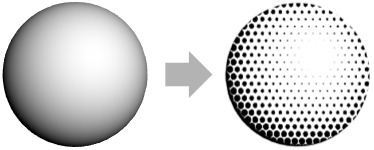
is a three-dimensional graphics directive specifying that surfaces that follow are to be drawn with a base pattern of dots.
uses the density d of shading.
HalftoneShading[col]
uses dots with the specified color col.
HalftoneShading["shape"]
uses the specified "shape" as base pattern.
HalftoneShading[d,col,"shape"]
uses a fixed pattern of "shape" with the specified color col and density d.
Details
- HalftoneShading is also known as halftoning.
- HalftoneShading is typically used to mimic continuous-tone with a base pattern of shapes whose size will vary to mimic to the correct luminosity on the surface.
- HalftoneShading[d,col,"shape"] specifies that the surface should be drawn with the shapes "shape" of color col with a density of shapes per area given by d.
- The shape density d is between 0 and 1. A higher value indicates more shapes per area.
- The color col can be defined by RGBColor, Hue or any other color specification.
- Possible "shape" values include:
-

"Disk" disk 
"Hexagon" hexagon 
"Line" line 
"Square" square 
"Triangle" triangle - The default value for the density is 0.5, the color Black, and the shape is taken to be "Disk".
- HalftoneShading[] is effectively equivalent to HalftoneShading[0.5,Black,"Disk"].
- The setting Lighting"Accent" uses a directional light and faithfully reproduces colors on the surface.
Examples
open all close allBasic Examples (3)
Apply halftone shading to the unit sphere with a directional light:
Graphics3D[{HalftoneShading[], Sphere[]}, Lighting -> "Accent"]Plot3D[ Style[(x^2 + y^2) Exp[1 - x^2 - y^2], HalftoneShading[]], {x, -3, 3}, {y, -3, 3}, Mesh -> None, PlotPoints -> 50, Lighting -> "Neutral"]Show a sailing ship using a halftone:
Graphics3D[{HalftoneShading[], ExampleData[{"Geometry3D", "Galleon"}, "GraphicsComplex"]}, Boxed -> False, Lighting -> "Accent"]Scope (13)
Basic Uses (5)
Apply halftone shading to a graphics primitive:
Graphics3D[{HalftoneShading[], #}, Lighting -> "Accent"]& /@ {Sphere[], CapsuleShape[], Cone[]}Apply halftone shading to a plot:
SphericalPlot3D[1 + 2Cos[2θ], {θ, 0, Pi}, {ϕ, 0, 2Pi}, Axes -> False, PlotStyle -> HalftoneShading[], PlotPoints -> 40, Lighting -> "Accent" ]Apply halftone shading to a chart:
BarChart3D[Range[5], ChartElements -> [image], ChartStyle -> HalftoneShading[]]Apply halftone shading to a 3D object:
Graphics3D[{HalftoneShading[], ExampleData[{"Geometry3D", "Beethoven"}, "GraphicsComplex"]}, Lighting -> "Accent"]HalftoneShading[]Specification (5)
HalftoneShading with no arguments uses gray tones:
Graphics3D[{HalftoneShading[], Sphere[]}, Lighting -> "Accent"]Apply halftone shading to the unit sphere with different densities:
Graphics3D[{HalftoneShading[#], Sphere[]}, Lighting -> "Accent"]& /@ {.15, .4, .7}Use colorized halftone shading:
Graphics3D[{HalftoneShading[#], Sphere[]}, Lighting -> "Accent"]& /@ {Red, Green, Blue}Use LightDarkSwitched to specify different colors for light and dark modes:
graphic = Graphics3D[{HalftoneShading[LightDarkSwitched[StandardRed, StandardBlue]], Sphere[]}, Lighting -> "Accent"];{LightModePane[graphic], DarkModePane[graphic]}Graphics3D[{HalftoneShading[#], Sphere[]}, Lighting -> "Accent"]& /@ {"Square", "Triangle", "Line"}Lighting (3)
HalftoneShading works with all types of lights:
lights = {{"Ambient", LightGray}, {"Point", White, ImageScaled[{1, 1, 2}]}, {"Directional", White, ImageScaled[{1, 1, 2}]}, {"Spot", White, {{1, -1, 1}, {0, 0, 0}}, Pi / 4}};
Graphics3D[{HalftoneShading[], Sphere[]}, Lighting -> {#}]& /@ lightsGraphics3D[{HalftoneShading[], Sphere[]}, Lighting -> {{"Directional", Red, ImageScaled[{1, -0.5, 1}]}, {"Directional", Green, ImageScaled[{-1, -0.5, 1}]}, {"Directional", Blue, ImageScaled[{0, 1, 1}]}, {"Ambient", GrayLevel[0.2]}}]Use "Accent" lighting to faithfully reproduce colors on the surface:
Graphics3D[{HalftoneShading[], Sphere[]}, Lighting -> #] & /@ {"Accent", Automatic}Possible Issues (2)
The default light scheme uses several colored light sources:
Graphics3D[{HalftoneShading[], Sphere[]}]Use a single directional light to get the standard hatching shading effect:
Graphics3D[{HalftoneShading[], Sphere[]}, Lighting -> {{"Directional", White, ImageScaled[{1, 1, 2}]}}]No shading effect is applied to faces of polygons or filled graphic objects:
Graphics3D[{Red, HalftoneShading[0], Sphere[]}]Text
Wolfram Research (2020), HalftoneShading, Wolfram Language function, https://reference.wolfram.com/language/ref/HalftoneShading.html.
CMS
Wolfram Language. 2020. "HalftoneShading." Wolfram Language & System Documentation Center. Wolfram Research. https://reference.wolfram.com/language/ref/HalftoneShading.html.
APA
Wolfram Language. (2020). HalftoneShading. Wolfram Language & System Documentation Center. Retrieved from https://reference.wolfram.com/language/ref/HalftoneShading.html