

RootTree
Details and Options
- RootTree[Tree[data,{subtree1,subtree2,…}]] returns Tree[data,{}].
- RootTree[Tree[data,None]] gives Tree[data,None].
- RootTree[tree,n] removes all subtrees on levels below level n.
- In RootTree[tree,n], the level n can be any machine integer or Infinity.
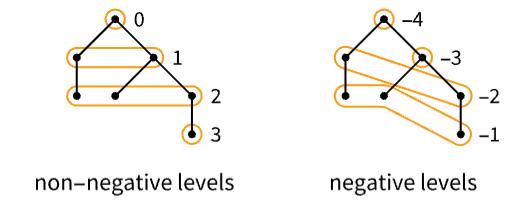
- A positive level n+1 consists of all subtrees of tree that are children of subtrees on level n.
- Level 0 corresponds to the root of the tree.
- Level -1 corresponds to the leaves.
- A negative level -(n+1) consists of all subtrees whose children are on levels -1, -2, …, -n, with highest level -n.
- RootTree has the same options as Tree.
List of all options
Examples
open all close allBasic Examples (3)
Options (9)
Styling Individual Tree Elements (2)
Specify the label for the generated tree element:
RootTree[[image], TreeElementLabel -> "?"]Specify labels and styles for subtrees by position:
RootTree[[image], 1,
	TreeElementLabel -> {___, _ ? EvenQ} -> None, TreeElementStyle -> {___, _ ? OddQ} -> {LightRed, EdgeForm[{Red, Dashed}]}]
Styling Entire Tree (4)
Specify labels and styles for all subtrees:
RootTree[[image], 1,
TreeElementLabel -> All -> None, TreeElementStyle -> All -> EdgeForm[Red]]RootTree[[image], 1, BaseStyle -> LightRed]Specify the style for both the edges and the edges of the tree elements:
RootTree[[image], 1, BaseStyle -> {Dashed, EdgeForm[{Dashing[{}], Thick}]}]Specify the base style and styles for individual tree elements:
RootTree[[image], 1, BaseStyle -> {Red, EdgeForm[None]}, TreeElementStyle -> All -> Opacity[0]]Tree Layout and Graphics Options (3)
Specify the orientation for the root:
RootTree[[image], 1, TreeLayout -> Bottom]RootTree[[image], 2, TreeLayout -> "BalloonEmbedding"]Specify Graphics options:
RootTree[[image], Background -> LightBlue, ImageSize -> 50]Properties & Relations (4)
RootTree[tree] gives Tree[TreeData[tree],None] when TreeChildren[tree] gives None:
TreeChildren[[image]]RootTree[[image]]% === Tree[TreeData[[image]], None]RootTree[tree] gives Tree[TreeData[tree],{}] when TreeChildren[tree] gives a list:
TreeChildren[[image]]RootTree[[image]]% === Tree[TreeData[[image]], {}]RootTree[tree] gives Tree[TreeData[tree],<>] when TreeChildren[tree] gives an association:
TreeChildren[[image]]RootTree[[image]]% === Tree[TreeData[[image]], <||>]RootTree[tree,-1] gives the whole tree:
RootTree[[image], -1]Text
Wolfram Research (2022), RootTree, Wolfram Language function, https://reference.wolfram.com/language/ref/RootTree.html.
CMS
Wolfram Language. 2022. "RootTree." Wolfram Language & System Documentation Center. Wolfram Research. https://reference.wolfram.com/language/ref/RootTree.html.
APA
Wolfram Language. (2022). RootTree. Wolfram Language & System Documentation Center. Retrieved from https://reference.wolfram.com/language/ref/RootTree.html