

GouraudShading
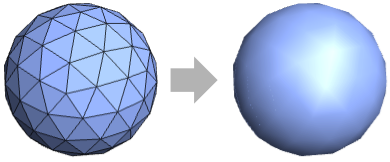
is a three‐dimensional graphics directive that specifies that faces of polygons and other filled graphics objects are to be drawn to reflect as a smooth surface using a normal‐vector average shading.
uses the attenuation factor d for the diffuse light.
GouraudShading[{d,s}]
uses the attenuation factor s for the specular light.
GouraudShading[{d,s,a}]
uses the attenuation factor a for the ambient light.
Details
- GouraudShading is also known as per‐vertex shading.
- GouraudShading is typically used to achieve smooth lighting on low-polygon surfaces.
- The final colors are computed from the averages of the surface normals at the vertices of the polygons and the luminosity of the color resulting from standard shading.
- GouraudShading[{d,s,a}] specifies that the diffuse light on a 3D surface should be attenuated by a factor d, the specular light by s and the ambient light by a.
- GouraudShading[] is effectively equivalent to GouraudShading[{1,1,1}].
- The setting Lighting"Accent" uses a directional light and faithfully reproduces colors on the surface.
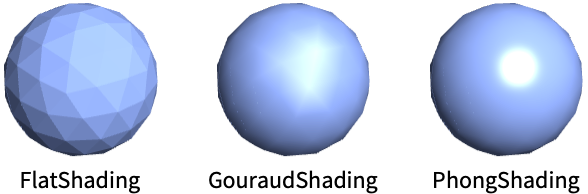
- The basic shading models FlatShading, GouraudShading and PhongShading compared:
Examples
open all close allBasic Examples (3)
Apply GouraudShading to the geodesic polyhedron:
Graphics3D[{GouraudShading[], GeodesicPolyhedron[4]}]Style a plot with GouraudShading:
Plot3D[Sin[x + y ^ 2], {x, -3, 3}, {y, -2, 2}, PlotStyle -> GouraudShading[], Mesh -> None]Draw a 3D model with GouraudShading:
Graphics3D[{GouraudShading[], ResourceData["Galleon"]}]Scope (14)
Basic Uses (5)
Apply Gouraud shading to a graphics primitive:
Graphics3D[{GouraudShading[], #}]& /@ {Sphere[], CapsuleShape[], Cone[]}Apply Gouraud shading to a plot:
SphericalPlot3D[1 + 2 Cos[2 θ], {θ, 0, Pi}, {ϕ, 0, 2 Pi}, Axes -> False, PlotStyle -> GouraudShading[], Mesh -> None]Apply Gouraud shading to a chart:
BarChart3D[Range[5], ChartElements -> [image], ChartStyle -> GouraudShading[]]Apply Gouraud shading to a 3D object:
Graphics3D[{GouraudShading[], ResourceData["Beethoven"]}]GouraudShading[]Specification (5)
GouraudShading with no arguments uses similar calculations as the default system shader:
Graphics3D[{GouraudShading[], Sphere[]}]Attenuate all light from the surface by a scaler value:
Graphics3D[{GouraudShading[#], Sphere[]}]& /@ {0, 0.5, 1.0}This is equivalent to specifying each attenuation factor explicitly:
Graphics3D[{GouraudShading[{#, #, #}], Sphere[]}]& /@ {0, 0.5, 1.0}Attenuate the diffuse light, setting other attenuation factors to zero:
Graphics3D[{GouraudShading[{#}], Sphere[]}]& /@ {0, 0.5, 1.0}Attenuate the specular light, setting other attenuation factors to zero:
Graphics3D[{GouraudShading[{0, #}], Specularity[White, 5], Sphere[]}]& /@ {0, 0.5, 1.0}Attenuate the ambient light, setting other attenuation factors to zero:
Graphics3D[{GouraudShading[{0, 0, #}], Sphere[]}]& /@ {0, 0.5, 1.0}Lighting (4)
GouraudShading works with all types of lights:
lights = {AmbientLight[LightGray], PointLight[White, ImageScaled[{1, 1, 2}]], DirectionalLight[White, ImageScaled[{1, 1, 2}]], SpotLight[White, {{1, -1, 1}, {0, 0, 0}}, Pi / 4]};
Graphics3D[{GouraudShading[], Sphere[]}, Lighting -> {#}]& /@ lightsGraphics3D[{GouraudShading[], Sphere[]}, Lighting -> {DirectionalLight[RGBColor[1, 0, 0], ImageScaled[{1, -0.5, 1}]], DirectionalLight[RGBColor[0, 1, 0], ImageScaled[{-1, -0.5, 1}]], DirectionalLight[RGBColor[0, 0, 1], ImageScaled[{0, 1, 1}]], AmbientLight[GrayLevel[0.2]]}]The specular percentage only applies if the Specularity directive has been specified:
Graphics3D[{GouraudShading[{1, #, 1}], Specularity[White], Sphere[]}]& /@ {0.0, 1.0}The ambient percentage only applies if an AmbientLight has been specified:
Graphics3D[{GouraudShading[{1, 1, #}], Sphere[]}, Lighting -> AmbientLight[LightGray]]& /@ {0.0, 1.0}Applications (2)
Basic Applications (2)
Interior face colors are linear combinations of the lighting calculated at each vertex:
v = {{0, 0, 0}, {1, 0, 0}, {1 / 2, 1, 0}};
cols = {Red, Green, Blue};
lights = Table[PointLight[cols[[i]], v[[i]] + {0, 0, 0.01}], {i, Length[v]}];
Graphics3D[{GouraudShading[], Triangle[v]}, Lighting -> lights, ViewPoint -> Above]
This is equivalent to passing precomputed vertex lighting as the VertexColors with an ambient White light:
Graphics3D[{EdgeForm[], Triangle[v, VertexColors -> cols]}, Lighting -> AmbientLight[White], ViewPoint -> Above]arrows[_[v_, ___, VertexNormals -> n_]] := Table[Arrow[{v[[i]], v[[i]] + n[[i]]}], {i, Length[v]}]
vnormals[p_] := Graphics3D[{GouraudShading[], p, arrows[p]}, Boxed -> False, Method -> {"ShrinkWrap" -> True}]vnormals[Polygon[{{Sqrt[3]/2, -1/2, 0}, {0, 1, 0}, {-1/2*Sqrt[3], -1/2, 0}},
VertexNormals -> {{0, 0, 1}, {0, 0, 1}, {0, 0, 1}}]]Triangle with perturbed normals:
vnormals[Polygon[{{Sqrt[3]/2, -1/2, 0}, {0, 1, 0}, {-1/2*Sqrt[3], -1/2, 0}},
 VertexNormals -> {{Sqrt[3/5]/2, -1/2*1/Sqrt[5], 2/Sqrt[5]}, {0, 1/Sqrt[5], 2/Sqrt[5]},
   {-1/2*Sqrt[3/5], -1/2*1/Sqrt[5], 2/Sqrt[5]}}]]
Polyhedron with smooth normals:
vnormals[Polyhedron[{{-0.5, 0.5, -0.5}, {0.5, 0.5, -0.5}, {0.5, -0.5, -0.5}, {-0.5, -0.5, -0.5},
  {-0.5, 0.5, 0.5}, {0.5, 0.5, 0.5}, {0.5, -0.5, 0.5}, {-0.5, -0.5, 0.5}},
 {{1, 2, 3, 4}, {5, 6, 2, 1}, {6, 7, 3, 2}, {7, 8, 4, 3}, {8, 5, 1, 4}, {8, 7, 6, 5 ... 258, 0.5773502691896258, 0.5773502691896258},
   {0.5773502691896258, 0.5773502691896258, 0.5773502691896258},
   {0.5773502691896258, -0.5773502691896258, 0.5773502691896258},
   {-0.5773502691896258, -0.5773502691896258, 0.5773502691896258}}]]
Vertices are duplicated with different normals to create hard edges:
vnormals[GraphicsComplex[...]]Properties & Relations (3)
GouraudShading uses VertexNormals if specified:
model = GraphicsComplex[{...}, Polygon[...], VertexNormals -> {...}];
Graphics3D[{GouraudShading[], model}]
Specify FaceForm with GouraudShading:
Graphics3D[{FaceForm[#], GouraudShading[], Icosahedron[]}]& /@ {Red, Green, Blue}GouraudShading approximates the PhongShading when the screen size and shade variance across polygons are small:
Graphics3D[{#, EdgeForm[], Specularity[White, 10], ResourceData["Stanford Bunny"]}, Boxed -> False]& /@ {PhongShading[], GouraudShading[]}Possible Issues (1)
Lighting artifacts are visible along polygon borders:
Plot3D[Cos[x + y] + Sin[y], {x, -3, 3}, {y, -2, 2}, PlotStyle -> GouraudShading[], Mesh -> None, PlotPoints -> 3]Use a more refined mesh to reduce the differences between polygons:
Plot3D[Cos[x + y] + Sin[y], {x, -3, 3}, {y, -2, 2}, PlotStyle -> GouraudShading[], Mesh -> None, PlotPoints -> 40]Interactive Examples (1)
Interactively drag the light position while rendering a triangle with GouraudShading applied. Notice that the color of the triangle is calculated by interpolating the light values at its corners:
DynamicModule[{pt = {0.5, 0.7}, corners = {{0, 0, 0}, {1, 0, 0}, {1 / 2, Sqrt[3] / 2, 0}}}, LocatorPane[Dynamic[pt], Graphics3D[{Dynamic[PointLight[Gray, Append[pt, 1 / 2], {0, 1, 0}]], GouraudShading[], Triangle[corners], PointSize[0.05], Point[corners, VertexNormals -> ConstantArray[{0, 0, 1}, 3]]}, ViewPoint -> Above, PlotRange -> {{0, 1}, {0, 1}, {-0.2, 0.2}}, Lighting -> None]]]Text
Wolfram Research (2022), GouraudShading, Wolfram Language function, https://reference.wolfram.com/language/ref/GouraudShading.html.
CMS
Wolfram Language. 2022. "GouraudShading." Wolfram Language & System Documentation Center. Wolfram Research. https://reference.wolfram.com/language/ref/GouraudShading.html.
APA
Wolfram Language. (2022). GouraudShading. Wolfram Language & System Documentation Center. Retrieved from https://reference.wolfram.com/language/ref/GouraudShading.html