



TimelinePlot
TimelinePlot[{date1,date2,…}]
makes a timeline plot with dates date1, date2, ….
TimelinePlot[{event1,event2,…}]
makes a timeline plot with events event1, event2, ….
TimelinePlot[{data1,data2,…}]
makes a timeline plot from multiple event datasets datai.
Details and Options
- TimelinePlot shows when events occur relative to each other.
- Possible forms of datei include:
-
DateObject[…],TimeObject[…] date or time object "string" DateString specification {y,m,d,h,m,s} DateList specification {y}, {y,m}, {y,m,d}, … shortened date list t absolute time given as a single number - In shortened date lists, omitted elements are taken to have default values {y,1,1,0,0,0}.
- The eventi can have the forms:
-
date1 a single date or time DateInterval[{date1,date2}] a start date date1 and end date date2 Entity[…] an entity with dates according to the property "Date" Entity[…]prop an entity with dates according to the property prop - Datasets datai can be given in the following forms:
-
{event1,event2,…} dates, times, intervals, entities, etc. TimeSeries[…] interval with start and end dates EventSeries[…] treat each time as an event {Entity[…],…}prop entities with dates according to the property prop EntityClass[…] entities with dates according to the property "Date" EntityClass[…]prop entities with dates according to the property prop <k1event1,k2event2,…> association of keys and events wi[formi,…] a date or event with value formi and wrapper wi - TimelinePlot[Tabular[…]cspec] extracts and plots values from the tabular object using the column specification cspec.
- The following forms of column specifications cspec are allowed for plotting tabular data:
-
col plot dates from column col {col1,col2,…,coln} plot columns {col1, …, coln} as groups of dates - The following wrappers wi can be used:
-
Annotation[e,label] provide an annotation Button[e,action] define an action to execute when the element is clicked EventHandler[e,…] define a general event handler for the element Hyperlink[e,uri] make the element act as a hyperlink Labeled[e,…] display the element with labeling Legended[e,…] include features of the element in a chart legend Mouseover[e,over] make the element show a mouseover form PopupWindow[e,cont] attach a popup window to the element StatusArea[e,label] display in the status area when the element is moused over Style[e,opts] show the element using the specified styles Tooltip[e,label] attach an arbitrary tooltip to the element - TimelinePlot has the same options as Graphics with the following additions and changes: [List of all options]
-
AspectRatio Automatic overall ratio of width to height Axes True whether to draw a time axis AxesOrigin Automatic where to draw a time axis DateFunction Automatic how to convert dates to standard form DateTicksFormat Automatic format for date tick labels Filling Automatic filling to insert under each event FillingStyle Automatic style for filling LabelingFunction Automatic how to label elements LegendAppearance Automatic overall appearance of legends PerformanceGoal $PerformanceGoal aspects of performance to try to optimize PlotLayout Automatic overall layout to use PlotLegends None legends for datasets PlotMarkers None markers to use to indicate each event PlotStyle Automatic style for events PlotTheme $PlotTheme overall theme for the plot Spacings Automatic spacing between datasets and axis TimeZone $TimeZone time zone to use for the plot - Possible settings for AxesOrigin include: Left, Right, Bottom, Top, and Center.
- Possible settings for Filling include:
-
Axis fill to the axis None no filling Bottom fill to the bottom of the plot Top fill to the top of the plot Above fill to the row above Below fill to the row below - TimelinePlot will place events in different rows. The overall placement in different rows can be affected using PlotLayout and the spacing between rows can controlled using Spacings.
- Possible settings for PlotLayout include:
-
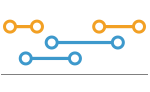
"Grouped" each dataset uses a minimum number of rows 
"Overlapped" each dataset uses a single row 
"Packed" use minimum number of rows for all events 
"Stacked" each event has a separate row 
"Vertical","VerticalGrouped",… vertical forms of layouts 
"Reverse","ReverseVertical",… reversed forms of layouts - Possible settings for Spacings include:
-
Automatic space rows evenly apart None no space between rows, but space to axis {s1,s2,…} use space s1 from axis to first row, then space s2, etc. - ColorData["DefaultPlotColors"] gives the default sequence of colors used by PlotStyle.
- Style and other specifications from options and other constructs in TimelinePlot are effectively applied in the order PlotStyle, then Style and other wrappers, with later specifications overriding earlier ones.
List of all options
Examples
open all close allBasic Examples (4)
Plot several dates on a timeline:
TimelinePlot[{DateObject[{2000, 7, 31}, "Day", "Gregorian", -6.], DateObject[{2003, 10, 23}, "Day", "Gregorian", -6.], DateObject[{2008, 2, 25}, "Day", "Gregorian", -6.], DateObject[{2010, 5, 17}, "Day", "Gregorian", -6.]}]TimelinePlot[{DateInterval[{DateObject[{2000, 7, 31}, "Day", "Gregorian", -6.], DateObject[{2003, 10, 23}, "Day", "Gregorian", -6.]}], DateInterval[{DateObject[{2008, 2, 25}, "Day", "Gregorian", -6.], DateObject[{2010, 5, 17}, "Day", "Gregorian", -6.]}]}]TimelinePlot[{Entity["HistoricalEvent", "WorldWar1"], Entity["HistoricalEvent", "WorldWar2"], Entity["HistoricalEvent", "VietnamWar"], Entity["HistoricalEvent", "KoreanWarBegins"]}]Plot multiple sets of dates and intervals:
TimelinePlot[{{DateInterval[{DateObject[{2003, 4, 28}, "Day", "Gregorian", -6.], DateObject[{2013, 3, 1}, "Day", "Gregorian", -6.]}], DateObject[{2009, 3, 27}, "Day", "Gregorian", -6.], DateInterval[{DateObject[{2002, 12, 20}, "Day", "Gregorian", -6.], DateObject[{2006, 9, 11}, "Day", "Gregorian", -6.]}]}, {DateInterval[{DateObject[{2004, 1, 15}, "Day", "Gregorian", -6.], DateObject[{2010, 9, 9}, "Day", "Gregorian", -6.]}], DateObject[{2000, 7, 31}, "Day", "Gregorian", -6.], DateInterval[{DateObject[{2009, 7, 27}, "Day", "Gregorian", -6.], DateObject[{2014, 8, 6}, "Day", "Gregorian", -6.]}]}}]Scope (34)
Data (14)
Plot a timeline using DateObject:
TimelinePlot[{DateObject[{2000}, "Year", "Gregorian", -6.], DateObject[{2001}, "Year", "Gregorian", -6.], DateObject[{2002}, "Year", "Gregorian", -6.], DateObject[{2003}, "Year", "Gregorian", -6.]}]Using TimeObject:
TimelinePlot[{TimeObject[{8, 15}, TimeZone -> -6.], TimeObject[{9, 45}, TimeZone -> -6.], TimeObject[{14, 45}, TimeZone -> -6.], TimeObject[{15, 15}, TimeZone -> -6.], TimeObject[{15, 30}, TimeZone -> -6.], TimeObject[{17, 15}, TimeZone -> -6.]}]Using DateString specifications:
TimelinePlot[{"June 2006", "August 2006", "November 2006", "January 2007"}]Plot the "Date" property from a list of entities:
TimelinePlot[{Entity["HistoricalEvent", "AirConditioningInvented"], Entity["HistoricalEvent", "BallpointPenInvented"], Entity["HistoricalEvent", "CottonGinInvented"], Entity["HistoricalEvent", "FrictionMatchesInvented"], Entity["HistoricalEvent", "IceCreamMakerInvented"], Entity["HistoricalEvent", "DisposableRazorInvented"]}]Use a specific property for a list of entities:
TimelinePlot[{Entity["Book", "AConnecticutYankeeInKingArthursCourt"], Entity["Book", "AdventuresOfHuckleberryFinn"], Entity["Book", "AdventuresOfTomSawyer"]} -> "FirstPublished"]Use a specific property for a class of entities:
TimelinePlot[EntityClass["Bridge", "ThreeSisters::6g25m"] -> "ConstructionEndDate"]Using DateList specifications:
TimelinePlot[{{2000, 3, 1}, {2000, 5, 10}, {2001, 4, 21}, {2003, 6, 1}}]Use DateFunction to prepend a year to {month,day} lists:
TimelinePlot[{{10, 1}, {10, 10}, {10, 20}, {10, 24}, {11, 5}, {11, 15}}, DateFunction :> (Prepend[#, 2014]&)]Using AbsoluteTime specifications:
TimelinePlot[{3163536000, 3163622400, 3163708800, 3163795200, 3163881600, 3163968000, 3164054400, 3164140800}]TimelinePlot[{DateInterval[{{2001, 10, 26}, {2012, 1, 7}}], DateInterval[{"2004/4/4", "1999/1/8"}], DateInterval[{3079123200, 3162326400}]}]TimeSeries shows the overall range of dates:
TimelinePlot[TemporalData[TimeSeries, {{{84.94051509093487, 45.03825324747791, 77.51123740862454,
    78.42446755479273, 77.00549822074817, 92.66443241125722, 35.07284335350971, 59.40244947890318,
    3.746191530217331, 50.511720741177925}},
  {{{4802682, 11 ... 99661, 1386134671, 2006284160, 2193287662, 2458466707, 2577058224,
     3362185107, 3386229788}}}, 1, {"Continuous", 1}, {"Discrete", 1}, 1,
  {ValueDimensions -> 1, ResamplingMethod -> {"Interpolation", InterpolationOrder -> 1}}}, True,
 10.1]]
EventSeries shows the discrete event dates:
TimelinePlot[TemporalData[EventSeries, {{{52.83673236323091, 30.87071951581501, 35.26261733859519,
    77.89514415994739, 20.076122662005517, 87.80126120505264, 82.3914176568504, 75.86072945367098,
    19.25060050510166, 9.014000188176624}},
  {{{159349399, 402061388, 1187111102, 1291846254, 2439623478, 2459156454, 2684744754, 2924308529,
     3017623916, 3595694858}}}, 1, {"Discrete", 1}, {"Discrete", 1}, 1,
  {ValueDimensions -> 1, ResamplingMethod -> None}}, True, 10.1]]
Keys in an Association are used as labels:
TimelinePlot[<|"key1" -> DateInterval[{{2010, 1, 1}, {2011, 1, 1}}], "key2" -> {2012, 1, 2}|>]Plot dates from a variety of sources:
TimelinePlot[{{{2001, 4, 3}, {2004, 8, 16}, {2001, 10, 18}, {2004, 5, 19}}, {"Tue 9 Jan 2001 00:00:00", "Sun 18 Feb 2001 00:00:00", "Fri 29 Jun 2001 00:00:00", "Thu 22 Jun 2000 00:00:00"}, {DateObject[{2002, 6, 7, 0, 0, 0.}, "Instant", "Gregorian", -6.], DateObject[{2002, 2, 27, 0, 0, 0.}, "Instant", "Gregorian", -6.], DateObject[{2003, 7, 19, 0, 0, 0.}, "Instant", "Gregorian", -6.], DateObject[{2003, 4, 12, 0, 0, 0.}, "Instant", "Gregorian", -6.]}}]Tabular Data (1)
Generate tabular data and generate DateObject instances that could be used:
tab = Tabular[IconizedObject[«Scientists»]]Plot the scientists' dates of birth:
TimelinePlot[tab -> "Birth"]TimelinePlot[tab -> "LifeSpan"]Use PivotToColumns to split LifeSpan column based on the area of knowledge of the scientists:
pivot = PivotToColumns[tab, "Field" -> "LifeSpan"]Display the lifespans for the mathematicians and physicists separately:
TimelinePlot[pivot -> {"Mathematics", "Physics"}]Wrappers (4)
Use wrappers on individual data, datasets, or collections of datasets:
Column[{TimelinePlot[
	{{Style[Yesterday, Red], Today}, {Today, Tomorrow}}], TimelinePlot[
	{Style[{Yesterday, Today}, Green], {Today, Tomorrow}}], TimelinePlot[
Style[{{Yesterday, Today}, {Today, Tomorrow}}, Blue]]}]Column[{TimelinePlot[
{{Style[Yesterday, Red], Today}, {Today, Tomorrow}}], TimelinePlot[
{Style[{Style[Yesterday, Red], Today}, Green], {Today, Tomorrow}}], TimelinePlot[
Style[{Style[{Style[Yesterday, Red], Today}, Green], {Today, Tomorrow}}, Blue]]}]Use PopupWindow to provide additional drilldown information:
TimelinePlot[{DateInterval[{DateObject[{2013, 1, 10}, "Day", "Gregorian", -6.], DateObject[{2013, 1, 13}, "Day", "Gregorian", -6.]}], Labeled[PopupWindow[DateInterval[{DateObject[{2013, 2, 1}, "Day", "Gregorian", -6.], DateObject[{2013, 3, 3}, "Day", "Gregorian", -6.]}], DateListPlot[TemporalData[TimeSeries, {{{61.67, 60.13, 62.24, 62.18, 64.02, 64.95, 65.63, 63.98, 63.86, 63.8,
    62.92, 62.9, 61.38, 60.99, 61.64, 60.55, 61.39, 60.79, 60.36, 58.86}},
  {{{3568665600, 3568924800, 3569011200, 3569097600, 3569184000, 356927040 ... 200, 3570393600,
     3570480000, 3570739200, 3570825600, 3570912000, 3570998400, 3571084800}}}, 1,
  {"Continuous", 1}, {"Discrete", 1}, 1, {ValueDimensions -> 1,
   ResamplingMethod -> {"Interpolation", InterpolationOrder -> 1}}}, True, 10.1]]], "click me", Above], DateInterval[{DateObject[{2013, 1, 21}, "Day", "Gregorian", -6.], DateObject[{2013, 2, 21}, "Day", "Gregorian", -6.]}]}]
Use Legended to add an additional legend:
TimelinePlot[{{DateInterval[{DateObject[{1981, 4, 21}, "Day", "Gregorian", -6.], DateObject[{2015, 2, 20}, "Day", "Gregorian", -6.]}]}, {Legended[DateInterval[{DateObject[{1985, 12, 9}, "Day", "Gregorian", -6.], DateObject[{2015, 2, 20}, "Day", "Gregorian", -6.]}], "label"]}}, PlotStyle -> 97]Layouts (4)
Pack the events in each dataset:
data = {{DateInterval[{DateObject[{1997, 7, 29}, "Day", "Gregorian", -6.], DateObject[{2000, 3, 18}, "Day", "Gregorian", -6.]}], DateInterval[{DateObject[{1999, 1, 8}, "Day", "Gregorian", -6.], DateObject[{2004, 4, 4}, "Day", "Gregorian", -6.]}], DateInterval[{DateObject[{2001, 10, 26}, "Day", "Gregorian", -6.], DateObject[{2012, 1, 7}, "Day", "Gregorian", -6.]}]}, {DateInterval[{DateObject[{1993, 2, 2}, "Day", "Gregorian", -6.], DateObject[{1996, 8, 18}, "Day", "Gregorian", -6.]}], DateInterval[{DateObject[{2003, 7, 2}, "Day", "Gregorian", -6.], DateObject[{2006, 4, 3}, "Day", "Gregorian", -6.]}], DateInterval[{DateObject[{2004, 10, 19}, "Day", "Gregorian", -6.], DateObject[{2006, 3, 2}, "Day", "Gregorian", -6.]}]}};TimelinePlot[data, PlotLayout -> "Grouped"]Use a single row for all events in each dataset:
TimelinePlot[data, PlotLayout -> "Overlapped"]TimelinePlot[data, PlotLayout -> "Packed"]Use a single row for each event:
TimelinePlot[data, PlotLayout -> "Stacked"]data = {{DateInterval[{DateObject[{1997, 7, 29}, "Day", "Gregorian", -6.], DateObject[{2000, 3, 18}, "Day", "Gregorian", -6.]}], DateInterval[{DateObject[{1999, 1, 8}, "Day", "Gregorian", -6.], DateObject[{2004, 4, 4}, "Day", "Gregorian", -6.]}], DateInterval[{DateObject[{2001, 10, 26}, "Day", "Gregorian", -6.], DateObject[{2012, 1, 7}, "Day", "Gregorian", -6.]}]}, {DateInterval[{DateObject[{1993, 2, 2}, "Day", "Gregorian", -6.], DateObject[{1996, 8, 18}, "Day", "Gregorian", -6.]}], DateInterval[{DateObject[{2003, 7, 2}, "Day", "Gregorian", -6.], DateObject[{2006, 4, 3}, "Day", "Gregorian", -6.]}], DateInterval[{DateObject[{2004, 10, 19}, "Day", "Gregorian", -6.], DateObject[{2006, 3, 2}, "Day", "Gregorian", -6.]}]}};TimelinePlot[data, PlotLayout -> "Vertical", ImageSize -> {Automatic, 300}]Plot time increasing from the right:
data = {{DateInterval[{DateObject[{1997, 7, 29}, "Day", "Gregorian", -6.], DateObject[{2000, 3, 18}, "Day", "Gregorian", -6.]}], DateInterval[{DateObject[{1999, 1, 8}, "Day", "Gregorian", -6.], DateObject[{2004, 4, 4}, "Day", "Gregorian", -6.]}], DateInterval[{DateObject[{2001, 10, 26}, "Day", "Gregorian", -6.], DateObject[{2012, 1, 7}, "Day", "Gregorian", -6.]}]}, {DateInterval[{DateObject[{1993, 2, 2}, "Day", "Gregorian", -6.], DateObject[{1996, 8, 18}, "Day", "Gregorian", -6.]}], DateInterval[{DateObject[{2003, 7, 2}, "Day", "Gregorian", -6.], DateObject[{2006, 4, 3}, "Day", "Gregorian", -6.]}], DateInterval[{DateObject[{2004, 10, 19}, "Day", "Gregorian", -6.], DateObject[{2006, 3, 2}, "Day", "Gregorian", -6.]}]}};TimelinePlot[data, PlotLayout -> "Reverse"]Plot time increasing from the bottom:
TimelinePlot[data, PlotLayout -> "ReverseVertical", ImageSize -> {Automatic, 300}]Place all events in the same row:
data = {{DateInterval[{DateObject[{1997, 7, 29}, "Day", "Gregorian", -6.], DateObject[{2000, 3, 18}, "Day", "Gregorian", -6.]}], DateInterval[{DateObject[{1999, 1, 8}, "Day", "Gregorian", -6.], DateObject[{2004, 4, 4}, "Day", "Gregorian", -6.]}], DateInterval[{DateObject[{2001, 10, 26}, "Day", "Gregorian", -6.], DateObject[{2012, 1, 7}, "Day", "Gregorian", -6.]}]}, {DateInterval[{DateObject[{1993, 2, 2}, "Day", "Gregorian", -6.], DateObject[{1996, 8, 18}, "Day", "Gregorian", -6.]}], DateInterval[{DateObject[{2003, 7, 2}, "Day", "Gregorian", -6.], DateObject[{2006, 4, 3}, "Day", "Gregorian", -6.]}], DateInterval[{DateObject[{2004, 10, 19}, "Day", "Gregorian", -6.], DateObject[{2006, 3, 2}, "Day", "Gregorian", -6.]}]}};TimelinePlot[data, Spacings -> None]Place all events along the axis:
TimelinePlot[data, Spacings -> 0]Draw the first row of events along the axis:
TimelinePlot[data, Spacings -> {0, 1}]Increase the spacing between successive rows of events:
TimelinePlot[data, Spacings -> {0, 1, 2, 3}]Presentation (5)
Use a theme with a bold color scheme:
TimelinePlot[{{DateInterval[{DateObject[{2005, 9, 18}, "Day", "Gregorian", -6.], DateObject[{1989, 5, 21}, "Day", "Gregorian", -6.]}], DateInterval[{DateObject[{1992, 8, 23}, "Day", "Gregorian", -6.], DateObject[{2003, 12, 13}, "Day", "Gregorian", -6.]}], DateInterval[{DateObject[{1997, 6, 17}, "Day", "Gregorian", -6.], DateObject[{2008, 7, 9}, "Day", "Gregorian", -6.]}]}, {DateInterval[{DateObject[{1988, 11, 9}, "Day", "Gregorian", -6.], DateObject[{2010, 1, 31}, "Day", "Gregorian", -6.]}], DateInterval[{DateObject[{2012, 6, 24}, "Day", "Gregorian", -6.], DateObject[{1995, 12, 8}, "Day", "Gregorian", -6.]}], DateInterval[{DateObject[{2004, 1, 18}, "Day", "Gregorian", -6.], DateObject[{1994, 8, 14}, "Day", "Gregorian", -6.]}]}, {DateInterval[{DateObject[{2001, 1, 7}, "Day", "Gregorian", -6.], DateObject[{2004, 10, 13}, "Day", "Gregorian", -6.]}], DateInterval[{DateObject[{2002, 3, 13}, "Day", "Gregorian", -6.], DateObject[{2005, 9, 4}, "Day", "Gregorian", -6.]}], DateInterval[{DateObject[{1994, 3, 14}, "Day", "Gregorian", -6.], DateObject[{2001, 3, 16}, "Day", "Gregorian", -6.]}]}}, PlotTheme -> "Web"]Use unique markers for each dataset:
TimelinePlot[{DateRange["Jan 21, 1954", "Mar 10, 1954", {1, "Week"}], DateRange["Feb 1, 1954", "Mar 15, 1954", {1, "Week"}],
	DateRange["Jan 2, 1954", "Mar 2, 1954", {1, "Week"}]}, PlotMarkers -> Automatic]
Use PlotStyle to change styles of events:
TimelinePlot[{{DateInterval[{DateObject[{1964, 10, 8}, "Day", "Gregorian", -6.], DateObject[{2014, 11, 17}, "Day", "Gregorian", -6.]}], DateInterval[{DateObject[{1975, 10, 22}, "Day", "Gregorian", -6.], DateObject[{1979, 8, 3}, "Day", "Gregorian", -6.]}]}, {DateInterval[{DateObject[{1969, 2, 5}, "Day", "Gregorian", -6.], DateObject[{2008, 11, 19}, "Day", "Gregorian", -6.]}], DateInterval[{DateObject[{1981, 2, 26}, "Day", "Gregorian", -6.], DateObject[{1986, 6, 3}, "Day", "Gregorian", -6.]}]}, {DateInterval[{DateObject[{1962, 10, 11}, "Day", "Gregorian", -6.], DateObject[{1987, 4, 16}, "Day", "Gregorian", -6.]}], DateInterval[{DateObject[{1979, 6, 15}, "Day", "Gregorian", -6.], DateObject[{1983, 12, 28}, "Day", "Gregorian", -6.]}]}}, PlotStyle -> {Orange, Purple, Blue}]Use Filling to fill the events:
TimelinePlot[{{DateInterval[{DateObject[{1994, 10, 8}, "Day", "Gregorian", -6.], DateObject[{2014, 11, 17}, "Day", "Gregorian", -6.]}], DateInterval[{DateObject[{1975, 10, 22}, "Day", "Gregorian", -6.], DateObject[{1979, 8, 3}, "Day", "Gregorian", -6.]}]}, {DateInterval[{DateObject[{1979, 2, 5}, "Day", "Gregorian", -6.], DateObject[{2008, 11, 19}, "Day", "Gregorian", -6.]}], DateInterval[{DateObject[{1981, 2, 26}, "Day", "Gregorian", -6.], DateObject[{1986, 6, 3}, "Day", "Gregorian", -6.]}]}, {DateInterval[{DateObject[{1962, 10, 11}, "Day", "Gregorian", -6.], DateObject[{1987, 4, 16}, "Day", "Gregorian", -6.]}], DateInterval[{DateObject[{1979, 6, 15}, "Day", "Gregorian", -6.], DateObject[{1983, 12, 28}, "Day", "Gregorian", -6.]}]}}, Filling -> Below]Change the FillingStyle:
TimelinePlot[{{DateInterval[{DateObject[{1994, 10, 8}, "Day", "Gregorian", -6.], DateObject[{2014, 11, 17}, "Day", "Gregorian", -6.]}], DateInterval[{DateObject[{1975, 10, 22}, "Day", "Gregorian", -6.], DateObject[{1979, 8, 3}, "Day", "Gregorian", -6.]}]}, {DateInterval[{DateObject[{1979, 2, 5}, "Day", "Gregorian", -6.], DateObject[{2008, 11, 19}, "Day", "Gregorian", -6.]}], DateInterval[{DateObject[{1981, 2, 26}, "Day", "Gregorian", -6.], DateObject[{1986, 6, 3}, "Day", "Gregorian", -6.]}]}, {DateInterval[{DateObject[{1962, 10, 11}, "Day", "Gregorian", -6.], DateObject[{1987, 4, 16}, "Day", "Gregorian", -6.]}], DateInterval[{DateObject[{1979, 6, 15}, "Day", "Gregorian", -6.], DateObject[{1983, 12, 28}, "Day", "Gregorian", -6.]}]}}, Filling -> Below, FillingStyle -> Opacity[1]]Labeling and Legending (6)
Use Labeled to add bubble labels:
TimelinePlot[{Labeled[DateInterval[{DateObject[{2010, 2, 1}, "Day", "Gregorian", -6.], DateObject[{2013, 5, 4}, "Day", "Gregorian", -6.]}], "label1"], Labeled[DateObject[{2012, 4, 6}, "Day", "Gregorian", -6.], "label2"], Labeled[DateInterval[{DateObject[{2011, 3, 1}, "Day", "Gregorian", -6.], DateObject[{2012, 12, 21}, "Day", "Gregorian", -6.]}], "label3"]}]Specify locations for the labels:
TimelinePlot[{Labeled[DateInterval[{DateObject[{2010, 2, 1}, "Day", "Gregorian", -6.], DateObject[{2013, 5, 4}, "Day", "Gregorian", -6.]}], "label1", Before], Labeled[DateObject[{2012, 4, 6}, "Day", "Gregorian", -6.], "label2", After], Labeled[DateInterval[{DateObject[{2011, 3, 1}, "Day", "Gregorian", -6.], DateObject[{2012, 12, 21}, "Day", "Gregorian", -6.]}], "label3", Automatic]}]Entity and EntityClass automatically create bubble labels when possible:
TimelinePlot[{Entity["HistoricalPeriod", "AfsharidDynasty"], Entity["HistoricalPeriod", "InitialPeriod"], Entity["HistoricalPeriod", "JoseonDynasty"], Entity["HistoricalPeriod", "LiaoDynasty"], Entity["HistoricalPeriod", "NaraPeriod"], Entity["HistoricalPeriod", "OldKingdom"], Entity["HistoricalPeriod", "SamanidDynasty"], Entity["HistoricalPeriod", "SpaceAge"], Entity["HistoricalPeriod", "TahiridDynasty"], Entity["HistoricalPeriod", "TaishoPeriod"]}]Create automatic placeholder legends for each dataset:
TimelinePlot[{{DateInterval[{DateObject[{1991, 12, 29}, "Day", "Gregorian", -6.], DateObject[{1992, 11, 19}, "Day", "Gregorian", -6.]}]}, {DateInterval[{DateObject[{2001, 10, 30}, "Day", "Gregorian", -6.], DateObject[{2002, 10, 25}, "Day", "Gregorian", -6.]}]}, {DateInterval[{DateObject[{1992, 3, 29}, "Day", "Gregorian", -6.], DateObject[{2002, 9, 5}, "Day", "Gregorian", -6.]}]}, {DateInterval[{DateObject[{2008, 10, 2}, "Day", "Gregorian", -6.], DateObject[{2013, 12, 17}, "Day", "Gregorian", -6.]}]}, {DateInterval[{DateObject[{1989, 5, 28}, "Day", "Gregorian", -6.], DateObject[{1999, 8, 13}, "Day", "Gregorian", -6.]}]}}, PlotLegends -> Automatic]Use Legended to highlight a specific event:
TimelinePlot[{DateInterval[{DateObject[{1991, 12, 29}, "Day", "Gregorian", -6.], DateObject[{1992, 11, 19}, "Day", "Gregorian", -6.]}], Legended[Style[DateInterval[{DateObject[{2001, 10, 30}, "Day", "Gregorian", -6.], DateObject[{2002, 10, 25}, "Day", "Gregorian", -6.]}], Red], "extra legend"], DateInterval[{DateObject[{1992, 3, 29}, "Day", "Gregorian", -6.], DateObject[{2002, 9, 5}, "Day", "Gregorian", -6.]}], DateInterval[{DateObject[{2008, 10, 2}, "Day", "Gregorian", -6.], DateObject[{2013, 12, 17}, "Day", "Gregorian", -6.]}], DateInterval[{DateObject[{1989, 5, 28}, "Day", "Gregorian", -6.], DateObject[{1999, 8, 13}, "Day", "Gregorian", -6.]}]}]PlotLegends->"Expressions" automatically picks up labels:
TimelinePlot[{{Entity["HistoricalPeriod", "AfsharidDynasty"]}, {Entity["HistoricalPeriod", "InitialPeriod"]}, {Entity["HistoricalPeriod", "JoseonDynasty"]}, {Entity["HistoricalPeriod", "LiaoDynasty"]}, {Entity["HistoricalPeriod", "NaraPeriod"]}, {Entity["HistoricalPeriod", "OldKingdom"]}}, PlotLegends -> Placed["Expressions", Bottom], PlotStyle -> 97, LabelingFunction -> None, Filling -> True]Options (61)
AspectRatio (1)
Choose the ratio of height to width from the actual plot values:
data = Thread@Labeled[{DateInterval[{"Jun 10, 1992", "Feb 27, 2002"}], DateInterval[{"Nov 1, 1993", "Apr 25, 1998"}], DateInterval[{"Jan 17, 1996", "Apr 10, 2003"}], DateInterval[{"Feb 12, 1998", "Nov 23, 2008"}], DateInterval[{"Sep 4, 1998", "Oct 27, 2000"}], DateInterval[{"Mar 9, 1999", "Sep 21, 1999"}], DateInterval[{"Dec 4, 1999", "Jul 27, 2011"}], DateInterval[{"Sep 18, 2004", "Nov 19, 2005"}], DateInterval[{"Mar 31, 2008", "Apr 28, 2008"}], DateInterval[{"Feb 26, 2009", "Sep 13, 2011"}]}, Range[10]];TimelinePlot[data]TimelinePlot[data, AspectRatio -> 1 / 2]Axes (1)
By default, Axes are drawn:
TimelinePlot[{{DateInterval[{"Jan 23, 1991", "Aug 24, 1998"}], DateInterval[{"Apr 22, 1991", "Dec 14, 1998"}], DateInterval[{"Jan 26, 2001", "Jun 22, 2013"}]}, {DateInterval[{"Dec 8, 1988", "Jan 6, 2011"}], DateInterval[{"Nov 22, 1993", "May 10, 1995"}], DateInterval[{"Apr 19, 2007", "Apr 9, 2014"}]}}]Use AxesFalse to turn off axes:
TimelinePlot[{{DateInterval[{"Jan 23, 1991", "Aug 24, 1998"}], DateInterval[{"Apr 22, 1991", "Dec 14, 1998"}], DateInterval[{"Jan 26, 2001", "Jun 22, 2013"}]}, {DateInterval[{"Dec 8, 1988", "Jan 6, 2011"}], DateInterval[{"Nov 22, 1993", "May 10, 1995"}], DateInterval[{"Apr 19, 2007", "Apr 9, 2014"}]}}, Axes -> False]AxesOrigin (2)
The axis is below the events by default:
TimelinePlot[{{DateInterval[{"Jan 23, 1991", "Aug 24, 1998"}], DateInterval[{"Apr 22, 1991", "Dec 14, 1998"}], DateInterval[{"Jan 26, 2001", "Jun 22, 2013"}]}, {DateInterval[{"Dec 8, 1988", "Jan 6, 2011"}], DateInterval[{"Nov 22, 1993", "May 10, 1995"}], DateInterval[{"Apr 19, 2007", "Apr 9, 2014"}]}}]TimelinePlot[{{DateInterval[{"Jan 23, 1991", "Aug 24, 1998"}], DateInterval[{"Apr 22, 1991", "Dec 14, 1998"}], DateInterval[{"Jan 26, 2001", "Jun 22, 2013"}]}, {DateInterval[{"Dec 8, 1988", "Jan 6, 2011"}], DateInterval[{"Nov 22, 1993", "May 10, 1995"}], DateInterval[{"Apr 19, 2007", "Apr 9, 2014"}]}}, AxesOrigin -> Center]TimelinePlot[{{DateInterval[{"Jan 23, 1991", "Aug 24, 1998"}], DateInterval[{"Apr 22, 1991", "Dec 14, 1998"}], DateInterval[{"Jan 26, 2001", "Jun 22, 2013"}]}, {DateInterval[{"Dec 8, 1988", "Jan 6, 2011"}], DateInterval[{"Nov 22, 1993", "May 10, 1995"}], DateInterval[{"Apr 19, 2007", "Apr 9, 2014"}]}}, AxesOrigin -> Top]Change the axis position along with PlotLayout:
Table[TimelinePlot[{{DateInterval[{"Jan 23, 1991", "Aug 24, 1998"}], DateInterval[{"Apr 22, 1991", "Dec 14, 1998"}], DateInterval[{"Jan 26, 2001", "Jun 22, 2013"}]}, {DateInterval[{"Dec 8, 1988", "Jan 6, 2011"}], DateInterval[{"Nov 22, 1993", "May 10, 1995"}], DateInterval[{"Apr 19, 2007", "Apr 9, 2014"}]}}, AxesOrigin -> origin, PlotLayout -> "Vertical", ImageSize -> {Automatic, 350}], {origin, {Left, Center, Right}}]AxesStyle (3)
Change the style for the axes:
TimelinePlot[{DateInterval[{"Jan 23, 1991", "Aug 24, 1998"}], DateInterval[{"Apr 22, 1991", "Dec 14, 1998"}], DateInterval[{"Jan 26, 2001", "Jun 22, 2013"}]}, AxesStyle -> Red]Use different styles for the ticks and the axes:
TimelinePlot[{DateInterval[{"Jan 23, 1991", "Aug 24, 1998"}], DateInterval[{"Apr 22, 1991", "Dec 14, 1998"}], DateInterval[{"Jan 26, 2001", "Jun 22, 2013"}]}, AxesStyle -> Red, TicksStyle -> StandardGray]Use different styles for the labels and the axes:
TimelinePlot[{DateInterval[{"Jan 23, 1991", "Aug 24, 1998"}], DateInterval[{"Apr 22, 1991", "Dec 14, 1998"}], DateInterval[{"Jan 26, 2001", "Jun 22, 2013"}]}, AxesStyle -> Red, LabelStyle -> StandardGray]DateFunction (2)
Filling (1)
Filling is turned off by default:
data = {{DateInterval[{DateObject[{1990, 1, 2}, "Day", "Gregorian", -6.], DateObject[{2014, 9, 19}, "Day", "Gregorian", -6.]}], DateInterval[{DateObject[{1996, 6, 12}, "Day", "Gregorian", -6.], DateObject[{2003, 4, 8}, "Day", "Gregorian", -6.]}], DateInterval[{DateObject[{2003, 12, 30}, "Day", "Gregorian", -6.], DateObject[{2004, 11, 26}, "Day", "Gregorian", -6.]}]}, {DateInterval[{DateObject[{1990, 6, 4}, "Day", "Gregorian", -6.], DateObject[{1993, 1, 24}, "Day", "Gregorian", -6.]}], DateInterval[{DateObject[{1994, 10, 30}, "Day", "Gregorian", -6.], DateObject[{2010, 9, 28}, "Day", "Gregorian", -6.]}], DateInterval[{DateObject[{1998, 3, 22}, "Day", "Gregorian", -6.], DateObject[{2011, 4, 27}, "Day", "Gregorian", -6.]}]}};TimelinePlot[data]TimelinePlot[data, Filling -> Below]TimelinePlot[data, Filling -> Axis]FillingStyle (4)
FillingStyle follows PlotStyle by default:
TimelinePlot[{{DateInterval[{DateObject[{1990, 5, 12}, "Day", "Gregorian", -6.], DateObject[{2009, 10, 21}, "Day", "Gregorian", -6.]}]}, {DateInterval[{DateObject[{2001, 11, 11}, "Day", "Gregorian", -6.], DateObject[{2009, 8, 7}, "Day", "Gregorian", -6.]}]}, {DateInterval[{DateObject[{1990, 3, 4}, "Day", "Gregorian", -6.], DateObject[{1991, 7, 12}, "Day", "Gregorian", -6.]}]}}, Filling -> Below]Fill with the opaque plot style:
TimelinePlot[{{DateInterval[{DateObject[{1990, 5, 12}, "Day", "Gregorian", -6.], DateObject[{2009, 10, 21}, "Day", "Gregorian", -6.]}]}, {DateInterval[{DateObject[{2001, 11, 11}, "Day", "Gregorian", -6.], DateObject[{2009, 8, 7}, "Day", "Gregorian", -6.]}]}, {DateInterval[{DateObject[{1990, 3, 4}, "Day", "Gregorian", -6.], DateObject[{1991, 7, 12}, "Day", "Gregorian", -6.]}]}}, Filling -> Below, FillingStyle -> Opacity[1], PlotStyle -> {Red, Orange, Yellow}]TimelinePlot[{{DateInterval[{DateObject[{1990, 5, 12}, "Day", "Gregorian", -6.], DateObject[{2009, 10, 21}, "Day", "Gregorian", -6.]}]}, {DateInterval[{DateObject[{2001, 11, 11}, "Day", "Gregorian", -6.], DateObject[{2009, 8, 7}, "Day", "Gregorian", -6.]}]}, {DateInterval[{DateObject[{1990, 3, 4}, "Day", "Gregorian", -6.], DateObject[{1991, 7, 12}, "Day", "Gregorian", -6.]}]}}, Filling -> Below, FillingStyle -> StandardGray]TimelinePlot[{{DateInterval[{DateObject[{1990, 5, 12}, "Day", "Gregorian", -6.], DateObject[{2009, 10, 21}, "Day", "Gregorian", -6.]}]}, {DateInterval[{DateObject[{2001, 11, 11}, "Day", "Gregorian", -6.], DateObject[{2009, 8, 7}, "Day", "Gregorian", -6.]}]}, {DateInterval[{DateObject[{1990, 3, 4}, "Day", "Gregorian", -6.], DateObject[{1991, 7, 12}, "Day", "Gregorian", -6.]}]}}, Filling -> True, FillingStyle -> Directive[Green, Opacity[0.5]]]Frame (4)
TimelinePlot does not use a frame by default:
TimelinePlot[{DateInterval[{"Jan 23, 1991", "Aug 24, 1998"}], DateInterval[{"Apr 22, 1991", "Dec 14, 1998"}], DateInterval[{"Jan 26, 2001", "Jun 22, 2013"}]}, ImageSize -> Small]Use FrameTrue to draw a frame around the plot:
TimelinePlot[{DateInterval[{"Jan 23, 1991", "Aug 24, 1998"}], DateInterval[{"Apr 22, 1991", "Dec 14, 1998"}], DateInterval[{"Jan 26, 2001", "Jun 22, 2013"}]}, ImageSize -> Small, Frame -> True]Draw a frame on the left and right edges:
TimelinePlot[{DateInterval[{"Jan 23, 1991", "Aug 24, 1998"}], DateInterval[{"Apr 22, 1991", "Dec 14, 1998"}], DateInterval[{"Jan 26, 2001", "Jun 22, 2013"}]}, ImageSize -> Small, Frame -> {{True, True}, {False, False}}]Draw a frame on the left and bottom edges:
TimelinePlot[{DateInterval[{"Jan 23, 1991", "Aug 24, 1998"}], DateInterval[{"Apr 22, 1991", "Dec 14, 1998"}], DateInterval[{"Jan 26, 2001", "Jun 22, 2013"}]}, ImageSize -> Small, Frame -> {{True, False}, {True, False}}]FrameLabel (4)
Place a label along the bottom frame of a plot:
TimelinePlot[{DateInterval[{"Jan 23, 1991", "Aug 24, 1998"}], DateInterval[{"Apr 22, 1991", "Dec 14, 1998"}], DateInterval[{"Jan 26, 2001", "Jun 22, 2013"}]}, ImageSize -> Small, Frame -> True, FrameLabel -> {"label"}]Frame labels are placed on the bottom and left frame edges by default:
TimelinePlot[{DateInterval[{"Jan 23, 1991", "Aug 24, 1998"}], DateInterval[{"Apr 22, 1991", "Dec 14, 1998"}], DateInterval[{"Jan 26, 2001", "Jun 22, 2013"}]}, ImageSize -> Small, Frame -> True, FrameLabel -> {"bottom", "left"}]Place labels on each of the edges in the frame:
TimelinePlot[{DateInterval[{"Jan 23, 1991", "Aug 24, 1998"}], DateInterval[{"Apr 22, 1991", "Dec 14, 1998"}], DateInterval[{"Jan 26, 2001", "Jun 22, 2013"}]}, ImageSize -> Small, Frame -> True, FrameLabel -> {{"left", "right"}, {"bottom", "top"}}]Use a customized style for both labels and frame tick labels:
TimelinePlot[{DateInterval[{"Jan 23, 1991", "Aug 24, 1998"}], DateInterval[{"Apr 22, 1991", "Dec 14, 1998"}], DateInterval[{"Jan 26, 2001", "Jun 22, 2013"}]}, ImageSize -> Small, Frame -> True, FrameLabel -> {{"left", "right"}, {"bottom", "top"}}, LabelStyle -> Directive[Bold, StandardGray]]FrameStyle (2)
Specify the style of the frame:
TimelinePlot[{DateInterval[{"Jan 23, 1991", "Aug 24, 1998"}], DateInterval[{"Apr 22, 1991", "Dec 14, 1998"}], DateInterval[{"Jan 26, 2001", "Jun 22, 2013"}]}, ImageSize -> Small, Frame -> True, FrameStyle -> Directive[StandardGray, Thick]]Specify the style for each frame edge:
TimelinePlot[{DateInterval[{"Jan 23, 1991", "Aug 24, 1998"}], DateInterval[{"Apr 22, 1991", "Dec 14, 1998"}], DateInterval[{"Jan 26, 2001", "Jun 22, 2013"}]}, ImageSize -> Small, Frame -> True, FrameStyle -> {{Directive[Green, Thick], Red}, {Directive[Gray, Thick], Blue}}]GridLines (2)
Use automatically placed time grid lines:
TimelinePlot[{{DateInterval[{DateObject[{1992, 10, 9}, "Day", "Gregorian", -6.], DateObject[{2009, 10, 18}, "Day", "Gregorian", -6.]}], DateInterval[{DateObject[{1992, 10, 16}, "Day", "Gregorian", -6.], DateObject[{2007, 9, 13}, "Day", "Gregorian", -6.]}], DateInterval[{DateObject[{1994, 4, 25}, "Day", "Gregorian", -6.], DateObject[{2001, 12, 22}, "Day", "Gregorian", -6.]}]}, {DateInterval[{DateObject[{1988, 11, 2}, "Day", "Gregorian", -6.], DateObject[{1993, 3, 17}, "Day", "Gregorian", -6.]}], DateInterval[{DateObject[{1992, 8, 22}, "Day", "Gregorian", -6.], DateObject[{2007, 10, 25}, "Day", "Gregorian", -6.]}], DateInterval[{DateObject[{1996, 12, 19}, "Day", "Gregorian", -6.], DateObject[{2004, 4, 25}, "Day", "Gregorian", -6.]}]}}, GridLines -> {Automatic, None}]Use dates to specify grid lines:
TimelinePlot[{{DateInterval[{DateObject[{1992, 10, 9}, "Day", "Gregorian", -6.], DateObject[{2009, 10, 18}, "Day", "Gregorian", -6.]}], DateInterval[{DateObject[{1992, 10, 16}, "Day", "Gregorian", -6.], DateObject[{2007, 9, 13}, "Day", "Gregorian", -6.]}], DateInterval[{DateObject[{1994, 4, 25}, "Day", "Gregorian", -6.], DateObject[{2001, 12, 22}, "Day", "Gregorian", -6.]}]}, {DateInterval[{DateObject[{1988, 11, 2}, "Day", "Gregorian", -6.], DateObject[{1993, 3, 17}, "Day", "Gregorian", -6.]}], DateInterval[{DateObject[{1992, 8, 22}, "Day", "Gregorian", -6.], DateObject[{2007, 10, 25}, "Day", "Gregorian", -6.]}], DateInterval[{DateObject[{1996, 12, 19}, "Day", "Gregorian", -6.], DateObject[{2004, 4, 25}, "Day", "Gregorian", -6.]}]}}, GridLines -> {DateRange["1990", "2005", Quantity[5, "Years"]], None}]ImageSize (6)
Use named sizes such as Tiny, Small, Medium and Large:
{TimelinePlot[{DateInterval[{"Jan 23, 1991", "Aug 24, 1998"}], DateInterval[{"Apr 22, 1991", "Dec 14, 1998"}], DateInterval[{"Jan 26, 2001", "Jun 22, 2013"}]}, ImageSize -> Tiny], TimelinePlot[{DateInterval[{"Jan 23, 1991", "Aug 24, 1998"}], DateInterval[{"Apr 22, 1991", "Dec 14, 1998"}], DateInterval[{"Jan 26, 2001", "Jun 22, 2013"}]}, ImageSize -> Small]}Specify the width of the plot:
{TimelinePlot[{DateInterval[{"Jan 23, 1991", "Aug 24, 1998"}], DateInterval[{"Apr 22, 1991", "Dec 14, 1998"}], DateInterval[{"Jan 26, 2001", "Jun 22, 2013"}]}, ImageSize -> 150], TimelinePlot[{DateInterval[{"Jan 23, 1991", "Aug 24, 1998"}], DateInterval[{"Apr 22, 1991", "Dec 14, 1998"}], DateInterval[{"Jan 26, 2001", "Jun 22, 2013"}]}, AspectRatio -> 1.5, ImageSize -> 150]}Specify the height of the plot:
{TimelinePlot[{DateInterval[{"Jan 23, 1991", "Aug 24, 1998"}], DateInterval[{"Apr 22, 1991", "Dec 14, 1998"}], DateInterval[{"Jan 26, 2001", "Jun 22, 2013"}]}, ImageSize -> {Automatic, 150}], TimelinePlot[{DateInterval[{"Jan 23, 1991", "Aug 24, 1998"}], DateInterval[{"Apr 22, 1991", "Dec 14, 1998"}], DateInterval[{"Jan 26, 2001", "Jun 22, 2013"}]}, AspectRatio -> 1 / 2, ImageSize -> {Automatic, 150}]}Allow the width and height to be up to a certain size:
{TimelinePlot[{DateInterval[{"Jan 23, 1991", "Aug 24, 1998"}], DateInterval[{"Apr 22, 1991", "Dec 14, 1998"}], DateInterval[{"Jan 26, 2001", "Jun 22, 2013"}]}, ImageSize -> UpTo[200]], TimelinePlot[{DateInterval[{"Jan 23, 1991", "Aug 24, 1998"}], DateInterval[{"Apr 22, 1991", "Dec 14, 1998"}], DateInterval[{"Jan 26, 2001", "Jun 22, 2013"}]}, AspectRatio -> 1 / 2, ImageSize -> UpTo[200]]}Use maximum sizes for the width and height:
{TimelinePlot[{DateInterval[{"Jan 23, 1991", "Aug 24, 1998"}], DateInterval[{"Apr 22, 1991", "Dec 14, 1998"}], DateInterval[{"Jan 26, 2001", "Jun 22, 2013"}]}, ImageSize -> {UpTo[150], UpTo[100]}], TimelinePlot[{DateInterval[{"Jan 23, 1991", "Aug 24, 1998"}], DateInterval[{"Apr 22, 1991", "Dec 14, 1998"}], DateInterval[{"Jan 26, 2001", "Jun 22, 2013"}]}, AspectRatio -> 1 / 2, ImageSize -> {UpTo[150], UpTo[100]}]}Use ImageSizeFull to fill the available space in an object:
Framed[Pane[TimelinePlot[{DateInterval[{"Jan 23, 1991", "Aug 24, 1998"}], DateInterval[{"Apr 22, 1991", "Dec 14, 1998"}], DateInterval[{"Jan 26, 2001", "Jun 22, 2013"}]}, ImageSize -> Full, Background -> StandardGray], {200, 50}]]Specify the image size as a fraction of the available space:
Framed[Pane[TimelinePlot[{DateInterval[{"Jan 23, 1991", "Aug 24, 1998"}], DateInterval[{"Apr 22, 1991", "Dec 14, 1998"}], DateInterval[{"Jan 26, 2001", "Jun 22, 2013"}]}, AspectRatio -> 1 / 2, ImageSize -> {Scaled[0.5], Scaled[0.5]}, Background -> StandardGray], {300, 100}]]LabelingFunction (4)
Events automatically get a tooltip with the date or date range:
TimelinePlot[{DateInterval[{DateObject[{1990, 7, 22}, "Day", "Gregorian", -6.], DateObject[{2007, 11, 8}, "Day", "Gregorian", -6.]}], DateInterval[{DateObject[{1994, 6, 3}, "Day", "Gregorian", -6.], DateObject[{2014, 6, 25}, "Day", "Gregorian", -6.]}], DateInterval[{DateObject[{2002, 7, 13}, "Day", "Gregorian", -6.], DateObject[{2007, 10, 2}, "Day", "Gregorian", -6.]}]}]Entities are automatically labeled with a bubble:
TimelinePlot[EntityClass["Building", "AcropolisAthens"] -> "ConstructionEndDate"]Do not add tooltips or any other labels:
TimelinePlot[{DateInterval[{DateObject[{1990, 7, 22}, "Day", "Gregorian", -6.], DateObject[{2007, 11, 8}, "Day", "Gregorian", -6.]}], DateInterval[{DateObject[{1994, 6, 3}, "Day", "Gregorian", -6.], DateObject[{2014, 6, 25}, "Day", "Gregorian", -6.]}], DateInterval[{DateObject[{2002, 7, 13}, "Day", "Gregorian", -6.], DateObject[{2007, 10, 2}, "Day", "Gregorian", -6.]}]}, LabelingFunction -> None]TimelinePlot[EntityClass["Building", "AcropolisAthens"] -> "ConstructionEndDate", LabelingFunction -> None]Write a custom label format to put in a Tooltip:
Clear[datelabel]datelabel[{start_, end_}, pos_, label_] := Row[DateString[#, {"MonthName", " ", "Day"}]& /@ {start, end}, " ~ "]TimelinePlot[{DateInterval[{DateObject[{1990, 7, 22}, "Day", "Gregorian", -6.], DateObject[{2007, 11, 8}, "Day", "Gregorian", -6.]}], DateInterval[{DateObject[{1994, 6, 3}, "Day", "Gregorian", -6.], DateObject[{2014, 6, 25}, "Day", "Gregorian", -6.]}], DateInterval[{DateObject[{2002, 7, 13}, "Day", "Gregorian", -6.], DateObject[{2007, 10, 2}, "Day", "Gregorian", -6.]}], DateInterval[{DateObject[{2006, 5, 5}, "Day", "Gregorian", -6.], DateObject[{2009, 4, 3}, "Day", "Gregorian", -6.]}], DateInterval[{DateObject[{2009, 3, 14}, "Day", "Gregorian", -6.], DateObject[{2010, 6, 11}, "Day", "Gregorian", -6.]}]}, LabelingFunction -> datelabel]PerformanceGoal (3)
Generate a plot with interactive highlighting:
TimelinePlot[{DateInterval[{"Jul 22, 1990", "Nov 8, 2007"}], DateInterval[{"Jun 3, 1994", "Jun 25, 2014"}], DateInterval[{"Jul 13, 2002", "Oct 2, 2007"}], DateInterval[{"May 5, 2006", "Apr 3, 2009"}], DateInterval[{"Mar 14, 2009", "Jun 11, 2010"}]}, PerformanceGoal -> "Quality"]Emphasize performance by disabling interactive behaviors:
TimelinePlot[RandomInteger[AbsoluteTime /@ {"2000/1/1", "2010/1/1"}, {100}], PerformanceGoal -> "Speed"]Typically, less memory is required for noninteractive plots:
Table[ByteCount@TimelinePlot[{DateInterval[{"Jul 22, 1990", "Nov 8, 2007"}], DateInterval[{"Jun 3, 1994", "Jun 25, 2014"}], DateInterval[{"Jul 13, 2002", "Oct 2, 2007"}], DateInterval[{"May 5, 2006", "Apr 3, 2009"}], DateInterval[{"Mar 14, 2009", "Jun 11, 2010"}]}, PerformanceGoal -> p], {p, {"Quality", "Speed"}}]PlotLayout (3)
Pack the events in each dataset:
data = {{DateInterval[{"Jul 29, 1997", "Mar 18, 2000"}], DateInterval[{"Jan 8, 1999", "Apr 4, 2004"}], DateInterval[{"Oct 26, 2001", "Jan 7, 2012"}]}, {DateInterval[{"Feb 2, 1993", "Aug 18, 1996"}], DateInterval[{"Jul 2, 2003", "Apr 3, 2006"}], DateInterval[{"Oct 19, 2004", "Mar 2, 2006"}]}};TimelinePlot[data, PlotLayout -> "Grouped"]Use a single row for all events in each dataset:
TimelinePlot[data, PlotLayout -> "Overlapped"]TimelinePlot[data, PlotLayout -> "Packed"]Use a single row for each event:
TimelinePlot[data, PlotLayout -> "Stacked"]data = {{DateInterval[{"Jul 29, 1997", "Mar 18, 2000"}], DateInterval[{"Jan 8, 1999", "Apr 4, 2004"}], DateInterval[{"Oct 26, 2001", "Jan 7, 2012"}]}, {DateInterval[{"Feb 2, 1993", "Aug 18, 1996"}], DateInterval[{"Jul 2, 2003", "Apr 3, 2006"}], DateInterval[{"Oct 19, 2004", "Mar 2, 2006"}]}};TimelinePlot[data, PlotLayout -> "Vertical", ImageSize -> {Automatic, 300}]Plot time increasing from the right:
data = {{DateInterval[{"Jul 29, 1997", "Mar 18, 2000"}], DateInterval[{"Jan 8, 1999", "Apr 4, 2004"}], DateInterval[{"Oct 26, 2001", "Jan 7, 2012"}]}, {DateInterval[{"Feb 2, 1993", "Aug 18, 1996"}], DateInterval[{"Jul 2, 2003", "Apr 3, 2006"}], DateInterval[{"Oct 19, 2004", "Mar 2, 2006"}]}};TimelinePlot[data, PlotLayout -> "Reverse"]Plot time increasing from the bottom:
TimelinePlot[data, PlotLayout -> "ReverseVertical", ImageSize -> {Automatic, 300}]PlotLegends (2)
Create a legend based on distinguishable colors:
TimelinePlot[{{DateInterval[{DateObject[{1970}, "Year", "Gregorian", -6.], DateObject[{1980}, "Year", "Gregorian", -6.]}]}, {DateInterval[{DateObject[{1980}, "Year", "Gregorian", -6.], DateObject[{1990}, "Year", "Gregorian", -6.]}]}, {DateInterval[{DateObject[{1990}, "Year", "Gregorian", -6.], DateObject[{2000}, "Year", "Gregorian", -6.]}]}}, PlotLegends -> {"70s", "80s", "90s"}]Use Placed to position legends:
TimelinePlot[{{DateInterval[{DateObject[{1970}, "Year", "Gregorian", -6.], DateObject[{1980}, "Year", "Gregorian", -6.]}]}, {DateInterval[{DateObject[{1980}, "Year", "Gregorian", -6.], DateObject[{1990}, "Year", "Gregorian", -6.]}]}, {DateInterval[{DateObject[{1990}, "Year", "Gregorian", -6.], DateObject[{2000}, "Year", "Gregorian", -6.]}]}}, PlotLegends -> Placed[{"70s", "80s", "90s"}, Below]]PlotMarkers (3)
Use unique PlotMarkers to distinguish sets of events:
TimelinePlot[{{DateInterval[{"Mar 20, 1990", "Jul 11, 2008"}]}, {DateInterval[{"Sep 17, 1990", "Mar 14, 2005"}]}, {DateInterval[{"Nov 14, 1999", "Sep 25, 2002"}]}}, PlotMarkers -> Automatic]TimelinePlot[{{DateInterval[{"Mar 20, 1990", "Jul 11, 2008"}]}, {DateInterval[{"Sep 17, 1990", "Mar 14, 2005"}]}, {DateInterval[{"Nov 14, 1999", "Sep 25, 2002"}]}}, PlotMarkers -> {Automatic, Tiny}]TimelinePlot[{{DateInterval[{"Mar 20, 1990", "Jul 11, 2008"}]}, {DateInterval[{"Sep 17, 1990", "Mar 14, 2005"}]}, {DateInterval[{"Nov 14, 1999", "Sep 25, 2002"}]}}, PlotMarkers -> {Automatic, 15}]TimelinePlot[{{DateInterval[{"Mar 20, 1990", "Jul 11, 2008"}]}, {DateInterval[{"Sep 17, 1990", "Mar 14, 2005"}]}, {DateInterval[{"Nov 14, 1999", "Sep 25, 2002"}]}}, PlotMarkers -> "Filled"]PlotRange (2)
PlotRange is automatically calculated:
TimelinePlot[{"2011/6/21", DateInterval[{"Feb 4, 2010", "Mar 4, 2011"}], DateInterval[{"Aug 4, 2009", "Aug 4, 2010"}]}]Use date format to specify plot range:
TimelinePlot[{"2011/6/21", DateInterval[{"Feb 4, 2010", "Mar 4, 2011"}], DateInterval[{"Aug 4, 2009", "Aug 4, 2010"}]}, PlotRange -> {"June 1, 2010", "June 1, 2011"}]PlotStyle (4)
Use thick, blue lines for the plot:
TimelinePlot[{DateInterval[{DateObject[{1930}, "Year", "Gregorian", -6.], DateObject[{1980}, "Year", "Gregorian", -6.]}], DateInterval[{DateObject[{1945}, "Year", "Gregorian", -6.], DateObject[{1980}, "Year", "Gregorian", -6.]}], DateInterval[{DateObject[{1925}, "Year", "Gregorian", -6.], DateObject[{1960}, "Year", "Gregorian", -6.]}]}, PlotStyle -> Directive[StandardBlue, AbsoluteThickness[3]]]By default, different styles are chosen for multiple datasets:
TimelinePlot[{{DateInterval[{DateObject[{1991, 1, 1}, "Day", "Gregorian", -6.], DateObject[{2005, 9, 1}, "Day", "Gregorian", -6.]}], DateInterval[{DateObject[{1999, 12, 22}, "Day", "Gregorian", -6.], DateObject[{2014, 4, 24}, "Day", "Gregorian", -6.]}], DateInterval[{DateObject[{2004, 4, 18}, "Day", "Gregorian", -6.], DateObject[{2006, 9, 14}, "Day", "Gregorian", -6.]}]}, {DateInterval[{DateObject[{1995, 10, 18}, "Day", "Gregorian", -6.], DateObject[{2003, 2, 22}, "Day", "Gregorian", -6.]}], DateInterval[{DateObject[{2003, 8, 3}, "Day", "Gregorian", -6.], DateObject[{2013, 2, 17}, "Day", "Gregorian", -6.]}], DateInterval[{DateObject[{2007, 1, 22}, "Day", "Gregorian", -6.], DateObject[{2014, 5, 7}, "Day", "Gregorian", -6.]}]}, {DateInterval[{DateObject[{1988, 7, 23}, "Day", "Gregorian", -6.], DateObject[{1999, 9, 15}, "Day", "Gregorian", -6.]}], DateInterval[{DateObject[{1989, 3, 10}, "Day", "Gregorian", -6.], DateObject[{1995, 6, 1}, "Day", "Gregorian", -6.]}], DateInterval[{DateObject[{1993, 4, 7}, "Day", "Gregorian", -6.], DateObject[{2013, 7, 31}, "Day", "Gregorian", -6.]}]}}]Explicitly specify the style for different datasets:
TimelinePlot[{{DateInterval[{DateObject[{1991, 1, 1}, "Day", "Gregorian", -6.], DateObject[{2005, 9, 1}, "Day", "Gregorian", -6.]}], DateInterval[{DateObject[{1999, 12, 22}, "Day", "Gregorian", -6.], DateObject[{2014, 4, 24}, "Day", "Gregorian", -6.]}], DateInterval[{DateObject[{2004, 4, 18}, "Day", "Gregorian", -6.], DateObject[{2006, 9, 14}, "Day", "Gregorian", -6.]}]}, {DateInterval[{DateObject[{1995, 10, 18}, "Day", "Gregorian", -6.], DateObject[{2003, 2, 22}, "Day", "Gregorian", -6.]}], DateInterval[{DateObject[{2003, 8, 3}, "Day", "Gregorian", -6.], DateObject[{2013, 2, 17}, "Day", "Gregorian", -6.]}], DateInterval[{DateObject[{2007, 1, 22}, "Day", "Gregorian", -6.], DateObject[{2014, 5, 7}, "Day", "Gregorian", -6.]}]}, {DateInterval[{DateObject[{1988, 7, 23}, "Day", "Gregorian", -6.], DateObject[{1999, 9, 15}, "Day", "Gregorian", -6.]}], DateInterval[{DateObject[{1989, 3, 10}, "Day", "Gregorian", -6.], DateObject[{1995, 6, 1}, "Day", "Gregorian", -6.]}], DateInterval[{DateObject[{1993, 4, 7}, "Day", "Gregorian", -6.], DateObject[{2013, 7, 31}, "Day", "Gregorian", -6.]}]}}, PlotStyle -> {Red, Blue, Orange}]Use built-in named and indexed color schemes:
Table[TimelinePlot[{{DateInterval[{DateObject[{1991, 1, 1}, "Day", "Gregorian", -6.], DateObject[{2005, 9, 1}, "Day", "Gregorian", -6.]}], DateInterval[{DateObject[{1999, 12, 22}, "Day", "Gregorian", -6.], DateObject[{2014, 4, 24}, "Day", "Gregorian", -6.]}], DateInterval[{DateObject[{2004, 4, 18}, "Day", "Gregorian", -6.], DateObject[{2006, 9, 14}, "Day", "Gregorian", -6.]}]}, {DateInterval[{DateObject[{1995, 10, 18}, "Day", "Gregorian", -6.], DateObject[{2003, 2, 22}, "Day", "Gregorian", -6.]}], DateInterval[{DateObject[{2003, 8, 3}, "Day", "Gregorian", -6.], DateObject[{2013, 2, 17}, "Day", "Gregorian", -6.]}], DateInterval[{DateObject[{2007, 1, 22}, "Day", "Gregorian", -6.], DateObject[{2014, 5, 7}, "Day", "Gregorian", -6.]}]}, {DateInterval[{DateObject[{1988, 7, 23}, "Day", "Gregorian", -6.], DateObject[{1999, 9, 15}, "Day", "Gregorian", -6.]}], DateInterval[{DateObject[{1989, 3, 10}, "Day", "Gregorian", -6.], DateObject[{1995, 6, 1}, "Day", "Gregorian", -6.]}], DateInterval[{DateObject[{1993, 4, 7}, "Day", "Gregorian", -6.], DateObject[{2013, 7, 31}, "Day", "Gregorian", -6.]}]}}, ImageSize -> 225, PlotStyle -> s], {s, {"Rainbow", 102}}]PlotTheme (2)
TimelinePlot[{{DateInterval[{DateObject[{1998, 11, 27}, "Day", "Gregorian", -6.], DateObject[{2014, 6, 7}, "Day", "Gregorian", -6.]}], DateInterval[{DateObject[{2009, 6, 22}, "Day", "Gregorian", -6.], DateObject[{2014, 3, 12}, "Day", "Gregorian", -6.]}]}, {DateInterval[{DateObject[{1994, 12, 2}, "Day", "Gregorian", -6.], DateObject[{1995, 8, 7}, "Day", "Gregorian", -6.]}], DateInterval[{DateObject[{1997, 8, 4}, "Day", "Gregorian", -6.], DateObject[{2012, 8, 31}, "Day", "Gregorian", -6.]}]}, {DateInterval[{DateObject[{1996, 11, 1}, "Day", "Gregorian", -6.], DateObject[{2013, 9, 15}, "Day", "Gregorian", -6.]}], DateInterval[{DateObject[{1997, 10, 13}, "Day", "Gregorian", -6.], DateObject[{2001, 12, 9}, "Day", "Gregorian", -6.]}]}}, PlotTheme -> "Web"]TimelinePlot[{{DateInterval[{DateObject[{1998, 11, 27}, "Day", "Gregorian", -6.], DateObject[{2014, 6, 7}, "Day", "Gregorian", -6.]}], DateInterval[{DateObject[{2009, 6, 22}, "Day", "Gregorian", -6.], DateObject[{2014, 3, 12}, "Day", "Gregorian", -6.]}]}, {DateInterval[{DateObject[{1994, 12, 2}, "Day", "Gregorian", -6.], DateObject[{1995, 8, 7}, "Day", "Gregorian", -6.]}], DateInterval[{DateObject[{1997, 8, 4}, "Day", "Gregorian", -6.], DateObject[{2012, 8, 31}, "Day", "Gregorian", -6.]}]}, {DateInterval[{DateObject[{1996, 11, 1}, "Day", "Gregorian", -6.], DateObject[{2013, 9, 15}, "Day", "Gregorian", -6.]}], DateInterval[{DateObject[{1997, 10, 13}, "Day", "Gregorian", -6.], DateObject[{2001, 12, 9}, "Day", "Gregorian", -6.]}]}}, PlotTheme -> "Web", Filling -> Below]Spacings (4)
Place all events in the same row:
TimelinePlot[{{DateObject[{1998, 11, 27}, "Day", "Gregorian", -6.], DateObject[{2014, 6, 7}, "Day", "Gregorian", -6.], DateObject[{2009, 6, 22}, "Day", "Gregorian", -6.], DateObject[{2014, 3, 12}, "Day", "Gregorian", -6.]}, {DateObject[{1994, 12, 2}, "Day", "Gregorian", -6.], DateObject[{1995, 8, 7}, "Day", "Gregorian", -6.], DateObject[{1997, 8, 4}, "Day", "Gregorian", -6.], DateObject[{2012, 8, 31}, "Day", "Gregorian", -6.]}, {DateObject[{1996, 11, 1}, "Day", "Gregorian", -6.], DateObject[{2013, 9, 15}, "Day", "Gregorian", -6.], DateObject[{1997, 10, 13}, "Day", "Gregorian", -6.], DateObject[{2001, 12, 9}, "Day", "Gregorian", -6.]}}, Spacings -> None]Place all events along the axis:
TimelinePlot[{{DateObject[{1998, 11, 27}, "Day", "Gregorian", -6.], DateObject[{2014, 6, 7}, "Day", "Gregorian", -6.], DateObject[{2009, 6, 22}, "Day", "Gregorian", -6.], DateObject[{2014, 3, 12}, "Day", "Gregorian", -6.]}, {DateObject[{1994, 12, 2}, "Day", "Gregorian", -6.], DateObject[{1995, 8, 7}, "Day", "Gregorian", -6.], DateObject[{1997, 8, 4}, "Day", "Gregorian", -6.], DateObject[{2012, 8, 31}, "Day", "Gregorian", -6.]}, {DateObject[{1996, 11, 1}, "Day", "Gregorian", -6.], DateObject[{2013, 9, 15}, "Day", "Gregorian", -6.], DateObject[{1997, 10, 13}, "Day", "Gregorian", -6.], DateObject[{2001, 12, 9}, "Day", "Gregorian", -6.]}}, Spacings -> {0}]Place the first set of events along the axis and evenly space the rest:
TimelinePlot[{{DateObject[{1998, 11, 27}, "Day", "Gregorian", -6.], DateObject[{2014, 6, 7}, "Day", "Gregorian", -6.], DateObject[{2009, 6, 22}, "Day", "Gregorian", -6.], DateObject[{2014, 3, 12}, "Day", "Gregorian", -6.]}, {DateObject[{1994, 12, 2}, "Day", "Gregorian", -6.], DateObject[{1995, 8, 7}, "Day", "Gregorian", -6.], DateObject[{1997, 8, 4}, "Day", "Gregorian", -6.], DateObject[{2012, 8, 31}, "Day", "Gregorian", -6.]}, {DateObject[{1996, 11, 1}, "Day", "Gregorian", -6.], DateObject[{2013, 9, 15}, "Day", "Gregorian", -6.], DateObject[{1997, 10, 13}, "Day", "Gregorian", -6.], DateObject[{2001, 12, 9}, "Day", "Gregorian", -6.]}}, Spacings -> {0, 1, 1}]Use different spacings between events:
TimelinePlot[{{DateObject[{1998, 11, 27}, "Day", "Gregorian", -6.], DateObject[{2014, 6, 7}, "Day", "Gregorian", -6.], DateObject[{2009, 6, 22}, "Day", "Gregorian", -6.], DateObject[{2014, 3, 12}, "Day", "Gregorian", -6.]}, {DateObject[{1994, 12, 2}, "Day", "Gregorian", -6.], DateObject[{1995, 8, 7}, "Day", "Gregorian", -6.], DateObject[{1997, 8, 4}, "Day", "Gregorian", -6.], DateObject[{2012, 8, 31}, "Day", "Gregorian", -6.]}, {DateObject[{1996, 11, 1}, "Day", "Gregorian", -6.], DateObject[{2013, 9, 15}, "Day", "Gregorian", -6.], DateObject[{1997, 10, 13}, "Day", "Gregorian", -6.], DateObject[{2001, 12, 9}, "Day", "Gregorian", -6.]}}, Spacings -> {1, 2, 3}, Filling -> Axis]TimeZone (2)
Plots are shown using the setting of $TimeZone:
TimelinePlot[{DateObject[{2015, 2, 26, 12, 32}, "Minute", "Gregorian", 0.], DateObject[{2015, 2, 26, 11, 48}, "Minute", "Gregorian", 0.], DateObject[{2015, 2, 26, 11, 36}, "Minute", "Gregorian", 0.], DateObject[{2015, 2, 26, 14, 27}, "Minute", "Gregorian", 0.], DateObject[{2015, 2, 26, 13, 39}, "Minute", "Gregorian", 0.]}]TimelinePlot[{DateObject[{2015, 2, 26, 12, 32}, "Minute", "Gregorian", 0.], DateObject[{2015, 2, 26, 11, 48}, "Minute", "Gregorian", 0.], DateObject[{2015, 2, 26, 11, 36}, "Minute", "Gregorian", 0.], DateObject[{2015, 2, 26, 14, 27}, "Minute", "Gregorian", 0.], DateObject[{2015, 2, 26, 13, 39}, "Minute", "Gregorian", 0.]}, TimeZone -> 0]Applications (3)
Show the holidays in a year for several countries:
countries = {Entity["Country", "UnitedStates"], Entity["Country", "Japan"], Entity["Country", "UnitedKingdom"], Entity["Country", "India"]};TimelinePlot[Table[DayRange[DateObject[{2014, 1, 1}], DateObject[{2014, 12, 31}], "Holiday", HolidayCalendar -> c], {c, countries}], PlotLegends -> Placed[countries, Below]]Plot Mathematica release dates:
TimelinePlot[<|"1.0" -> DateObject[{1988, 6, 23}, "Day", "Gregorian", -6.], "1.1" -> DateObject[{1988, 10, 31}, "Day", "Gregorian", -6.], "1.2" -> DateObject[{1989, 8, 1}, "Day", "Gregorian", -6.], "2.0" -> DateObject[{1991, 1, 15}, "Day", "Gregorian", -6.], "2.1" -> DateObject[{1992, 6, 15}, "Day", "Gregorian", -6.], "2.2" -> DateObject[{1993, 6, 1}, "Day", "Gregorian", -6.], "3.0" -> DateObject[{1996, 9, 3}, "Day", "Gregorian", -6.], "4.0" -> DateObject[{1999, 5, 19}, "Day", "Gregorian", -6.], "4.1" -> DateObject[{2000, 11, 2}, "Day", "Gregorian", -6.], "4.2" -> DateObject[{2002, 11, 1}, "Day", "Gregorian", -6.], "5.0" -> DateObject[{2003, 6, 12}, "Day", "Gregorian", -6.], "5.1" -> DateObject[{2004, 10, 25}, "Day", "Gregorian", -6.], "5.2" -> DateObject[{2005, 6, 20}, "Day", "Gregorian", -6.], "6.0" -> DateObject[{2007, 5, 1}, "Day", "Gregorian", -6.], "7.0" -> DateObject[{2008, 11, 18}, "Day", "Gregorian", -6.], "8.0" -> DateObject[{2010, 11, 15}, "Day", "Gregorian", -6.], "9.0" -> DateObject[{2012, 11, 28}, "Day", "Gregorian", -6.], "10.0" -> DateObject[{2014, 7, 9}, "Day", "Gregorian", -6.], "10.1" -> DateObject[{2015, 3, 30}, "Day", "Gregorian", -6.], "10.2" -> DateObject[{2015, 7, 14}, "Day", "Gregorian", -6.], "10.3" -> DateObject[{2015, 10, 15}, "Day", "Gregorian", -6.], "10.4" -> DateObject[{2016, 3, 2}, "Day", "Gregorian", -5.], "11.0" -> DateObject[{2016, 8, 8}, "Day", "Gregorian", -5.], "11.1" -> DateObject[{2017, 3, 16}, "Day", "Gregorian", -5.], "11.2" -> DateObject[{2017, 9, 14}, "Day", "Gregorian", -5.], "11.3" -> DateObject[{2018, 3, 8}, "Day", "Gregorian", -5.], "12.0" -> DateObject[{2019, 4, 16}, "Day"], "12.1" -> DateObject[{2020, 3, 18}, "Day"], "12.2" -> DateObject[{2020, 12, 16}, "Day"], "12.3" -> DateObject[{2021, 5, 20}, "Day"], "13.0" -> DateObject[{2021, 12, 13}, "Day"], "13.1" -> DateObject[{2022, 6, 29}, "Day"], "13.2" -> DateObject[{2022, 12, 14}, "Day"], "13.3" -> DateObject[{2023, 6, 28}, "Day"], "14.0" -> DateObject[{2023, 12, 13}, "Day"]|>]Create a timeline of the wives of Henry VIII:
TimelinePlot[<|Entity["Person", "CatherineOfAragon::4v85x"] -> DateInterval[{"June 11, 1509", "May 23, 1533"}], Entity["Person", "AnneBoleyn::4b66g"] -> DateInterval[{"May 28, 1533", "May 17, 1536"}], Entity["Person", "JaneSeymour::dw3ym"] -> DateInterval[{"May 30, 1536", "Oct 24, 1537"}], Entity["Person", "AnneOfCleves::p26by"] -> DateInterval[{"Jan 6, 1540", "Jul 12, 1540"}], Entity["Person", "CatherineHoward::w5rzy"] -> DateInterval[{"Jul 28, 1540", "Feb 13, 1542"}], Entity["Person", "CatherineParr::49fr2"] -> DateInterval[{"Jul 12, 1543", "Jan 28, 1547"}]|>]Text
Wolfram Research (2015), TimelinePlot, Wolfram Language function, https://reference.wolfram.com/language/ref/TimelinePlot.html (updated 2025).
CMS
Wolfram Language. 2015. "TimelinePlot." Wolfram Language & System Documentation Center. Wolfram Research. Last Modified 2025. https://reference.wolfram.com/language/ref/TimelinePlot.html.
APA
Wolfram Language. (2015). TimelinePlot. Wolfram Language & System Documentation Center. Retrieved from https://reference.wolfram.com/language/ref/TimelinePlot.html