



SectorChart
SectorChart[{{x1,y1},{x1,y2},…}]
makes a sector chart with sector angles proportional to xi and radii yi.
SectorChart[{…,wi[{xi,yi},…],…,wj[{xj,yj},…],…}]
makes a sector chart with sector features defined by the symbolic wrappers wk.
SectorChart[{data1,data2,…}]
makes a sector chart from multiple datasets datai.
Details and Options
- Data elements for SectorChart can be given in the following forms:
-
{xi,yi} pure sector angle and radius {Quantity[xi,ux],Quantity[yi,uy]} sector angle and radius with units wi[{xi,yi},…] a sector with size {xi,yi} and wrapper wi formi->mi a sector form with metadata mi - Data not given in these forms is ignored in forming the sector chart.
- Datasets for SectorChart can be given in the following forms:
-
{e1,e2,…} list of elements with or without wrappers <k1e1,k2e2,…> association of keys and lengths TimeSeries[…],EventSeries[…],TemporalData[…] time series, event series, and temporal data WeightedData[…] dataset with weights w[{e1,e2,…},…] wrapper applied to a whole dataset w[{data1,data1,…},…] wrapper applied to all datasets - SectorChart[objcspec] extracts and plots values from the Tabular, TimeSeries or EventSeries object obj using the column specification cspec.
- The following forms of column specifications cspec are allowed for plotting tabular data:
-
{colx,coly} plot column y against column x {{colx1,coly1},{colx2,coly2},…} plot column y1 against column x1, y2 against x2, … - The following wrappers can be used for chart elements:
-
Annotation[e,label] provide an annotation Button[e,action] define an action to execute when the element is clicked Callout[e,label] display the element with a callout EventHandler[e,…] define a general event handler for the element Hyperlink[e,uri] make the element act as a hyperlink Labeled[e,…] display the element with labeling Legended[e,…] include features of the element in a chart legend Mouseover[e,over] make the element show a mouseover form PopupWindow[e,cont] attach a popup window to the element StatusArea[e,label] display in the status area when the element is moused over Style[e,opts] show the element using the specified styles Tooltip[e,label] attach an arbitrary tooltip to the element - In SectorChart, Labeled, Callout and Placed allow the following positions:
-
"RadialOuter","RadialCenter","RadialInner" positions within sectors "RadialOutside","RadialInside","RadialEdge" positions outside sectors "RadialCallout" positions with callout lines {{sθ,sr},{lx,ly}} scaled position {lx,ly} in the label at scaled polar position {sθ,sr} in the sector - In SectorChart, Callout allows the following positions pos:
-
Automatic automatic placement {x,y} position in the graphic Scaled[{sθ,sr}] scaled polar position {sθ,sr} in the sector {pos,{lx,ly}} scaled position {lx,ly} in the label at position pos - SectorChart has the same options as Graphics with the following additions and changes: [List of all options]
-
ChartElementFunction Automatic how to generate raw graphics for sectors ColorFunction Automatic how to color sectors ColorFunctionScaling True whether to normalize arguments to ColorFunction LabelingFunction Automatic how to label sectors LabelingSize Automatic maximum size of callouts and labels LegendAppearance Automatic overall appearance of legends PerformanceGoal $PerformanceGoal aspects of performance to try to optimize PlotInteractivity $PlotInteractivity whether to allow interactive elements PlotLabels None category labels for sectors PlotLayout Automatic overall layout to use PlotLegends None legends for data elements and datasets PlotRange Automatic range of values to include PlotStyle Automatic style for sectors PlotTheme $PlotTheme overall theme for the chart PolarAxes False whether to draw polar axes PolarAxesOrigin Automatic where to draw polar axes PolarGridLines None polar gridlines to draw PolarTicks Automatic polar axes ticks SectorOrigin Automatic initial angle and radius of sectors SectorSpacing Automatic spacing between sectors TargetUnits Automatic units to display in the chart - Possible settings for PlotLayout that show multiple datasets in a single display panel include:
-

"Grouped" separate the data for each dataset 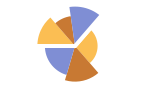
"Stacked" accumulate the data for each dataset - Possible settings for PlotLayout that show individual datasets in different panels include:
-
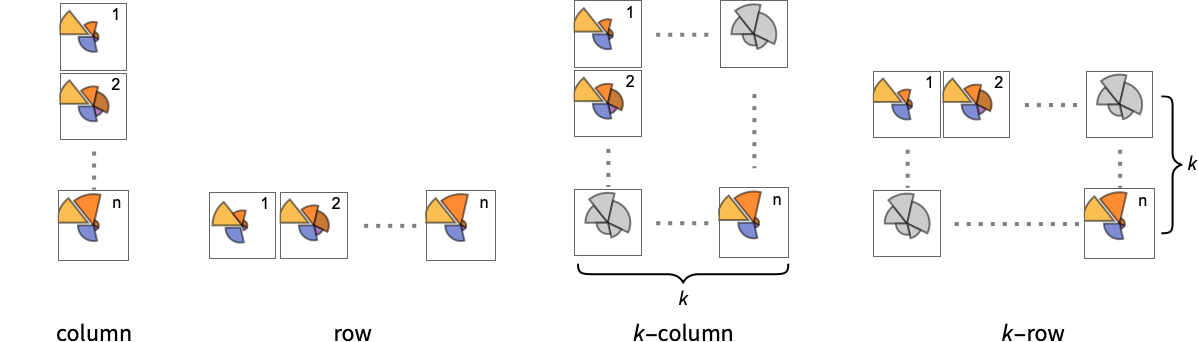
"Column" use separate group sectors in a column of panels "Row" use separate group sectors in a row of panels {"Column",k},{"Row",k} use k columns or rows {"Column",UpTo[k]},{"Row",UpTo[k]} use at most k columns or rows - Typical settings for PlotLegends include:
-
None no legend Automatic automatically determine legend {lbl1,lbl2,…} use lbl1, lbl2, … as legend labels Placed[lspec,…] specify placement for legend - PlotStylesty specifies the styles to use for each curve. Possible settings include:
-
{sty1,sty2,…} sequence of styles for the data <"key"val,…> styling elements for different levels of data - The accepted keys are:
-
"Base" overall style for all the bars "Elements" list of styles for the elements yi in each group "Groups" list of styles of each group of values datai - ColorData["DefaultChartColors"] gives the default sequence of colors used by PlotStyle.
- The arguments supplied to ChartElementFunction are the sector region {{θmin,θmax},{rmin,rmax}}, the values {xi,yi}, and the metadata {m1,m2,…} from each level in a nested list of datasets.
- A list of built-in settings for ChartElementFunction can be obtained from ChartElementData["SectorChart"].
- The arguments supplied to ColorFunction are θ and r, where θ is the angle of sector and r the radius.
- Style and other specifications from options and other constructs in SectorChart are effectively applied in the order PlotStyle, ColorFunction, Style and other wrappers, and ChartElementFunction, with later specifications overriding earlier ones.
List of all options
Examples
open all close allBasic Examples (4)
A sector chart with the second component representing the radial size:
SectorChart[{{1, 1}, {1, 2}, {1, 3}}]SectorChart[{{1, 1}, {1, 2}, {1, 3}}, SectorOrigin -> {Automatic, 1}]SectorChart[{{{1, 1}, {1, 2}, {1, 3}}, {{7, 3}, {5, 2}, {1, 1}}}]Show multiple sets as a row of sector charts:
SectorChart[{{{1, 1}, {1, 2}, {1, 3}}, {{7, 3}, {5, 2}, {1, 1}}}, ChartLayout -> "Row"]SectorChart[{{1, 1}, {1, 2}, {1, 3}}, PlotLabels -> {"a", "b", "c"}]SectorChart[{{1, 1}, {1, 2}, {1, 3}}, PlotLegends -> {"a", "b", "c"}]Scope (32)
Data and Layouts (13)
Items in a dataset are grouped together:
SectorChart[{{{1, 1}, {1, 2}, {1, 3}}, {{2, 1}, {2, 2}, {2, 3}}, {{3, 1}, {3, 2}, {3, 3}}}]Datasets do not need to have the same number of items:
SectorChart[{{{1, 2}, {2, 3}}, {{1, 1}, {2, 2}, {3, 3}}, {{1, 1}, {2, 2}, {3, 3}, {4, 4}}}]Nonreal data is taken to be missing and typically is ignored in the pie chart:
SectorChart[{{{1, 2}, {2, 3}}, {{1, 1}, {2, Missing[]}, {3, 3}}, {{1, 1}, {2, 2}, {foo, 3}, {4, 4}}}]SectorChart[{{Quantity[1, "Seconds"], Quantity[2, "Meters"]}, {Quantity[1, "Seconds"], Quantity[3, "Meters"]}, {Quantity[2, "Seconds"], Quantity[5, "Meters"]}, {Quantity[3, "Seconds"], Quantity[7, "Meters"]}, {Quantity[5, "Seconds"], Quantity[11, "Meters"]}}]The time stamps in TimeSeries, EventSeries, and TemporalData are ignored:
SectorChart[TimeSeries[{{19, 16}, {9, 3}, {7, 2}, {17, 5}}, {"May 24, 1982"}]]The values in associations are taken as the values of the sectors:
SectorChart[<|"a" -> {2, 3}, "b" -> {4, 6}, "c" -> {5, 8}, "d" -> {3, 7}|>]SectorChart[<|"a" -> {2, 3}, "b" -> {4, 6}, "c" -> {5, 8}, "d" -> {3, 7}|>, PlotLabels -> Placed[Automatic, "RadialCallout"]]SectorChart[<|"a" -> {2, 3}, "b" -> {4, 6}, "c" -> {5, 8}, "d" -> {3, 7}|>, PlotLabels -> Callout[Automatic]]SectorChart[<|"a" -> {2, 3}, "b" -> {4, 6}, "c" -> {5, 8}, "d" -> {3, 7}|>, PlotStyle -> {Hue[0.61, 0.7, 1], Hue[0.17, 0.4, 0.65], Hue[0.64, 0.5, 0.75], Hue[0.45, 0.4, 0.7]}, PlotLegends -> Automatic]SectorChart[<|"group a" -> <|"a" -> {1, 1}, "b" -> {2, 3}, "c" -> {5, 8}, "d" -> {3, 7}|>, "group b" -> <|"a" -> {1, 1}, "b" -> {3, 2}, "c" -> {5, 3}, "d" -> {7, 2}|>|>, PlotLegends -> Automatic]The weights in WeightedData are ignored:
SectorChart[WeightedData[{{1, 2}, {3, 4}, {5, 6}}, {0.5, 0.2, 0.1}]]Use different layouts to display multiple datasets:
Table[SectorChart[RandomInteger[{1, 4}, {2, 10, 2}], ChartLayout -> l], {l, {"Grouped", "Stacked"}}]SectorChart[{IconizedObject[«data #1»], IconizedObject[«data #2»], IconizedObject[«data #3»]}, ImageSize -> Medium, ChartLayout -> "Row"]Use a column of sector charts:
SectorChart[{IconizedObject[«data #1»], IconizedObject[«data #2»], IconizedObject[«data #3»]}, ImageSize -> Medium, ChartLayout -> "Column"]SectorChart[{IconizedObject[«data #1»], IconizedObject[«data #2»], IconizedObject[«data #3»], IconizedObject[«data #4»]}, ImageSize -> Medium, ChartLayout -> {"Row", 2}]Control the direction of sectors:
Table[SectorChart[{{1, 1}, {1, 2}, {2, 3}, {3, 2}}, SectorOrigin -> o, PlotLabel -> o], {o, {{Pi / 6, "Clockwise"}, {Pi / 6, "Counterclockwise"}}}]Control the starting angle of sectors:
Table[SectorChart[{{1, 1}, {1, 2}, {2, 3}, {3, 2}}, SectorOrigin -> o, PlotLabel -> o], {o, {0, Pi / 2}}]Control the starting radius of sectors:
Table[SectorChart[{{1, 1}, {1, 2}, {2, 3}, {3, 2}}, SectorOrigin -> o, PlotLabel -> o], {o, {{{0, "Clockwise"}, 0}, {{0, "Clockwise"}, 1}}}]Adjust the spacing between sectors and groups of sectors:
Table[SectorChart[{{{2, 1}, {3, 4}, {4, 2}, {3, 4}}, {{2, 2}, {2, 3}, {3, 2}, {4, 3}}}, SectorSpacing -> s, PlotLabel -> s], {s, {Automatic, {0, 1}, {0.1, 1}}}]Tabular Data (3)
tabdata = AggregateRows[Tabular[ResourceData["Sample Data: 1993 US Cars"]], {"AvgPrice" -> (Mean[#AvgPrice]&), "TotalCars" -> (Length[#AvgPrice]&), "AvgWeight" -> (Mean[#Weight]&), "AvgFuelTankCap" -> (Mean[#FuelTankCapacity]&)}, {"Type"}]Compare the average price of each group of cars with the number of cars:
SectorChart[tabdata -> {"TotalCars", "AvgPrice"}, PlotLabels -> Normal[tabdata[All, "Type"]]]Plot the values for all the components in TimeSeries or EventSeries:
SectorChart[TimeSeries[TimeEventSeries`TimestampData[Association["UniformlySpacedQ" -> True, "Count" -> 5,
   "Endpoints" -> TabularColumn[Association[
      "Data" -> {2, {{NumericArray[{20563, -2147483648}, "Integer32"], {},
          DataStructure["BitVec ... {{TabularColumn[Association["Data" -> {{1, 3, 5, 7, 8}, {}, None},
           "ElementType" -> "Integer64"]], TabularColumn[Association[
           "Data" -> {{13, 17, 18, 19, 19}, {}, None}, "ElementType" -> "Integer64"]]}}]]]],
 Association[]]]
Plot the values for a pair of components of a TimeSeries or EventSeries:
ts = TimeSeries[TimeEventSeries`TimestampData[Association["UniformlySpacedQ" -> True, "Count" -> 5,
   "Endpoints" -> TabularColumn[Association[
      "Data" -> {2, {{NumericArray[{20563, -2147483648}, "Integer32"], {},
          DataStructure["BitVec ... olumn[Association[
           "Data" -> {{10, 10, 14, 16, 18}, {}, None}, "ElementType" -> "Integer64"]],
         TabularColumn[Association["Data" -> {{13, 10, 6, 6, 6}, {}, None},
"ElementType" -> "Integer64"]]}}]]]], Association[]];SectorChart[ts -> {"a", "b"}]Plot values from multiple pairs of components:
SectorChart[ts -> {{"a", "b"}, {"a", "c"}}]Wrappers (4)
Use wrappers on individual data, datasets, or collections of datasets:
{{d1, d2, d3, d4}, {w1, w2, w3, w4}} = {{{2, 1}, {3, 4}, {4, 2}, {3, 4}}, {{2, 2}, {2, 3}, {3, 2}, {4, 3}}};{SectorChart[{{d1, Style[d2, RGBColor[0.93, 0.27, 0.27]], d3, d4}, {w1, w2, w3, w4}}], SectorChart[{Style[{d1, d2, d3, d4}, RGBColor[0.14, 0.8, 0.14]], {w1, w2, w3, w4}}], SectorChart[Style[{{d1, d2, d3, d4}, {w1, w2, w3, w4}}, RGBColor[0.4, 0.6, 1]]]}{SectorChart[{{d1, Style[d2, RGBColor[0.93, 0.27, 0.27]], d3, d4}, {w1, w2, w3, w4}}], SectorChart[{Style[{d1, Style[d2, RGBColor[0.93, 0.27, 0.27]], d3, d4}, RGBColor[0.14, 0.8, 0.14]], {w1, w2, w3, w4}}], SectorChart[Style[{Style[{d1, Style[d2, RGBColor[0.93, 0.27, 0.27]], d3, d4}, RGBColor[0.14, 0.8, 0.14]], {w1, w2, w3, w4}}, RGBColor[0.4, 0.6, 1]]]}Override the default tooltips:
SectorChart[{{1, 3}, {2, 1}, Tooltip[{3, 3}, "median"], {4, 2}}]Use any object in the tooltip:
SectorChart[Table[Tooltip[{QuantityMagnitude@CountryData[c, "Population"], QuantityMagnitude@CountryData[c, "LifeExpectancy"]}, CountryData[c, "Flag"]], {c, CountryData["G8"]}]]Use PopupWindow to provide additional dropdown information:
SectorChart[{{1, 3}, {2, 1}, PopupWindow[{3, 3}, DateListPlot[FinancialData["IBM", "Jan. 1, 2004"]]], {4, 2}}]Button can be used to trigger any action:
SectorChart[{{1, 3}, {2, 1}, Button[{3, 3}, Speak[3]], {4, 2}}]Styling and Appearance (5)
Use an explicit list of styles for the sectors:
SectorChart[{{1, 3}, {2, 1}, {3, 3}, {4, 2}}, PlotStyle -> {RGBColor[0.93, 0.27, 0.27], RGBColor[0.14, 0.8, 0.14], RGBColor[0.4, 0.6, 1], RGBColor[1, 0.75, 0]}]Use themes to control the overall appearance:
{SectorChart[{{1, 3}, {2, 1}, {3, 3}, {4, 2}}, PlotTheme -> "Web"], SectorChart[{{1, 3}, {2, 1}, {3, 3}, {4, 2}}, PlotTheme -> "Marketing"], SectorChart[{{1, 3}, {2, 1}, {3, 3}, {4, 2}}, PlotTheme -> "Monochrome"]}Use built-in programmatically generated sectors:
ChartElementData["SectorChart"]Table[SectorChart[{{1, 3}, {2, 1}, {3, 3}, {4, 2}}, ChartElementFunction -> f, PlotStyle -> {RGBColor[0.761959, 0.470832, 0.940597], RGBColor[0.927848, 0.742785, 0.6151383333333333], RGBColor[0.929162, 0.95034, 0.6648153333333333], RGBColor[0.431296, 0.709773, 0.927077]}], {f, {"NoiseSector", "PlateauSector"}}]For detailed settings, use Palettes ▶ ChartElementSchemes:
SectorChart[{{1, 3}, {2, 1}, {3, 3}, {4, 2}}, ChartElementFunction -> ChartElementDataFunction["GlassSector", "GradientDirection" -> "Angular"], PlotStyle -> {RGBColor[0.468742, 0., 0.0158236], RGBColor[0.871407, 0.20684366666666665, 0.013399966666666667], RGBColor[0.9899876666666667, 0.5566463333333334, 0.06420996666666667], RGBColor[1., 0.820127, 0.126955]}]Use a theme with dark background and bezel sectors:
SectorChart[{{1, 3}, {2, 2}, {3, 3}, {4, 2}}, PlotTheme -> "Marketing"]SectorChart[{{{4, 9}, {7, 4}, {4, 10}, {7, 4}, {4, 9}}, {{7, 4}, {5, 7}, {9, 8}, {8, 4}, {9, 4}}}, PlotTheme -> "Monochrome"]Labeling and Legending (7)
Use Labeled to add a label to a sector:
SectorChart[{{1, 3}, {2, 1}, Labeled[{3, 3}, "label"], {4, 2}}]Use symbolic positions for label placement:
Table[SectorChart[{{1, 3}, {2, 1}, Labeled[{3, 3}, "label", p], {4, 2}}, PlotLabel -> p, SectorOrigin -> {Automatic, 1}], {p, {"RadialInner", "RadialCenter", "RadialOuter"}}]Table[SectorChart[{{1, 3}, {2, 1}, Labeled[{3, 3}, "label", p], {4, 2}}, PlotLabel -> p, SectorOrigin -> {Automatic, 1}], {p, {"RadialInside", "RadialOutside"}}]Table[SectorChart[{Labeled[{1, 3}, "L1", p], Labeled[{2, 1}, "L2", p], Labeled[{3, 3}, "L3", p], Labeled[{4, 2}, "L4", p]}, PlotLabel -> p], {p, {"RadialCallout", "VerticalCallout"}}]Use Callout to add a label to a sector:
SectorChart[{{2, 1}, Callout[{2, 3}, "label"], {3, 4}}]Change the appearance of the callout:
SectorChart[{{2, 1}, Callout[{2, 3}, "label", Appearance -> "Balloon"], {3, 4}}]Automatically position callouts:
SectorChart[Callout[#, Unique["text"]]& /@ RandomReal[{0.3, 1}, {6, 2}]]Provide value labels for sectors by using LabelingFunction:
SectorChart[{{2, 1}, {2, 3}, {3, 4}, {4, 2}}, LabelingFunction -> "RadialOutside"]Generate callouts from the data:
SectorChart[RandomInteger[{3, 10}, {6, 2}], LabelingFunction -> (Callout[Style[Total@#, 10 + #[[2]]], Automatic]&)]Options (82)
AspectRatio (4)
By default, the ratio of the height to width for the plot is determined automatically:
SectorChart[{{1, 3}, {2, 1}, {3, 3}, {4, 2}}]Make the height the same as the width with AspectRatio1:
SectorChart[{{1, 3}, {2, 1}, {3, 3}, {4, 2}}, AspectRatio -> 1]Use a numerical value to specify the height-to-width ratio:
SectorChart[{{1, 3}, {2, 1}, {3, 3}, {4, 2}}, AspectRatio -> 1 / 2]AspectRatioFull adjusts the height and width to tightly fit inside other constructs:
plot = SectorChart[{{1, 3}, {2, 1}, {3, 3}, {4, 2}}, AspectRatio -> Full];{Framed[Pane[plot, {50, 100}]], Framed[Pane[plot, {100, 100}]], Framed[Pane[plot, {100, 50}]]}Axes (3)
By default, Axes are not drawn:
SectorChart[{{1, 3}, {2, 1}, {3, 3}, {4, 2}}]Use AxesTrue to turn on axes:
SectorChart[{{1, 3}, {2, 1}, {3, 3}, {4, 2}}, Axes -> True]Turn on each axis individually:
{SectorChart[{{1, 3}, {2, 1}, {3, 3}, {4, 2}}, Axes -> {True, False}], SectorChart[{{1, 3}, {2, 1}, {3, 3}, {4, 2}}, Axes -> {False, True}]}AxesLabel (3)
No axes labels are drawn by default:
SectorChart[{{1, 3}, {2, 1}, {3, 3}, {4, 2}}, Axes -> True]

SectorChart[{{1, 3}, {2, 1}, {3, 3}, {4, 2}}, Axes -> True, AxesLabel -> label]SectorChart[{{1, 3}, {2, 1}, {3, 3}, {4, 2}}, Axes -> True, AxesLabel -> {x, y}]AxesOrigin (2)
AxesStyle (3)
Change the style for the axes:
SectorChart[{{1, 3}, {2, 1}, {3, 3}, {4, 2}}, Axes -> True, AxesStyle -> RGBColor[0.93, 0.27, 0.27]]Specify the style of each axis:
SectorChart[{{1, 3}, {2, 1}, {3, 3}, {4, 2}}, Axes -> True, AxesStyle -> {{Thick, RGBColor[0.93, 0.27, 0.27]}, {Thick, RGBColor[0.4, 0.6, 1]}}]Use different styles for the ticks and the axes:
SectorChart[{{1, 3}, {2, 1}, {3, 3}, {4, 2}}, Axes -> True, AxesStyle -> RGBColor[0.14, 0.8, 0.14], TicksStyle -> RGBColor[0.93, 0.27, 0.27]]ChartElementFunction (5)
Get a list of built-in settings for ChartElementFunction:
ChartElementData["SectorChart"]For detailed settings, use Palettes ▶ ChartElementSchemes:
Table[SectorChart[Tuples[{1, 2}, 2], ChartElementFunction -> f, PlotStyle -> {RGBColor[0.761959, 0.470832, 0.940597], RGBColor[0.927848, 0.742785, 0.6151383333333333], RGBColor[0.929162, 0.95034, 0.6648153333333333], RGBColor[0.431296, 0.709773, 0.927077]}, PlotLabel -> f], {f, {"Sector", "PlateauSector"}}]Table[SectorChart[Tuples[{1, 2}, 2], ChartElementFunction -> f, PlotStyle -> {RGBColor[0.761959, 0.470832, 0.940597], RGBColor[0.927848, 0.742785, 0.6151383333333333], RGBColor[0.929162, 0.95034, 0.6648153333333333], RGBColor[0.431296, 0.709773, 0.927077]}, PlotLabel -> f], {f, {"NoiseSector", "OscillatingSector"}}]Table[SectorChart[Tuples[{1, 2}, 2], ChartElementFunction -> f, PlotStyle -> {RGBColor[0.761959, 0.470832, 0.940597], RGBColor[0.927848, 0.742785, 0.6151383333333333], RGBColor[0.929162, 0.95034, 0.6648153333333333], RGBColor[0.431296, 0.709773, 0.927077]}, PlotLabel -> f], {f, {"SquareWaveSector", "TriangleWaveSector"}}]Table[SectorChart[Tuples[{1, 2}, 2], ChartElementFunction -> f, PlotStyle -> {RGBColor[0.761959, 0.470832, 0.940597], RGBColor[0.927848, 0.742785, 0.6151383333333333], RGBColor[0.929162, 0.95034, 0.6648153333333333], RGBColor[0.431296, 0.709773, 0.927077]}, PlotLabel -> f], {f, {"GlassSector", "GradientSector"}}]Use ChartElementData to specify the same chart element rendering function as above:
SectorChart[Tuples[{1, 2}, 2], ChartElementFunction -> Function[{angleRadiusMinMax, yr, meta}, ChartElementData["TriangleWaveSector"][angleRadiusMinMax, yr, meta]]]Write a custom ChartElementFunction:
f[{{t0_, t1_}, {r0_, r1_}}, ___] := Disk[{0, 0}, r1, {t0, t1}]SectorChart[Tuples[{1, 2}, 2], ChartElementFunction -> f]Use metadata passed on from the input, in this case charting the data:
DataDrilldownSector[{{t0_, t1_}, {r0_, r1_}}, y_, {data_List}] :=
PopupWindow[ChartElementData["NoiseSector"][{{t0, t1}, {r0, r1}}, y], BarChart[data]]DataDrilldownSector[{{t0_, t1_}, {r0_, r1_}}, y_, _] :=
ChartElementData["Sector"][{{t0, t1}, {r0, r1}}, y]SectorChart[{{1, 1} -> Range[5], {1, 2}, {2, 1} -> RandomReal[1, 10], {2, 2}}, ChartElementFunction -> DataDrilldownSector]ColorFunction (4)
SectorChart[Table[{Exp[-t ^ 2], Exp[-t ^ 2]}, {t, -2, 2, 0.25}], ColorFunction -> Function[{angle, radius}, ColorData["Rainbow"][angle]]]Use ColorFunctionScaling->False to get unscaled angular values:
SectorChart[Tuples[{1, 2}, 2], ColorFunction -> (Switch[{#1, #2}, {1, 1}, RGBColor[1, 0.75, 0], {1, 2}, RGBColor[0.98, 0.56, 0.17], {2, 1}, RGBColor[0.93, 0.27, 0.27], _, RGBColor[0.4, 0.6, 1]]&), ColorFunctionScaling -> False]SectorChart[{{1, 1}, {1, 2}, {2, 1}, {2, 2}}, ColorFunction -> Function[{angle, radius}, ColorData["Rainbow"][angle radius / 4]], ColorFunctionScaling -> False]ColorFunction overrides styles in PlotStyle:
SectorChart[Tuples[{1, 2, 3}, 2], PlotStyle -> {RGBColor[0.93, 0.27, 0.27], RGBColor[0.14, 0.8, 0.14], RGBColor[0.67, 0.54, 0.42]}, ColorFunction -> "Pastel"]Use ColorFunction to combine different style effects:
SectorChart[Table[{Exp[-t ^ 2], Exp[-t ^ 2]}, {t, -2, 2, 0.25}], ColorFunction -> Function[{angle, radius}, Opacity[radius]], PlotStyle -> RGBColor[0.8, 0.3, 0.8]]ColorFunctionScaling (2)
Use ColorFunctionScaling->False to get unscaled height values:
SectorChart[Tuples[{1, 2}, 2], ColorFunction -> (Switch[{#1, #2}, {1, 1}, RGBColor[1, 0.75, 0], {1, 2}, RGBColor[0.98, 0.56, 0.17], {2, 1}, RGBColor[0.93, 0.27, 0.27], _, RGBColor[0.4, 0.6, 1]]&), ColorFunctionScaling -> False]SectorChart[{{1, 1}, {1, 2}, {2, 1}, {2, 2}}, ColorFunction -> Function[{angle, radius}, ColorData["Rainbow"][angle radius / 4]], ColorFunctionScaling -> False]Frame (4)
SectorChart doesn't use a frame by default:
SectorChart[{{1, 3}, {2, 1}, {3, 3}, {4, 2}}]Use FrameTrue to draw a frame around the chart:
SectorChart[{{1, 3}, {2, 1}, {3, 3}, {4, 2}}, Frame -> True]Draw a frame on the left and right edges:
SectorChart[{{1, 3}, {2, 1}, {3, 3}, {4, 2}}, Frame -> {{True, True}, {False, False}}]Draw a frame on the left and bottom edges:
SectorChart[{{1, 3}, {2, 1}, {3, 3}, {4, 2}}, Frame -> {{True, False}, {True, False}}]FrameLabel (4)
Place a label along the bottom frame of a chart:
SectorChart[{{1, 3}, {2, 1}, {3, 3}, {4, 2}}, Frame -> True, FrameLabel -> {"label"}]Frame labels are placed on the bottom and left frame edges by default:
SectorChart[{{1, 3}, {2, 1}, {3, 3}, {4, 2}}, Frame -> True, FrameLabel -> {"bottom", "left"}]Place labels on each of the edges in the frame:
SectorChart[{{1, 3}, {2, 1}, {3, 3}, {4, 2}}, Frame -> True, FrameLabel -> {{"left", "right"}, {"bottom", "top"}}]Use a customized style for both labels & frame tick labels:
SectorChart[{{1, 3}, {2, 1}, {3, 3}, {4, 2}}, Frame -> True, FrameLabel -> {{"left", "right"}, {"bottom", "top"}}, LabelStyle -> Directive[Bold, RGBColor[0.67, 0.54, 0.42]]]FrameStyle (2)
Specify the style of the frame:
SectorChart[{{1, 3}, {2, 1}, {3, 3}, {4, 2}}, Frame -> True, FrameStyle -> Directive[RGBColor[0.67, 0.54, 0.42], Thick]]Specify the style for each frame edge:
SectorChart[{{1, 3}, {2, 1}, {3, 3}, {4, 2}}, Frame -> True, FrameStyle -> {{Directive[RGBColor[0.14, 0.8, 0.14], Thick], RGBColor[0.93, 0.27, 0.27]}, {Directive[GrayLevel[0.62], Thick], RGBColor[0.4, 0.6, 1]}}]ImageSize (7)
Use named sizes, such as Tiny, Small, Medium and Large:
{SectorChart[{{1, 1}, {1, 2}, {1, 3}}, ImageSize -> Tiny], SectorChart[{{1, 1}, {1, 2}, {1, 3}}, ImageSize -> Small]}Specify the width of the plot:
SectorChart[{{1, 1}, {1, 2}, {1, 3}}, ImageSize -> 150]Specify the height of the plot:
SectorChart[{{1, 1}, {1, 2}, {1, 3}}, ImageSize -> {Automatic, 150}]Allow the width and height to be up to a certain size:
SectorChart[{{1, 1}, {1, 2}, {1, 3}}, ImageSize -> UpTo[200]]Specify the width and height for a graphic, padding with space if necessary:
SectorChart[{{1, 1}, {1, 2}, {1, 3}}, ImageSize -> {200, 250}, Background -> LightBlue]Use maximum sizes for the width and height:
SectorChart[{{1, 1}, {1, 2}, {1, 3}}, ImageSize -> {UpTo[250], UpTo[200]}]Use ImageSizeFull to fill the available space in an object:
chart = SectorChart[{{1, 1}, {1, 2}, {1, 3}}, ImageSize -> Full];{Framed[Pane[chart, {100, 100}]], Framed[Pane[chart, {200, 200}]]}Specify the image size as a fraction of the available space:
Framed[Pane[SectorChart[{{1, 1}, {1, 2}, {1, 3}}, ImageSize -> {Scaled[0.5], Scaled[0.5]}, Background -> LightBlue], {200, 100}]]LabelingFunction (8)
Use automatic labeling by values through Tooltip and StatusArea:
SectorChart[{{1, 1}, {1, 2}, {2, 3}, {3, 2}}, LabelingFunction -> Automatic]SectorChart[{{1, 1}, {1, 2}, {2, 3}, {3, 2}}, LabelingFunction -> None]Use Placed to control label placement:
Table[SectorChart[{{1, 1}, {1, 2}, {2, 3}, {3, 2}}, LabelingFunction -> (Placed[#, p]&), PlotLabel -> p, Ticks -> None], {p, {"RadialInner", "RadialCenter", "RadialOuter"}}]Symbolic positions outside the sector:
Table[SectorChart[{{1, 1}, {1, 2}, {2, 3}, {3, 2}}, SectorOrigin -> {Automatic, 4}, LabelingFunction -> (Placed[#, p]&), PlotLabel -> p], {p, {"RadialInside", "RadialOutside", "RadialEdge"}}]Table[SectorChart[{{1, 1}, {1, 2}, {2, 3}, {3, 2}}, LabelingFunction -> (Placed[#, p]&), PlotLabel -> p], {p, {"RadialCallout", "VerticalCallout"}}]Coordinate-based placement relative to a bar:
Table[SectorChart[{{1, 1}, {1, 2}, {2, 3}, {3, 2}}, LabelingFunction -> (Placed[#, p]&), PlotLabel -> p, SectorOrigin -> {Automatic, 2}], {p, {{0.1, 0.1}, {1 / 2, 1 / 2}, {1, 1}}}]Use Callout to place labels automatically:
SectorChart[{{1, 1}, {1, 2}, {2, 3}, {3, 2}}, LabelingFunction -> (Callout[Row[{"$", NumberForm[#[[2]], {2, 2}]}], Automatic]&)]Control the formatting of labels:
SectorChart[{{1, 1}, {1, 2}, {2, 3}, {3, 2}}, LabelingFunction -> (Placed[Row[{"$", #[[1]]}, " "], "RadialOutside"]&)]Use the given chart labels as arguments to the labeling function:
data = {{{1, 1}, {1, 2}, {2, 3}, {3, 2}}, {{1, 1}, {2, 2}, {2, 3}}};SectorChart[data, PlotLabels -> {{"r1", "r2"}, {"c1", "c2", "c3"}}, LabelingFunction -> (Placed[Row[{#3[[1, 1]], #3[[2, 1]], #1}, ","], Tooltip]&)]LabelingSize (3)
Textual labels are shown at their actual sizes:
SectorChart[{{1, 1}, {1, 2}, {2, 3}, {3, 2}}, PlotLabels -> {"healthfulness", "obstreperous", "spectrogram", "vestige"}]Image labels are automatically resized:
SectorChart[{{1, 1}, {1, 2}, {2, 3}, {3, 2}}, PlotLabels -> {[image], [image], [image], [image], [image], [image], [image]}]Specify a maximum size for textual labels:
SectorChart[{{1, 1}, {1, 2}, {2, 3}, {3, 2}}, PlotLabels -> {"healthfulness", "obstreperous", "spectrogram", "vestige"}, LabelingSize -> 50]PlotInteractivity (4)
Charts with a moderate number of sectors automatically have tooltips and mouseover effects:
SectorChart[{{1, 1}, {2, 1}, {2, 2}}]Turn off all the interactive elements:
SectorChart[{{1, 1}, {2, 1}, {2, 2}}, PlotInteractivity -> False]Interactive elements provided as part of the input are disabled:
SectorChart[{{1, 1}, {2, 1}, Tooltip[{2, 2}, "Hello"]}, PlotInteractivity -> False]Allow provided interactive elements and disable automatic ones:
SectorChart[{{1, 1}, {2, 1}, Tooltip[{2, 2}, "Hello"]}, PlotInteractivity -> <|"User" -> True, "System" -> False|>]PlotLabels (8)
By default, labels are placed radially centered:
SectorChart[{{1, 1}, {1, 2}, {2, 3}, {3, 2}}, PlotLabels -> {"a", "b", "c", "d"}]SectorChart[{{{1, 2}, {1, 3}, {1, 2}}, {{2, 2}, {1, 1}, {3, 2}}}, PlotLabels -> {"a", "b"}]Labeled wrappers in data will place additional labels:
SectorChart[{{1, 1}, Labeled[{1, 2}, "label", "RadialOutside"], {2, 3}, {3, 2}}, PlotLabels -> {"a", "b", "c", "d"}]Use Placed to control label placement:
Table[SectorChart[{{1, 1}, {1, 2}, {2, 3}, {3, 2}}, PlotLabels -> Placed[{"a", "b", "c", "d"}, p], PlotLabel -> p], {p, {"RadialInner", "RadialCenter", "RadialOuter"}}]Table[SectorChart[{{1, 1}, {1, 2}, {2, 3}, {3, 2}}, SectorOrigin -> {Automatic, 1}, PlotLabels -> Placed[{"a", "b", "c", "d"}, p], PlotLabel -> p, Ticks -> None], {p, {"RadialInside", "RadialOutside", "RadialEdge"}}]Table[SectorChart[{{1, 1}, {1, 2}, {2, 3}, {3, 2}}, SectorOrigin -> {Automatic, 1}, PlotLabels -> Placed[{"a", "b", "c", "d"}, p], PlotLabel -> p, Ticks -> None], {p, {"RadialCallout", "VerticalCallout"}}]Coordinate-based placement relative to a sector:
Table[SectorChart[{{1, 1}, {1, 2}, {2, 3}, {3, 2}}, SectorOrigin -> {Automatic, 1}, PlotLabels -> Placed[{"aa", "bb", "cc"}, p], Ticks -> None, PlotLabel -> p], {p, {{0.1, 0.1}, {1 / 2, 1 / 2}, {1, 1}}}]Place all labels at the first outer corner and vary the coordinates within the label:
Table[SectorChart[{{1, 1}, {1, 2}, {2, 3}, {3, 2}}, PlotRange -> 2.8, SectorOrigin -> {Automatic, 1}, PlotLabels -> Placed[Framed /@ {"aa", "bb", "cc"}, {{1, 1}, p}], Ticks -> None, PlotLabel -> p], {p, {{0.1, 0.1}, {1 / 2, 1 / 2}, {1, 1}}}]Use the third argument to Placed to control formatting:
SectorChart[{{1, 1}, {1, 2}, {2, 3}, {3, 2}}, PlotLabels -> Placed[{"aaa", "bbb", "ccc", "ddd"}, "RadialCenter", Rotate[#, 45Degree]&]]SectorChart[{{1, 1}, {1, 2}, {2, 3}, {3, 2}}, PlotLabels -> Placed[{"aaa", "bbb", "ccc", "ddd"}, "RadialCenter", Panel[#, FrameMargins -> 0]&]]SectorChart[{{1, 1}, {1, 2}, {2, 3}, {3, 2}}, PlotLabels -> Placed[{"aaa", "bbb", "ccc", "ddd"}, "RadialCenter", Hyperlink[#, "http://www.wolfram.com"]&]]By default, labels are associated with rows of data:
SectorChart[{{{1, 1}, {1, 2}, {2, 3}}, {{3, 2}, {1, 2}, {2, 3}}}, PlotLabels -> {"r1", "r2"}]Associate labels with rows or datasets:
SectorChart[{{{1, 1}, {1, 2}, {2, 3}}, {{3, 2}, {1, 2}, {2, 3}}}, PlotLabels -> <|"Elements" -> {"c1", "c2", "c3"}|>]SectorChart[{{{1, 1}, {1, 2}, {2, 3}}, {{3, 2}, {1, 2}, {2, 3}}}, PlotLabels -> <|"Groups" -> {"r1", "r2"}, "Elements" -> {"c1", "c2", "c3"}|>]Use Placed to affect placements:
SectorChart[{{{1, 1}, {1, 2}, {2, 3}}, {{3, 2}, {1, 2}, {2, 3}}}, PlotLabels -> <|"Groups" -> Placed[{"r1", "r2"}, "VerticalCallout"], "Elements" -> Placed[{"c1", "c2", "c3"}, "RadialCenter"]|>]Use Callout to connect the labels to the sectors:
SectorChart[{{{1, 1}, {1, 2}, {2, 3}}, {{3, 2}, {1, 2}, {2, 3}}}, PlotLabels -> <|"Elements" -> Callout[{"c1", "c2", "c3"}, Automatic]|>]SectorChart[{{1, 1}, {1, 2}, {2, 3}}, PlotLabels -> Placed[{{"a", "b", "c"}, {"x", "y", "z"}}, {"RadialCenter", "RadialCallout"}]]PlotLayout (4)
PlotLayout is grouped by default in concentric rings:
data = {{{1, 1}, {1, 2}, {2, 3}, {3, 2}}, {{1, 1}, {2, 2}, {2, 3}}};{SectorChart[data], SectorChart[data, PlotLayout -> "Grouped"]}data = {{{1, 1}, {1, 2}, {2, 3}, {3, 2}}, {{1, 1}, {2, 2}, {2, 3}}};SectorChart[data, PlotLayout -> "Stacked"]The stacked layout can display many datasets:
SectorChart[RandomReal[1, {10, 5, 2}], PlotLayout -> "Stacked"]Place each of the sectors in a separate panel using shared scales:
SectorChart[{{{1, 6}, {1, 4}, {2, 7}, {1, 6}, {2, 8}}, {{1, 4}, {1, 3}, {2, 10}, {1, 6}, {2, 4}}, {{1, 8}, {1, 3}, {2, 8}, {1, 7}, {2, 6}}}, ImageSize -> Medium, PlotLayout -> "Column"]Use a row instead of a column:
SectorChart[{{{1, 6}, {1, 4}, {2, 7}, {1, 6}, {2, 8}}, {{1, 6}, {1, 3}, {2, 10}, {1, 6}, {2, 4}}, {{1, 8}, {1, 3}, {2, 8}, {1, 7}, {2, 6}}}, ImageSize -> Medium, PlotLayout -> "Row"]SectorChart[{IconizedObject[«data #1»], IconizedObject[«data #2»], IconizedObject[«data #3»], IconizedObject[«data #4»], IconizedObject[«data #5»], IconizedObject[«data #6»]}, ImageSize -> Medium, PlotLayout -> {"Column", 4}]SectorChart[{IconizedObject[«data #1»], IconizedObject[«data #2»], IconizedObject[«data #3»], IconizedObject[«data #4»], IconizedObject[«data #5»], IconizedObject[«data #6»]}, ImageSize -> Medium, PlotLayout -> {"Column", UpTo[4]}]PlotLegends (7)
Add categorical legend entries for the columns of data:
SectorChart[{{{1, 1}, {1, 2}, {2, 3}}, {{3, 2}, {1, 2}, {2, 3}}}, PlotLegends -> <|"Elements" -> {"ccc1", "ccc2", "ccc3"}|>, PlotStyle -> <|"Elements" -> {RGBColor[0.761959, 0.470832, 0.940597], RGBColor[0.9584254999999999, 0.877884, 0.5906629999999999], RGBColor[0.431296, 0.709773, 0.927077]}|>]SectorChart[{{{1, 1}, {1, 2}, {2, 3}}, {{3, 2}, {1, 2}, {2, 3}}}, PlotLegends -> <|"Groups" -> {"rr1", "rr2"}|>, PlotStyle -> <|"Groups" -> {RGBColor[0.761959, 0.470832, 0.940597], RGBColor[0.431296, 0.709773, 0.927077]}|>]Use Legended to add additional legend entries:
SectorChart[{{{1, 1}, Legended[Style[{1, 2}, RGBColor[0.93, 0.27, 0.27]], "aa"], {2, 3}}, {{3, 2}, {1, 2}, {2, 3}}}, PlotStyle -> <|"Elements" -> {RGBColor[0.761959, 0.470832, 0.940597], RGBColor[0.9584254999999999, 0.877884, 0.5906629999999999], RGBColor[0.431296, 0.709773, 0.927077]}|>, PlotLegends -> <|"Elements" -> {"ccc1", "ccc2", "ccc3"}|>]Use Legended to specify individual legend entries:
SectorChart[{{2, 3}, Legended[{2, 3}, "aa"], {3, 2}, {1, 1}, Legended[{1, 2}, "bb"], {1, 2}}, PlotStyle -> <|"Elements" -> {RGBColor[0.761959, 0.470832, 0.940597], RGBColor[0.8750956, 0.6580038, 0.746929], RGBColor[0.9440982, 0.7955892, 0.5942686], RGBColor[0.9537862, 0.937389, 0.6180996], RGBColor[0.7952328000000001, 0.8988539999999999, 0.8302508], RGBColor[0.431296, 0.709773, 0.927077]}|>]Generate a legend for datasets:
SectorChart[{{{1, 1}, {1, 2}, {3, 2}}, {{1, 1}, {2, 2}, {2, 3}}}, PlotLegends -> {"Group A", "Group B"}, PlotStyle -> <|"Groups" -> {RGBColor[0.761959, 0.470832, 0.940597], RGBColor[0.431296, 0.709773, 0.927077]}|>]Unused legend labels are dropped:
SectorChart[{{{1, 1}, {1, 2}, {2, 3}, {3, 2}}, {{1, 1}, {2, 2}, {2, 3}}}, PlotLegends -> {"Group A", "Group B", "Group C"}, PlotStyle -> <|"Groups" -> {RGBColor[0.761959, 0.470832, 0.940597], RGBColor[0.431296, 0.709773, 0.927077]}|>]Legends can be applied to several dimensions:
SectorChart[{{{1, 1}, {1, 2}, {2, 3}, {3, 2}}, {{1, 1}, {2, 2}, {2, 3}}}, PlotLegends -> <|"Groups" -> {"Test A", "Test B"}, "Elements" -> {"John", "Mary", "Bob"}|>, PlotStyle -> <|"Groups" -> {EdgeForm[Directive[RGBColor[0.93, 0.27, 0.27], Thickness[0.01]]], EdgeForm[Dashed]}, "Elements" -> {RGBColor[0.761959, 0.470832, 0.940597], RGBColor[0.9584254999999999, 0.877884, 0.5906629999999999], RGBColor[0.431296, 0.709773, 0.927077]}|>]Use Placed to control the placement of legends:
Table[SectorChart[{{{1, 1}, {1, 2}, {2, 3}, {3, 2}}, {{1, 1}, {2, 2}, {2, 3}}}, PlotLegends -> Placed[{"John", "Mary", "Bob"}, pos], PlotStyle -> {RGBColor[0.761959, 0.470832, 0.940597], RGBColor[0.431296, 0.709773, 0.927077]}], {pos, {Before, Below}}]PlotStyle (5)
Use PlotStyle to style sectors:
SectorChart[{{1, 1}, {1, 2}, {2, 3}, {3, 2}}, PlotStyle -> {RGBColor[0.93, 0.27, 0.27], RGBColor[0.14, 0.8, 0.14], RGBColor[0.4, 0.6, 1], RGBColor[1, 0.75, 0]}]SectorChart[{{1, 1}, {1, 2}, {2, 3}, {3, 2}}, PlotStyle -> Directive[Opacity[0.7], EdgeForm[Dashed]]]SectorChart[{{{1, 1}, {1, 2}, {2, 3}, {3, 2}}, {{1, 1}, {2, 2}, {2, 3}}}, PlotStyle -> {RGBColor[0.93, 0.27, 0.27], RGBColor[0.4, 0.6, 1]}]SectorChart[{{{1, 2}, {2, 2}, {2, 3}}, {{1, 1}, {2, 2}, {2, 1}}}, PlotStyle -> <|"Elements" -> {RGBColor[0.93, 0.27, 0.27], RGBColor[0.14, 0.8, 0.14], RGBColor[0.4, 0.6, 1]}|>]SectorChart[{{{1, 1}, {1, 2}, {2, 3}, {3, 2}}, {{1, 1}, {2, 2}, {2, 3}}}, PlotStyle -> <|"Groups" -> {RGBColor[0.93, 0.27, 0.27], RGBColor[0.14, 0.8, 0.14]}|>]Style base, rows and columns of data:
SectorChart[{{{1, 1}, {1, 2}, {2, 3}, {3, 2}}, {{1, 1}, {2, 2}, {2, 3}}}, PlotStyle -> <|"Base" -> EdgeForm[{Thick, Dashed}], "Groups" -> {Opacity[0.5], Opacity[0.9]}, "Elements" -> {RGBColor[0.93, 0.27, 0.27], RGBColor[0.14, 0.8, 0.14], RGBColor[0.4, 0.6, 1]}|>]PlotStyle combines with Style:
SectorChart[{{1, 2}, Style[{1, 3}, EdgeForm[Dashed]], {1, 1}, {2, 2}}, PlotStyle -> {RGBColor[0.93, 0.27, 0.27], RGBColor[0.14, 0.8, 0.14], RGBColor[0.4, 0.6, 1], RGBColor[1, 0.75, 0]}]Style may override settings for PlotStyle:
SectorChart[{{1, 2}, Style[{1, 3}, EdgeForm[None]], {1, 1}, {2, 2}}, PlotStyle -> EdgeForm[{Thick, Dashed}]]"Elements" or "Groups" may override "Base" settings:
SectorChart[{{{1, 1}, {1, 2}, {2, 3}, {3, 2}}, {{1, 1}, {2, 2}, {2, 3}}}, PlotStyle -> <|"Base" -> EdgeForm[None], "Elements" -> EdgeForm[Dashed]|>]ColorFunction may override settings for PlotStyle:
SectorChart[{{1, 1}, {1, 2}, {2, 3}, {3, 2}}, PlotStyle -> EdgeForm[Dashed], ColorFunction -> (EdgeForm[None]&)]Use ColorFunction to combine different style effects:
SectorChart[{{1, 1}, {1, 2}, {2, 3}, {3, 2}}, PlotStyle -> EdgeForm /@ {Dashed, Dotted, DotDashed}, ColorFunction -> (Blend[{LightBlue, LightRed}, #]&)]SectorChart[RandomReal[{0.4, 1}, {3, 8, 2}], PlotStyle -> <|"Groups" -> "Rainbow"|>, ChartLayout -> "Grouped", ColorFunction -> Function[{height}, Opacity[height]]]PieChart[{{1, 2, 3, 4, 5}, {1, 2, 3}}, ChartElementFunction -> "TriangleWaveSector", PlotStyle -> {RGBColor[0.761959, 0.470832, 0.940597], RGBColor[0.431296, 0.709773, 0.927077]}]Applications (3)
Click on the sectors to hear the name of the country, its GDP per capita, and population:
countries = {"Sweden", "Portugal", "Bulgaria", "Slovenia", "Austria"};
properties = {"GDPPerCapita", "Population"};data = Table[With[{v = cp}, Button[v[[2 ;; 3]], Speak[StringJoin[ToString /@ {v[[1]], ", GDP per capita: $", Round[v[[2]]], ", Population: ", Round[v[[3]]]}]]]], {cp, Table[Prepend[QuantityMagnitude@Table[CountryData[c, p], {p, properties}], c], {c, countries}]}];SectorChart[data, AxesLabel -> properties, PlotLabels -> Placed[countries, Tooltip]]countries = CountryData["G8"];
gdp = CountryData[#, {"GDP", 2006}]& /@ countries;
gdpPerCapita = CountryData[#, {"GDPPerCapita", 2006}]& /@ countries;
population = CountryData[#, {"Population", 2006}]& /@ countries;
data = Transpose[{population, gdpPerCapita}];
dollarForm[a_] := NumberForm[a, {10, 2}, NumberPadding -> {"", "0"}]Add a fancy Tooltip label for each sector:
labeler = (Placed[#, Tooltip, Style[Column[{Row[{"GDP (Area): ", dollarForm[First@# * Last@#]}], Row[{"Population (Angle): ", First@#}], Row[{"GDP Per Capita (Radius): ", dollarForm[First@#]}]}, Alignment -> {Left, Bottom}, Frame -> True], 14, FontFamily -> "Helvetica"]&]&);SectorChart[data, SectorOrigin -> {Automatic, 10000}, LabelingFunction -> labeler, PlotStyle -> <|"Elements" -> 2|>, PlotLabels -> Placed[EntityValue[countries, "Name"], "RadialCallout", Style[#, 12, FontFamily -> "Helvetica", Darker@Brown]&], Epilog -> Text[Style["GDP", 12, Bold, Darker[Brown], FontFamily -> "Helvetica"]], PlotLabel -> Style["Visualizing GDP Per Capita", 14, Bold, FontFamily -> "Helvetica", Darker@Brown], PlotRange -> All, PlotLegends -> Placed[Style[dollarForm[#], FontFamily -> "Helvetica"]& /@ gdp, After]]Wind direction from WeatherData ranges from 0° to 360°:
WeatherData["KCMI", "WindDirection"]WeatherData["KCMI", "WindDirection", "Units"]Get wind direction data for Willard Airport (CMI) in Champaign, Illinois:
data = WeatherData["KCMI", "WindDirection", {{2007, 11, 1}, {2008, 11, 1}}]["Values"];data = DeleteCases[data, _Missing];Define a chart element function that stores bin width and count data using Sow:
sowingBar[{{x0_, x1_}, {y0_, y1_}}, __] := (Sow[{x1 - x0, 100 * (y1 - y0)}];Rectangle[{x0, y0}, {x1, y1}])Create a histogram of the wind directions, and store the bin width and frequencies:
{histogram, newdata} = Reap[Histogram[data, Automatic, "Probability", ChartElementFunction -> sowingBar]];histogramCreate a polar histogram of the wind direction frequencies:
SectorChart[newdata, SectorOrigin -> {Pi / 2, "Clockwise"}, PolarAxes -> True, PolarGridLines -> Automatic, PolarTicks -> {"Direction", Automatic}, PlotStyle -> <|"Elements" -> Directive[Opacity[1], EdgeForm[Thin]]|>]Properties & Relations (4)
SectorChart is a generalization of PieChart:
{SectorChart[{{1, 1}, {2, 1}, {3, 1}}], PieChart[{1, 2, 3}]}Use SectorChart3D to render sectors in 3D:
SectorChart3D[{{2, 2, 3}, {2, 1, 2}, {1, 2, 1}}]Use RectangleChart to render pairs as bars:
RectangleChart[{{1, 1}, {2, 2}, {3, 1}}]Use ListPlot and ListLinePlot to produce line graphs from pairs of numbers:
{ListPlot[Table[{i, i ^ 2}, {i, 10}], Filling -> Axis], ListLinePlot[Table[{i, i ^ 2}, {i, 10}]]}Neat Examples (3)
SectorChart[RandomReal[10, {10, 2}], PolarAxes -> True, PolarGridLines -> Automatic, PolarTicks -> {Automatic, Table[{i, "A " ~~ ToString[i], {0.1, 0.6}}, {i, 0, 10, 2}]}, TicksStyle -> {Directive[Darker[RGBColor[0.14, 0.8, 0.14]], 12, Bold], Directive[GrayLevel[0.62], 12, Bold]}]Detailed chart using grid lines:
SectorChart[RandomReal[1, {20, 2}], PolarAxes -> True, PolarGridLines -> Automatic, GridLinesStyle -> Directive[Dashed, RGBColor[0.98, 0.56, 0.17]], PolarAxesOrigin -> {{Top, Right}, Automatic}]SectorChart[RandomReal[10, {10, 300, 2}], ColorFunction -> "DeepSeaColors", PerformanceGoal -> "Speed", Background -> GrayLevel[0.62], PlotStyle -> <|"Base" -> EdgeForm[None]|>]Text
Wolfram Research (2008), SectorChart, Wolfram Language function, https://reference.wolfram.com/language/ref/SectorChart.html (updated 2026).
CMS
Wolfram Language. 2008. "SectorChart." Wolfram Language & System Documentation Center. Wolfram Research. Last Modified 2026. https://reference.wolfram.com/language/ref/SectorChart.html.
APA
Wolfram Language. (2008). SectorChart. Wolfram Language & System Documentation Center. Retrieved from https://reference.wolfram.com/language/ref/SectorChart.html