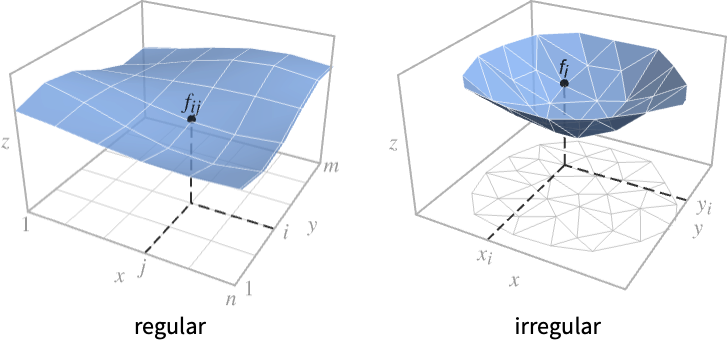
ListPlot3D[{{f11,…,f1n},…,{fm1,…,fmn}}]
generates a surface with height fij at  position {j,i}.
ListPlot3D[{{x1,y1,f1},…,{xk,yk,fk}}]
generates a surface with height fi at  position {xi,yi}.




ListPlot3D
ListPlot3D[{{f11,…,f1n},…,{fm1,…,fmn}}]
generates a surface with height fij at  position {j,i}.
ListPlot3D[{{x1,y1,f1},…,{xk,yk,fk}}]
generates a surface with height fi at  position {xi,yi}.
ListPlot3D[{data1,data2,…}]
plots the surfaces corresponding to each of the datai.
Details and Options
- ListPlot3D is also known as a 3D surface plot.
- Regular data {{f11,…,f1n},…,{fm1,…,fmn}} is plotted as a height f[x,y] at the point {x,y} with f[j,i] having value fij.
- Irregular data {{x1,y1,f1},…,{xn,yn,zn}} is plotted as a height f[x,y] at the point {x,y} with f[xi,yi] having value fi.
- It visualizes the surface
 where f is the function above and the region
  is the Cartesian product
  for regular data and the convex hull of {{x1,y1},…,{xn,yn}} for irregular data.
 - Data values xi, yi and fi can be given in the following forms:
-
xi a real-valued number Quantity[xi,unit] a quantity with a unit Around[xi,ei] value xi with uncertainty ei Interval[{xmin,xmax}] values between xmin and xmax - Values xi, yi and fi that are not of the preceding form are taken to be missing and are not shown.
- The datai have the following forms and interpretations:
-
<"k1"{x1,y1,f1},"k2"{x2,y2,f2},…> values {{x1,y1,f1},…,{xk,yk,fk}} SparseArray values as a normal array QuantityArray magnitudes WeightedData unweighted values - ListPlot3D[Tabular[…]cspec] extracts and plots values from the tabular object using the column specification cspec.
- The following forms of column specifications cspec are allowed for plotting tabular data:
-
{colx,coly,colz} plot column z against columns x and y {{colx1,coly1,colz1},{colx2,coly2,colz2},…} plot column z1 against column x1 and y1 , z2 against x2 and y2, etc. - In ListPlot3D[array], array must be a rectangular array. Each element can be either a single real number representing a
 value, or an
  triple.
 - There will be holes in the surface corresponding to array elements that do not represent explicit height values.
- ListPlot3D[array] by default takes the
 and
and  coordinate values for each data point to be successive integers starting at 1.
 - The elements of array can also be triples {x11,y11,z11}, specifying heights zij at explicit positions {xij,yij}. The connectivity of the surface in this case is still taken to follow the 2D array.
- The following wrappers w can be used for the datai:
-
Annotation[datai,label] provide an annotation for the data Button[datai,action] define an action to execute when the data is clicked Callout[datai,label] label the data with a callout Callout[datai,label,pos] place the callout at relative position pos EventHandler[datai,…] define a general event handler for the data Hyperlink[datai,uri] make the data a hyperlink Labeled[datai,label] label the data Labeled[datai,label,pos] place the label at relative position pos Legended[datai,label] identify the data in a legend PopupWindow[datai,cont] attach a popup window to the data StatusArea[datai,label] display in the status area on mouseover Style[datai,styles] show the data using the specified styles Tooltip[datai,label] attach a tooltip to the data Tooltip[datai] use data values as tooltips - Wrappers w can be applied at multiple levels:
-
w[datai] wrap the data w[{data1,…}] wrap a collection of datai w1[w2[…]] use nested wrappers - Callout, Labeled and Placed can use the following positions pos:
-
Automatic automatically placed labels Above, Below, Before, After positions around the surface {x,y} near the surface at a position {x,y} {x,y,z} at the position {x,y,z} {s,Above},{s,Below},… relative position at position s around the surface {pos,epos} epos in label placed at relative position pos of the surface - ListPlot3D has the same options as Graphics3D, with the following additions and changes: [List of all options]
-
Axes True whether to draw axes BoundaryStyle Automatic how to draw boundary lines for surfaces BoxRatios {1,1,0.4} bounding 3D box ratios ClippingStyle Automatic how to draw clipped parts of the surface ColorFunction Automatic how to determine the color of surfaces ColorFunctionScaling True whether to scale arguments to ColorFunction DataRange Automatic the range of  and
and  values to assume for data
 Filling None filling under the surface FillingStyle Opacity[0.5] style to use for filling InterpolationOrder None the polynomial degree in each variable of surfaces used in joining data points IntervalMarkers Automatic how to render uncertainty IntervalMarkersStyle Automatic style for uncertainty elements LabelingSize Automatic size to use for callout and label MaxPlotPoints Automatic the maximum number of points to include Mesh Automatic how many mesh lines in each direction to draw MeshFunctions {#1&,#2&} how to determine the placement of mesh lines MeshShading None how to shade regions between mesh lines MeshStyle Automatic the style for mesh lines Method Automatic the method to use for interpolation and data reduction NormalsFunction Automatic how to determine effective surface normals PerformanceGoal $PerformanceGoal aspects of performance to try to optimize PlotFit None how to fit a surface to the points PlotFitElements Automatic fitted elements to show in the plot PlotLabels None labels to use for surfaces PlotLegends None legends for surfaces PlotRange {Full,Full,Automatic} the range of  or other values to include
 PlotRangePadding Automatic how much to pad the range of values PlotStyle Automatic graphics directives to specify the style for the surface PlotTheme $PlotTheme overall theme for the plot RegionFunction (True&) how to determine whether a point should be included ScalingFunctions None how to scale individual coordinates TextureCoordinateFunction Automatic how to determine texture coordinates TextureCoordinateScaling True whether to scale arguments to TextureCoordinateFunction VertexColors Automatic colors to assume at each point VertexNormals Automatic effective normals to assume at each point - In the default case with no explicit
 and
and  given, the setting DataRange->{{xmin,xmax},{ymin,ymax}} specifies the ranges of coordinate values to use.
 - With the default setting DataRange->Automatic, ListPlot3D[{{a11,a12,a13},…,{an1,an2,an3}}] will assume that the data being given is {{x1,y1,z1},…}, rather than an
 ×3 array of height values.
 - ListPlot3D[list,DataRange->All] always takes list to represent an array of height values.
- Typical settings for PlotLegends include:
-
None no legend Automatic automatically determine legend {lbl1,lbl2,…} use lbl1, lbl2, … as legend labels Placed[lspec,…] specify placement for legend - PlotStylesty specifies the styles to use for each curve. Possible settings include:
-
{sty1,sty2,…} sequence of styles for the datasets <"key"val,…> styling elements for different levels of data - The accepted keys are:
-
"Base" overall style for all the datai "Lists" list of styles styi for each datai - ColorData["DefaultPlotColors"] gives the default sequence of colors used by PlotStyle.
- Possible settings for ScalingFunctions include:
-
sz scale the z axis {sx,sy} scale x and y axes {sx,sy,sz} scale x, y and z axes - Each scaling function si is either a string "scale" or {g,g-1}, where g-1 is the inverse of g.
- For ListPlot3D[array], Mesh->Full draws a mesh that crosses at the position of each data point.
- The arguments supplied to functions in MeshFunctions and RegionFunction are
 ,
,  , and
, and  . Functions in ColorFunction and TextureCoordinateFunction are by default supplied with scaled versions of these arguments.
 - The setting for VertexColors must be an array or list with the same structure as the coordinate data.
- An explicit setting for VertexColors overrides colors determined from ColorFunction.
- Themes that affect 3D surfaces include:
-
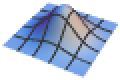
"DarkMesh" dark mesh lines 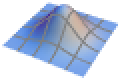
"GrayMesh" gray mesh lines 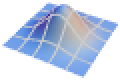
"LightMesh" light mesh lines 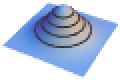
"ZMesh" vertically distributed mesh lines 
"ThickSurface" add thickness to surfaces 
"FilledSurface" add filling below surfaces - ListPlot3D returns Graphics3D[data].
-
AlignmentPoint Center the default point in the graphic to align with AspectRatio Automatic ratio of height to width Axes True whether to draw axes AxesEdge Automatic on which edges to put axes AxesLabel None axes labels AxesOrigin Automatic where axes should cross AxesStyle {} graphics directives to specify the style for axes Background None background color for the plot BaselinePosition Automatic how to align with a surrounding text baseline BaseStyle {} base style specifications for the graphic BoundaryStyle Automatic how to draw boundary lines for surfaces Boxed True whether to draw the bounding box BoxRatios {1,1,0.4} bounding 3D box ratios BoxStyle {} style specifications for the box ClippingStyle Automatic how to draw clipped parts of the surface ClipPlanes None clipping planes ClipPlanesStyle Automatic style specifications for clipping planes ColorFunction Automatic how to determine the color of surfaces ColorFunctionScaling True whether to scale arguments to ColorFunction ContentSelectable Automatic whether to allow contents to be selected ControllerLinking False when to link to external rotation controllers ControllerPath Automatic what external controllers to try to use DataRange Automatic the range of  and
and  values to assume for data
 Epilog {} 2D graphics primitives to be rendered after the main plot FaceGrids None grid lines to draw on the bounding box FaceGridsStyle {} style specifications for face grids Filling None filling under the surface FillingStyle Opacity[0.5] style to use for filling FormatType TraditionalForm default format type for text ImageMargins 0. the margins to leave around the graphic ImagePadding All what extra padding to allow for labels, etc. ImageSize Automatic absolute size at which to render the graphic InterpolationOrder None the polynomial degree in each variable of surfaces used in joining data points IntervalMarkers Automatic how to render uncertainty IntervalMarkersStyle Automatic style for uncertainty elements LabelingSize Automatic size to use for callout and label LabelStyle {} style specifications for labels Lighting Automatic simulated light sources to use MaxPlotPoints Automatic the maximum number of points to include Mesh Automatic how many mesh lines in each direction to draw MeshFunctions {#1&,#2&} how to determine the placement of mesh lines MeshShading None how to shade regions between mesh lines MeshStyle Automatic the style for mesh lines Method Automatic the method to use for interpolation and data reduction NormalsFunction Automatic how to determine effective surface normals PerformanceGoal $PerformanceGoal aspects of performance to try to optimize PlotFit None how to fit a surface to the points PlotFitElements Automatic fitted elements to show in the plot PlotLabel None a label for the plot PlotLabels None labels to use for surfaces PlotLegends None legends for surfaces PlotRange {Full,Full,Automatic} the range of  or other values to include
 PlotRangePadding Automatic how much to pad the range of values PlotRegion Automatic final display region to be filled PlotStyle Automatic graphics directives to specify the style for the surface PlotTheme $PlotTheme overall theme for the plot PreserveImageOptions Automatic whether to preserve image options when displaying new versions of the same graphic Prolog {} 2D graphics primitives to be rendered before the main plot RegionFunction (True&) how to determine whether a point should be included RotationAction "Fit" how to render after interactive rotation ScalingFunctions None how to scale individual coordinates SphericalRegion Automatic whether to make the circumscribing sphere fit in the final display area TextureCoordinateFunction Automatic how to determine texture coordinates TextureCoordinateScaling True whether to scale arguments to TextureCoordinateFunction Ticks Automatic specification for ticks TicksStyle {} style specification for ticks TouchscreenAutoZoom False whether to zoom to fullscreen when activated on a touchscreen VertexColors Automatic colors to assume at each point VertexNormals Automatic effective normals to assume at each point ViewAngle Automatic angle of the field of view ViewCenter Automatic point to display at the center ViewMatrix Automatic explicit transformation matrix ViewPoint {1.3,-2.4,2.} viewing position ViewProjection Automatic projection method for rendering objects distant from the viewer ViewRange All range of viewing distances to include ViewVector Automatic position and direction of a simulated camera ViewVertical {0,0,1} direction to make vertical
List of all options
Examples
open all close allBasic Examples (3)
Use an array of values to define heights for a surface:
ListPlot3D[{{1, 1, 1, 1}, {1, 2, 1, 2}, {1, 1, 3, 1}, {1, 2, 1, 4}}, Mesh -> All]Give explicit  ,
,  ,
,  coordinates for points on a surface:
ListPlot3D[{{0, 0, 1}, {1, 0, 0}, {0, 1, 0}}, Mesh -> All]Use different interpolations of data:
data = Table[Sin[j ^ 2 + i], {i, 0, Pi, Pi / 5}, {j, 0, Pi, Pi / 5}];ListPlot3D[data, Mesh -> None, InterpolationOrder -> 0, ColorFunction -> "SouthwestColors"]ListPlot3D[data, Mesh -> None, InterpolationOrder -> 3, ColorFunction -> "SouthwestColors"]Scope (29)
General Data (9)
For regular data consisting of  values, the
  and
and  data ranges are taken to be integer values:
ListPlot3D[Table[Sin[x y], {x, 0, 3, 0.1}, {y, 0, 3, 0.1}]]Provide explicit  and
and  data ranges by using DataRange:
ListPlot3D[Table[Sin[x y], {x, 0, 3, 0.1}, {y, 0, 3, 0.1}], DataRange -> {{0, 3}, {0, 3}}]Plot multiple sets of regular data:
ListPlot3D[Table[a Sin[x y], {a, {-1, 1}}, {x, 0, 3, 0.1}, {y, 0, 3, 0.1}], PlotStyle -> {Green, Yellow}]For irregular data consisting of  triples, the
  and
and  data ranges are inferred from data:
data = Table[{x = RandomReal[{-1, 1}], y = RandomReal[{-1, 1}], x ^ 2 - y ^ 2}, {300}];ListPlot3D[data, BoxRatios -> Automatic, Mesh -> All]Plot multiple sets of irregular data:
data1 = Table[{x = RandomReal[{-1, 1}], y = RandomReal[{-1, 1}], x ^ 2 - y ^ 2}, {300}];data2 = Table[{x = RandomReal[{-1, 1}], y = RandomReal[{-1, 1}], y ^ 2 - x ^ 2}, {300}];ListPlot3D[{data1, data2}, BoxRatios -> Automatic, PlotStyle -> {Cyan, Red}, Mesh -> All]Areas around where the data is nonreal are excluded:
ListPlot3D[ReplacePart[Partition[Range[100], 10], {{3, 3} -> None, {5, 7} -> I, {8, 4} -> Missing["NotAvailable"]}], Mesh -> All]ListPlot3D[Table[{x = RandomReal[{-1, 1}], y = RandomReal[{-1, 1}], Sqrt[1 - x ^ 2 - y ^ 2]}, {1000}]]Use MaxPlotPoints to limit the number of points used:
data = Table[Sin[x y], {x, 0, 3, 0.075}, {y, 0, 3, 0.075}];Table[ListPlot3D[data, MaxPlotPoints -> mp, Mesh -> All], {mp, {Infinity, 25, 10}}]PlotRange is selected automatically:
ListPlot3D[Table[1 / (x ^ 2 + y ^ 2), {x, -2, 2, 4 / 51}, {y, -2, 2, 4 / 51}]]Use PlotRange to focus in on areas of interest:
{ListPlot3D[Table[x ^ 4 + y ^ 4 - x ^ 2 - y ^ 2 + 1, {x, -2, 2, 0.1}, {y, -2, 2, 0.1}]], ListPlot3D[Table[x ^ 4 + y ^ 4 - x ^ 2 - y ^ 2 + 1, {x, -2, 2, 0.1}, {y, -2, 2, 0.1}], PlotRange -> {0, 2}, ClippingStyle -> None]}Use RegionFunction to restrict the surface to a region given by inequalities:
data = Flatten[Table[{x, y, Sin[x ^ 2 + y ^ 2] / (x ^ 2 + y ^ 2)}, {x, -4, 4, 0.2}, {y, -4, 4, 0.2}], 1];//QuietListPlot3D[data, PlotRange -> All, RegionFunction -> Function[{x, y, z}, Norm[{x, y}] < 4]]Tabular Data (1)
tabular = Tabular[Association["RawSchema" -> Association["ColumnProperties" ->
     Association["x" -> Association["ElementType" -> "Real64"],
      "y" -> Association["ElementType" -> "Real64"], "f" -> Association["ElementType" -> "Real64"],
      "g" -> Association["ElementType" -> "Real64"]], "KeyColumns" -> None,
    "Backend" -> "WolframKernel"], "BackendData" ->
   Association["ColumnData" -> DataStructure["ColumnTable",
      {{TabularColumn[Association["Data" -> {{-0.33582559210197255, 0.8803676729681109,
             -0.003450317591317193, -0.5776054861233806, -0.18944540146303104, 0.08137938087842855,
             0.7104751091887305, -0.7249989427695543, 0.7189171513953225, 0.07484856016827364,
             0.08394237912410371, -0.8397091750258563, -0.34613065738227494, 0.3153135739547788,
             0.1915099877033827, 0.6156751086440714, -0.6764522289849321, 0.42594752908865297,
             0.5452064158161848, -0.20490357958422162, 0.2656442175819875, 0.5930624991868867,
             -0.7653974593098988, -0.405399907196919, 0.4261842168600495, 0.007537997753683873,
             0.02320951605378001, 0.029467822857674145, -0.7726538362038052, -0.8906519148256042,
             -0.38273234260173566, -0.04463951504268252, -0.16350850917765758, 0.4690419314081237,
             -0.07389578232631427, -0.17270808669527418, -0.5037831593577057, -0.03935310416421582,
             0.15289554619000345, 0.4761074052545588, 0.01960730503071178, 0.346592918693779,
             -0.47057706227574775, -0.35440713666529167, -0.34731051462701956, -0.0457101610377397,
             0.04848867532803812, 0.04010379877047812, 0.36938420883956324, -0.10815861126341457,
             0.6830059609993497, -0.03055755892317922, 0.052870816573050865, 0.179789625890681,
             0.023635433559453523, -0.030528341731038623, -0.21544153070879574, 0.5826821668876411,
             -0.20600453971631344, -0.42604275708726047, -0.3929283758555415, -0.5043728799993309,
             0.04899025018573085, -0.6259318276915798, -0.7385675893002966, 0.02511690116030315,
             -0.4164641437703871, -0.44641422111020956, 0.05742014701654436, 0.18026818253918503,
             -0.25393260418265173, 0.6021117017355871, 0.37177688919047097, 0.11360855924293391,
             -0.25955329915886216, 0.5489751164992835, 0.23958190188503348, 0.39276345483198566,
             0.3478442618183317, -0.3456381030733422, 0.4225740854243536, 0.050722540211116975,
             -0.4339376582341843, -0.8928688667944833, 0.2875870676301678, 0.04838535997016681,
             0.17191625353893386, -0.040332095223106545, 0.2979213513808396, -0.25100379031925163,
             0.018748029889601718, 0.3372233005229358, 0.5402016231417128, 0.05153948798389716,
             0.06657679195492089, 0.507705731340098, 0.23183070367402803, 0.17700860995773013,
             -0.46345961004467046, -0.6014722768342563, -0.3922042067620207, 0.46797042738344224,
             -0.6158846471708826, -0.21699658897203888, -0.5884939906085117, 0.5155817648259232,
             0.038469952543080936, -0.5307883875682963, 0.09721123850987222, 0.3363794736422771,
             0.03788984473431475, -0.48615099167870535, 0.03748937070711202, 0.5612941694265542,
             0.07205272450151311, 0.30972359067445165, -0.14344517208631288, -0.09100952129998968,
             -0.6066500430261582, -0.22052556751928473, 0.47003854859072286, 0.1595273318284402,
             -0.03860225460772638, 0.5251973641127975, -0.30222122163790915, -0.040424594644161975,
             0.3704616954568948, 0.375203639020476, -0.15731117999349786, -0.5402663560146413,
             0.0017958271756500443, 0.7042906004786842, -0.2581690297697128, -0.7406702017442801,
             0.7443264602887835, -0.5384351417571395, 0.1597222348452349, 0.3260164469009681,
             0.18083274349158138, 0.33096472385489184, -0.6405785635713598, 0.2571675133342489,
             0.41891532310320506, -0.18246530531294006, 0.5807105548239027, 0.01799972403389352,
             -0.02399787933864095, 0.3512402551683941, -0.12710039402331913, -0.14875144251467443,
             0.4836386106491894, 0.4045689471949738, -0.389211183018424, -0.4132772147311336,
             0.4888407559699957, -0.3951245745675573, -0.7165591324044193, -0.20907255373597197,
             -0.22856965055876172, -0.3673381942839634, -0.1410469034783053, -0.009661409233815388,
             -0.39919895738938344, -0.37096936498542143, 0.662931082598076, -0.016494755798288147,
             0.33106254724578527, 0.5559302765103005, -0.1895047357455171, 0.4457984306185924,
             -0.39170159845212427, 0.7480628908636631, 0.5124033874417243, 0.7707606882795327,
             -0.1872735900152881, 0.585417550107661, -0.3063201531061375, 0.5852948104227167,
             0.5850235449060104, -0.2176121958842699, -0.6984400530394087, 0.03257926667939274,
             -0.9384991346972504, -0.059169774448424466, 0.5 ... Type" -> "Real64"]], TabularColumn[
         Association["Data" -> {{0.8939921590638151, 0.09599126606056499, -1.4461887698687872,
             0.3574534768754277, -1.121171318799583, -0.33073336818577137, 0.9259094587267503,
             0.042022916683887426, 0.892305825288878, -0.5540058901593593, -0.03510132460611314,
             0.18571071889023255, -0.2772288527592096, -0.7716551383714281, 0.4068956517806689,
             0.36221629323967275, 0.8982381800002951, -0.40620115298861925, 0.3054024974923232,
             -0.6163159803789945, -0.07859957322062693, 0.28549955900599683, 0.3312036742634056,
             0.26331224460193225, -0.05870202519594381, 0.00031555230999197326,
             -0.7436146779660238, -1.14390630001407, 0.1411388081014004, 0.046792707579414866,
             -0.3774362463202895, 0.022381136398829594, -0.4960159800986063, 0.3796350869710431,
             -1.138603222451506, -0.23455582228395613, 0.2659092692654318, -1.183528195744674,
             -0.4791210452818651, -0.29303339287164004, -0.5211330588561782, -0.13502698285089174,
             0.7870363346872017, 0.8982544467986264, -0.22914999050005214, -0.2479061783114385,
             -0.4347495019488776, -0.08331096396423883, 0.8772708961908716, -0.27178839713175307,
             0.9483092790315122, -0.4724839296008851, -1.0909555502232477, -0.9408472343160451,
             -1.3960488289616102, -0.5202140745791314, -0.19832524998359002, 0.7868474016813832,
             0.35042789273021696, -0.22195854339794094, 1.0239338679811123, 1.241797268360188,
             -1.0053256713543575, 0.8794698395861581, 0.646958311741143, -0.30533288076463466,
             -0.12791364372821087, 0.5168966892467696, -0.854322017990838, 0.3237507945931768,
             -0.3365136569790853, -0.07542508011071905, -0.1896622911757588, -0.8151518333271205,
             -0.785903912584512, 0.9943540702594823, -0.09970798805958633, 0.8155460093130154,
             0.2517100213619473, -0.5074402739814479, 1.054331521209021, -0.37095280525637275,
             -0.0033124165376286503, 0.00810519783609609, 0.604491487382795, -1.087039179804143,
             0.3217896701925536, -0.9757724909993218, -0.5296157669589694, -0.44353010018306926,
             -0.9772156827519269, 0.9974526044782488, 1.0401382798005163, -1.333826721300462,
             -1.1657073859193974, 0.5988738776781478, -0.46515644169593257, -0.06189485735399641,
             0.43024118140166445, -0.005056861065915311, 0.4969647835990133, 1.2389334026274614,
             1.0969746972416095, 0.2699914383982267, -0.007263249176729766, 0.025694595799883486,
             0.009334789628101163, 0.3959739514237559, -0.6919031699208391, -0.5727673459546412,
             -0.7526649101588971, 0.37676652058113047, -1.1097067424942098, 0.7907395601868871,
             -0.9921651497523799, -0.7285869946231459, -0.8828106067813857, -0.062486591022684154,
             0.5791694114075633, -0.3234808446001126, -0.29576406882665246, -0.7873078267171731,
             -1.0345538770658507, 0.6447352486264667, -0.09256576962703741, -0.9165601254045901,
             -0.11276989000586415, 0.1559393927752605, -0.6024250703013618, 0.14448974619397612,
             -0.04760739467769851, 0.7709694771458564, -0.014742247510236057, 0.23626276607833294,
             0.6638730651502748, -0.03186729016669311, -1.0357092218146797, 0.6433340083061274,
             -0.9411413021162254, 0.4909973640778654, 0.7189944529089185, 0.11055457421211713,
             1.267850511973201, -0.9438375692417983, 0.17379076568211732, -0.10851220031896575,
             -1.2713361573907198, 0.3346883790200734, -0.0621077599435433, -0.04321780837452255,
             -0.18862788259467456, 0.021760098075714426, 0.8532897115032967, -0.28556892622426977,
             0.15408641950632404, -0.1714149113043416, 0.39533058049223047, -0.4397787874261183,
             -0.9441709999324307, 0.6380059863875251, -1.079304150111603, -0.015220209887687373,
             0.04287582799227833, -0.36459460042586384, 1.085392552357007, -1.4351301279221556,
             -0.2639348179992805, 1.0262808227866909, -0.6574884811876281, 0.03985598924795783,
             -0.3005474803479229, 0.6683106567979948, -0.23062780939455543, 0.5666187686239714,
             0.37219192126078904, -0.02563679932918994, 0.4429249457425396, -0.04381111047074612,
             0.187906287726331, -0.9973413808733808, 0.00426805123864777, -0.12866722429447683,
             0.00749480936676912, -0.8515711317056425, -0.08786646448345839, 0.2606608909833542,
             0.9058373813263996, 0.11471040362679649, 0.019510758576114784, 0.07867647334176021,
             0.018095050021316034, -0.9234813248766701, 0.27933341322409344, -0.6676322195851319,
             -0.4217872567696394, -0.810239936029394, -0.9402166292180882, 0.17133206921427285,
             1.2481069003723113, 0.9831436029884254}, {}, None}, "ElementType" -> "Real64"]]}}]]]];
Plot a shaded density plot of column f over columns x and y:
ListPlot3D[tabular -> {"x", "y", "f"}]Plot multiple sets of columns as separate surfaces:
ListPlot3D[tabular -> {{"x", "y", "f"}, {"x", "y", "g"}}]Include color swatch legends for the plot:
ListPlot3D[tabular -> {{"x", "y", "f"}, {"x", "y", "g"}}, PlotLegends -> {"f", "g"}]Special Data (4)
Use Quantity to include units with the data:
ListPlot3D[Quantity[RandomReal[1, {6, 3}], "Meters"], AxesLabel -> Automatic]Include different units for the x, y and z coordinates:
data = UnitSimplify[Flatten[Table[{m, a, m a}, {m, Quantity[0, "Grams"], Quantity[10, "Grams"]}, {a, Quantity[0, "Meters"/"Seconds"^2], Quantity[10, "Meters"/"Seconds"^2]}], 1]];ListPlot3D[data, AxesLabel -> Automatic]zvar = Table[Around[Sin[x] Cos[y], 1], {x, -4, 4}, {y, -4, 4}];ListPlot3D[zvar]Plot data with uncertainty in x, y and z:
xyzvar3D  =
  Flatten[Table[{Around[x, 1], Around[y, 1],
Around[Sin[x] Cos[y], 1]}, {x, -4, 4}, {y, -4, 4}], 1];ListPlot3D[xyzvar3D]Labeling and Legending (6)
Label surfaces with Labeled:
data = Join@@Table[{x, y, Sin[x + Cos[y]]}, {x, -3, 3}, {y, -3, 3}];ListPlot3D[Labeled[data, "label"]]Label surfaces with PlotLabels:
data = Join@@Table[{x, y, Sin[x + Cos[y]]}, {x, -3, 3}, {y, -3, 3}];ListPlot3D[data, PlotLabels -> Sin[x + Cos[y]]]Place the label near the surface at an {x,y} value:
data = Join@@Table[{x, y, Sin[x + Cos[y]]}, {x, -3, 3}, {y, -3, 3}];ListPlot3D[Labeled[data, "label", {0, 0}]]Use Callout:
ListPlot3D[Callout[data, "label", {0, 0}]]data = Join@@Table[{x, y, Sin[x + Cos[y]]}, {x, -3, 3}, {y, -3, 3}];Place a label with specific locations:
ListPlot3D[Callout[data, "label", {2, 0, 1}]]Include legends for each surface:
data1 = Join@@Table[{x, y, x ^ 2 + y ^ 2}, {x, -3, 3}, {y, -3, 3}];
data2 = Join@@Table[{x, y, -x ^ 2 - y ^ 2}, {x, -3, 3}, {y, -3, 3}];ListPlot3D[{data1, data2}, PlotLegends -> {HoldForm[x ^ 2 + y ^ 2], HoldForm[-x ^ 2 - y ^ 2]}]Use Legended to provide a legend for a specific dataset:
data1 = Table[{x = RandomReal[{-1, 1}], y = RandomReal[{-1, 1}], x ^ 2 - y ^ 2}, {300}];data2 = Table[{x = RandomReal[{-1, 1}], y = RandomReal[{-1, 1}], y ^ 2 - x ^ 2}, {300}];ListPlot3D[{data1, Legended[data2, HoldForm[y^2 - x^2]]}, BoxRatios -> Automatic, PlotStyle -> {Green, Yellow}]Use Placed to change the legend location:
ListPlot3D[{data1, Legended[data2, Placed[HoldForm[y^2 - x^2], Above]]}, BoxRatios -> Automatic, PlotStyle -> {Green, Yellow}]Presentation (9)
Provide an explicit PlotStyle for the surface:
ListPlot3D[Table[Sin[j ^ 2 + i], {i, -3, 3, 0.05}, {j, -3, 3, 0.05}], PlotStyle -> Directive[Orange, Specularity[White, 20]], Mesh -> None]Provide separate styles for different surfaces:
data1 = Table[Sqrt[1 - x ^ 2 - y ^ 2], {x, -1, 1, 0.05}, {y, -1, 1, 0.05}];data2 = Table[-Sqrt[1 - x ^ 2 - y ^ 2], {x, -1, 1, 0.05}, {y, -1, 1, 0.05}];ListPlot3D[{data1, data2}, PlotStyle -> {Yellow, Cyan}, BoxRatios -> Automatic, DataRange -> {{-1, 1}, {-1, 1}}]ListPlot3D[Table[Sin[i + j ^ 2], {i, 0, 3, 0.1}, {j, 0, 3, 0.1}], AxesLabel -> {j, i}, PlotLabel -> Sin[i + j ^ 2], PlotStyle -> Purple]ListPlot3D[Table[Sin[i + j ^ 2], {i, 0, 3, 0.1}, {j, 0, 3, 0.1}], ColorFunction -> Function[{x, y, z}, Hue[z]]]ListPlot3D[Table[Sin[i + j ^ 2], {i, 0, 3, 0.1}, {j, 0, 3, 0.1}], Mesh -> 8, ColorFunction -> "SolarColors", MeshFunctions -> {Function[{x, y, z}, z]}]Style the areas between mesh lines:
ListPlot3D[Table[Sin[i + j ^ 2], {i, 0, 3, 0.1}, {j, 0, 3, 0.1}], Mesh -> 8, MeshShading -> {{Blue, Green}, {Cyan, Purple}}]Provide an interactive Tooltip for a surface:
ListPlot3D[Tooltip[Table[Sin[i + j ^ 2], {i, 0, 3, 0.1}, {j, 0, 3, 0.1}], TraditionalForm@Sin[i + j ^ 2]], PlotStyle -> Darker[Green]]ListPlot3D[Table[Sin[i + j ^ 2], {i, 0, 3, 0.1}, {j, 0, 3, 0.1}], Filling -> Bottom, FillingStyle -> Directive[Opacity[0.6], Blue], PlotStyle -> Red]ListPlot3D[Table[Sin[i + j ^ 2], {i, -3, 3, 0.05}, {j, -3, 3, 0.05}], PlotTheme -> "Web"]Options (122)
BoundaryStyle (6)
Use a black boundary around the edges of the surface:
ListPlot3D[Table[Sin[j ^ 2 + i], {i, 0, Pi, 0.1}, {j, 0, Pi, 0.1}]]Use a thick boundary around the edges of the surface:
ListPlot3D[Table[Sin[j ^ 2 + i], {i, 0, Pi, 0.1}, {j, 0, Pi, 0.1}], BoundaryStyle -> Thick, Mesh -> None]Use a thick red boundary around the edges of the surface:
ListPlot3D[Table[Sin[j ^ 2 + i], {i, 0, Pi, 0.1}, {j, 0, Pi, 0.1}], BoundaryStyle -> Directive[Red, Thick], Mesh -> None]ListPlot3D[Table[Sin[j ^ 2 + i], {i, 0, Pi, 0.1}, {j, 0, Pi, 0.1}], BoundaryStyle -> None, Mesh -> 5]BoundaryStyle applies to holes cut by RegionFunction:
ListPlot3D[Table[Sin[j ^ 2 + i], {i, 0, Pi, 0.1}, {j, 0, Pi, 0.1}], BoundaryStyle -> Thick, RegionFunction -> Function[{x, y, z}, Abs[z] ≥ 0.25], Mesh -> None]BoundaryStyle applies where there are jumps in the surface:
ListPlot3D[{{10, 10, 1}, {6, 8, 10}, {7, 9, 9}, {1, 1, 2}, {4, 6, 4}, {7, 4, 9}, {10, 6, 8}}, InterpolationOrder -> 0, BoundaryStyle -> Thick, Mesh -> None]ClippingStyle (4)
By default clipped regions have no color:
data = Flatten[Table[{x, y, Re[Sin[x + I y]]}, {x, -2Pi, 2Pi, 0.2}, {y, -2Pi, 2Pi, 0.2}], 1];ListPlot3D[data, Mesh -> None, PlotStyle -> Orange]data = Flatten[Table[{x, y, Re[Sin[x + I y]]}, {x, -2Pi, 2Pi, 0.2}, {y, -2Pi, 2Pi, 0.2}], 1];ListPlot3D[data, ClippingStyle -> None, Mesh -> None, PlotStyle -> Orange]Make clipped regions partially transparent:
data = Flatten[Table[{x, y, Re[Sin[x + I y]]}, {x, -2Pi, 2Pi, 0.2}, {y, -2Pi, 2Pi, 0.2}], 1];ListPlot3D[data, ClippingStyle -> Opacity[0.5], Mesh -> None, PlotStyle -> Orange]Color clipped regions red at the bottom and blue at the top:
data = Flatten[Table[{x, y, Re[Sin[x + I y]]}, {x, -2Pi, 2Pi, 0.2}, {y, -2Pi, 2Pi, 0.2}], 1];ListPlot3D[data, ClippingStyle -> {Red, Blue}, Mesh -> None, PlotStyle -> Orange]ColorFunction (6)
Color by scaled  ,
,  , and
, and  values:
Table[ListPlot3D[Table[Sin[j ^ 2 + i], {i, 0, Pi, 0.1}, {j, 0, Pi, 0.1}], ColorFunction -> Function[{x, y, z}, Evaluate[f]], PlotLabel -> f, Mesh -> None], {f, {Hue[x], Hue[y], Hue[z]}}]Color by scaled  and
and  coordinates:
ListPlot3D[Table[Sin[j ^ 2 + i], {i, 0, Pi, 0.1}, {j, 0, Pi, 0.1}], ColorFunction -> Function[{x, y, z}, RGBColor[x, y, 0.]], Mesh -> None]Use ColorData for predefined color gradients:
ListPlot3D[Table[Sin[j ^ 2 + i], {i, 0, Pi, 0.1}, {j, 0, Pi, 0.1}], ColorFunction -> (ColorData["DarkRainbow"][#1]&)]Named color gradients color in the  direction:
ListPlot3D[Table[Sin[j ^ 2 + i], {i, 0, Pi, 0.1}, {j, 0, Pi, 0.1}], ColorFunction -> "DarkRainbow"]ColorFunction has higher priority than PlotStyle:
ListPlot3D[Table[Sin[j ^ 2 + i], {i, 0, Pi, 0.1}, {j, 0, Pi, 0.1}], ColorFunction -> "DarkRainbow", PlotStyle -> Directive[Opacity[0.5], Red]]ColorFunction has lower priority than MeshShading:
ListPlot3D[Table[Sin[j ^ 2 + i], {i, 0, Pi, 0.1}, {j, 0, Pi, 0.1}], ColorFunction -> Hue, MeshShading -> {{Automatic, None}, {None, Automatic}}]ColorFunctionScaling (2)
data = Flatten[Table[{x, y, Abs[Sin[x + I y]]}, {x, -2Pi, 2Pi, Pi / 5}, {y, -2, 2, 1 / 5}], 1];ListPlot3D[data, ColorFunction -> Function[{x, y, z}, Hue@Rescale[Arg[Sin[x + I y]], {-Pi, Pi}]], ColorFunctionScaling -> False]Unscaled coordinates are dependent on DataRange:
data = Table[Sin[j ^ 2 + i], {i, 0, Pi, 0.1}, {j, 0, Pi, 0.1}];ListPlot3D[data, ColorFunction -> Function[{x, y, z}, RGBColor[x, y, 0]], ColorFunctionScaling -> False]ListPlot3D[data, ColorFunction -> Function[{x, y, z}, RGBColor[x, y, 0]], ColorFunctionScaling -> False, DataRange -> {{0, 1}, {0, 1}}]DataRange (5)
Arrays of height values are displayed against the number of elements in each direction:
ListPlot3D[Table[Sin[i + j], {i, 0, 2Pi, 0.1}, {j, 0, 2Pi, 0.1}]]Rescale to the sampling space:
ListPlot3D[Table[Sin[i + j], {i, 0, 2Pi, 0.1}, {j, 0, 2Pi, 0.1}], DataRange -> {{0, 2Pi}, {0, 2Pi}}]Each dataset is scaled to the same domain:
ListPlot3D[{Array[Times, {20, 20}], Array[100&, {5, 5}]}, DataRange -> {{0, 1}, {0, 1}}, PlotRange -> All, PlotStyle -> {Red, Blue}, Mesh -> All]Triples are interpreted as  ,
,  ,
,  coordinates:
data = Flatten[Table[{i, j, Sin[i + j]}, {j, 0, 2Pi, 0.5}, {i, -3, 3}], 1];ListPlot3D[data, Mesh -> All]Force interpretation as arrays of height values:
data = Table[Sin[i + j], {j, 0, 2Pi, 0.5}, {i, -1, 1}];ListPlot3D[data, DataRange -> All, Mesh -> All, PlotRange -> All]The dataset is normally interpreted as a list of  triples:
ListPlot3D[data, Mesh -> All, PlotRange -> All]Filling (5)
ListPlot3D[Table[Sin[j ^ 2 + i], {i, 0, Pi, 0.1}, {j, 0, Pi, 0.1}], Filling -> Bottom, Mesh -> None]Filling occurs along the region cut by the RegionFunction:
ListPlot3D[Table[Sin[j ^ 2 + i], {i, -Pi, Pi, 0.2}, {j, -Pi, Pi, 0.2}], Filling -> Bottom, RegionFunction -> (#1 ^ 2 + #2 ^ 2 < 5&), DataRange -> {{-Pi, Pi}, {-Pi, Pi}}, Mesh -> None]ListPlot3D[Table[Sin[j ^ 2 + i], {i, -Pi, Pi, 0.2}, {j, -Pi, Pi, 0.2}], Filling -> {1 -> Top, 1 -> Bottom}, RegionFunction -> (#1 ^ 2 + #2 ^ 2 < 5&), DataRange -> {{-Pi, Pi}, {-Pi, Pi}}]Fill surface 1 to the bottom with blue and surface 2 to the top with red:
ListPlot3D[Table[Cos[y] + a, {a, {-1, 1}}, {x, 0, 2Pi}, {y, 0, 2Pi}], Filling -> {1 -> {Bottom, Blue}, 2 -> {Top, Red}}]ListPlot3D[RandomReal[{}, {10, 3}], InterpolationOrder -> 0, Filling -> Bottom, Mesh -> None]FillingStyle (3)
Fill to the bottom with a variety of styles:
Table[ListPlot3D[Table[Sin[j ^ 2 + i], {i, 0, Pi, 0.1}, {j, 0, Pi, 0.1}], Filling -> Bottom, FillingStyle -> fs], {fs, {Opacity[0.5], Orange}}]Fill to the plane  with red below and blue above:
ListPlot3D[Table[Sin[j ^ 2 + i], {i, 0, Pi, 0.1}, {j, 0, Pi, 0.1}], Filling -> 0, FillingStyle -> {Red, Blue}]Fill to the plane  from above only:
ListPlot3D[Table[Sin[j ^ 2 + i], {i, 0, Pi, 0.1}, {j, 0, Pi, 0.1}], Filling -> 0, FillingStyle -> {None, Blue}]InterpolationOrder (5)
Points are normally joined with flat polygons:
ListPlot3D[Table[Sin[j ^ 2 + i], {i, 0, Pi, 0.5}, {j, 0, Pi, 0.5}], PlotRange -> All, Mesh -> All]Use zero-order or piecewise-constant interpolation:
ListPlot3D[Table[Sin[j ^ 2 + i], {i, 0, Pi, 0.5}, {j, 0, Pi, 0.5}], Mesh -> None, InterpolationOrder -> 0, PlotRange -> All]Use third-order spline interpolation to fit the data:
ListPlot3D[Table[Sin[j ^ 2 + i], {i, 0, Pi, 0.5}, {j, 0, Pi, 0.5}], Mesh -> None, InterpolationOrder -> 3, PlotRange -> All]Table[ListPlot3D[Table[Sin[j ^ 2 + i], {i, 0, Pi, 0.5}, {j, 0, Pi, 0.5}], Mesh -> None, InterpolationOrder -> i, Mesh -> Full, PlotLabel -> i, PlotRange -> All], {i, 0, 5}]For irregular data, zero-order interpolation gives Voronoi regions for each point:
data = Flatten[Table[{r Sin[t], r Cos[t], Sqrt[r t]}, {t, 0, 2Pi, 0.5}, {r, 0, 2, 0.5}], 1];ListPlot3D[data, Mesh -> All]ListPlot3D[data, Mesh -> All, InterpolationOrder -> 0]IntervalMarkers (2)
Interval markers are bars by default:
zvar = Table[Around[Sin[x] Cos[y], 1], {x, -4, 4}, {y, -4, 4}];ListPlot3D[zvar]Use named IntervalMarkers:
xyzvar = Flatten[
Table[{x, y, Around[Sin[x] Cos[y], 1]}, {x, -4, 4}, {y, -4, 4}], 1];ListPlot3D[xyzvar, IntervalMarkers -> "Tubes"]IntervalMarkersStyle (2)
Interval markers are black by default:
zvar = Table[Around[Sin[x] Cos[y], 1], {x, -4, 4}, {y, -4, 4}];ListPlot3D[zvar]Specify a style for the bars using IntervalMarkersStyle:
xyzvar = Flatten[
Table[{x, y, Around[Sin[x] Cos[y], 1]}, {x, -4, 4}, {y, -4, 4}], 1];ListPlot3D[xyzvar, IntervalMarkersStyle -> Red]LabelingSize (2)
Textual labels are shown at their actual sizes:
ListPlot3D[Table[Sin[j ^ 2 + i], {i, 0, Pi, 0.1}, {j, 0, Pi, 0.1}], PlotLabels -> "maximum point"]Specify a maximum size for textual labels:
ListPlot3D[Table[Sin[j ^ 2 + i], {i, 0, Pi, 0.1}, {j, 0, Pi, 0.1}], PlotLabels -> "maximum point", LabelingSize -> 30]Image labels are automatically resized:
label = [image];ListPlot3D[Table[Sin[j ^ 2 + i], {i, 0, Pi, 0.1}, {j, 0, Pi, 0.1}], PlotLabels -> label]Specify a maximum size for image labels:
ListPlot3D[Table[Sin[j ^ 2 + i], {i, 0, Pi, 0.1}, {j, 0, Pi, 0.1}], PlotLabels -> label, LabelingSize -> 60]Show image labels at their natural sizes:
ListPlot3D[Table[Sin[j ^ 2 + i], {i, 0, Pi, 0.1}, {j, 0, Pi, 0.1}], PlotLabels -> label, LabelingSize -> Full]MaxPlotPoints (4)
ListPlot3D normally uses all of the points in the dataset:
ListPlot3D[Table[Sin[j ^ 2 + i], {i, 0, Pi, 0.1}, {j, 0, Pi, 0.1}], Mesh -> All]data = Table[{x = RandomReal[Pi], y = RandomReal[Pi], Sin[x ^ 2 + y]}, {500}];ListPlot3D[data, Mesh -> All]Limit the number of points used in each direction:
ListPlot3D[Table[Sin[j ^ 2 + i], {i, 0, Pi, 0.1}, {j, 0, Pi, 0.1}], MaxPlotPoints -> 10, Mesh -> All]MaxPlotPoints imposes a regular grid on irregular data:
data = Table[{x = RandomReal[Pi], y = RandomReal[Pi], Sin[x ^ 2 + y]}, {500}];ListPlot3D[data, Mesh -> All, MaxPlotPoints -> 10]The grid does not extend beyond the convex hull of the original data:
data = Select[Table[{x = RandomReal[Pi], y = RandomReal[Pi], 0}, {500}], Norm[#] < Pi&];ListPlot3D[data, Mesh -> All, MaxPlotPoints -> 10, ViewPoint -> Above]Mesh (7)
ListPlot3D[Table[Sin[j ^ 2 + i], {i, 0, Pi, 0.1}, {j, 0, Pi, 0.1}], Mesh -> None]Show the initial and final sampling mesh:
data = Table[Sin[j ^ 2 + i], {i, 0, Pi, 0.25}, {j, 0, Pi, 0.25}];{ListPlot3D[data, Mesh -> Full], ListPlot3D[data, Mesh -> All]}The entire mesh for irregular data is a Delaunay triangulation:
data = Table[{x = RandomReal[3], y = RandomReal[3], Sin[x ^ 2 + y]}, {100}];ListPlot3D[data, Mesh -> All]Use 5 mesh lines in each direction:
ListPlot3D[Table[Sin[j ^ 2 + i], {i, 0, Pi, 0.1}, {j, 0, Pi, 0.1}], Mesh -> 5]Use 3 mesh lines in the  direction and 6 mesh lines in the
  direction:
ListPlot3D[Table[Sin[j ^ 2 + i], {i, 0, Pi, 0.1}, {j, 0, Pi, 0.1}], Mesh -> {3, 6}]Use mesh lines at specific values:
data = Flatten[Table[{i, j, Sin[i ^ 2 + j]}, {i, 0, Pi, 0.1}, {j, 0, Pi, 0.1}], 1];ListPlot3D[data, Mesh -> {{1, 2}, {Pi / 2}}]Use different styles for different mesh lines:
data = Flatten[Table[{i, j, Sin[i ^ 2 + j]}, {i, -2, 2, 0.1}, {j, -2, 2, 0.1}], 1];ListPlot3D[data, Mesh -> {{{0, Thick}}, {{0, Red}}}]MeshFunctions (3)
Use the  value as the mesh function:
ListPlot3D[Table[Sin[j ^ 2 + i], {i, 0, Pi, 0.1}, {j, 0, Pi, 0.1}], MeshFunctions -> {#3&}, Mesh -> 5]Use mesh lines in the  and
and  directions:
ListPlot3D[Table[Sin[j ^ 2 + i], {i, 0, Pi, 0.1}, {j, 0, Pi, 0.1}], MeshFunctions -> {#1&, #2&}, Mesh -> {5, 5}]Use mesh lines corresponding to fixed distances from the origin:
ListPlot3D[Table[Sin[j ^ 2 + i], {i, 0, Pi, 0.1}, {j, 0, Pi, 0.1}], MeshFunctions -> {Sqrt[#1 ^ 2 + #2 ^ 2 + #3 ^ 2]&}, Mesh -> 5]MeshShading (4)
Use None to remove regions:
ListPlot3D[Table[Sin[j ^ 2 + i], {i, 0, Pi, 0.1}, {j, 0, Pi, 0.1}], Mesh -> 10, MeshFunctions -> {#3&}, MeshShading -> {Red, None}]Lay a checkerboard pattern over a surface:
ListPlot3D[Table[Sin[j ^ 2 + i], {i, 0, Pi, 0.1}, {j, 0, Pi, 0.1}], Mesh -> 7, MeshFunctions -> {#1&, #2&}, MeshShading -> {{Yellow, Green}, {Green, Yellow}}]MeshShading has a higher priority than PlotStyle:
ListPlot3D[Table[Sin[j ^ 2 + i], {i, 0, Pi, 0.1}, {j, 0, Pi, 0.1}], Mesh -> 7, PlotStyle -> Red, MeshShading -> {{Green, Automatic}, {Automatic, Green}}]MeshShading has a higher priority than ColorFunction:
ListPlot3D[Table[Sin[j ^ 2 + i], {i, 0, Pi, 0.1}, {j, 0, Pi, 0.1}], Mesh -> 10, MeshFunctions -> {#1&, #2&}, MeshShading -> {{None, Automatic}, {Automatic, None}}, ColorFunction -> "DarkRainbow"]MeshStyle (2)
ListPlot3D[Table[Sin[j ^ 2 + i], {i, 0, Pi, 0.1}, {j, 0, Pi, 0.1}], MeshStyle -> Red, Mesh -> 5]Use red mesh lines in the  direction and thick mesh lines in the
  direction:
ListPlot3D[Table[Sin[j ^ 2 + i], {i, 0, Pi, 0.1}, {j, 0, Pi, 0.1}], MeshStyle -> {Red, Thick}, Mesh -> 5]NormalsFunction (4)
Normals are automatically calculated:
ListPlot3D[Table[Sin[j ^ 2 + i], {i, 0, Pi, 0.2}, {j, 0, Pi, 0.2}], Mesh -> None]Use None to get flat shading for all the polygons:
ListPlot3D[Table[Sin[j ^ 2 + i], {i, 0, Pi, 0.2}, {j, 0, Pi, 0.2}], NormalsFunction -> None, Mesh -> None]Vary the effective normals used on the surface:
ListPlot3D[Table[Sin[j ^ 2 + i], {i, 0, Pi, 0.2}, {j, 0, Pi, 0.2}], Mesh -> None, NormalsFunction -> Function[{x, y, z}, RandomReal[{0, 1}, {3}]]]VertexNormals has a higher priority than NormalsFunction:
ListPlot3D[Table[Sin[j ^ 2 + i], {i, 0, Pi, 0.2}, {j, 0, Pi, 0.2}], Mesh -> None, NormalsFunction -> Function[{x, y, z}, RandomReal[{0, 1}, {3}]], VertexNormals -> Table[{i / 16, Sin[i j], j / 16}, {1}, {i, 16}, {j, 16}]]PerformanceGoal (2)
Generate a higher-quality plot:
data = Table[Sin[j ^ 2 + i], {i, 0, Pi, 0.02}, {j, 0, Pi, 0.02}];Timing[ListPlot3D[data, PerformanceGoal -> "Quality"]]Emphasize performance, possibly at the cost of quality:
data = Table[Sin[j ^ 2 + i], {i, 0, Pi, 0.02}, {j, 0, Pi, 0.02}];Timing[ListPlot3D[data, PerformanceGoal -> "Speed"]]PlotFit (4)
By default, surfaces can be very detailed:
ListPlot3D[IconizedObject[«data»]]Fitting the data results in smoother surfaces:
ListPlot3D[IconizedObject[«data»], PlotFit -> Automatic]Fit a quadratic surface to the data:
ListPlot3D[IconizedObject[«data»], PlotFit -> "Quadratic"]Use KernelModelFit to approximate the data:
ListPlot3D[IconizedObject[«data»], PlotFit -> "Kernel"]PlotFitElements (4)
By default, the fitted model is shown with the data points:
ListPlot3D[ResourceData["Sample Tabular Data: Car Models"] -> {"displacement", "horsepower", "mpg"}, PlotFit -> Automatic]Include the data points with the fitted surface:
ListPlot3D[ResourceData["Sample Tabular Data: Car Models"] -> {"displacement", "horsepower", "mpg"}, PlotFit -> Automatic, PlotFitElements -> "DataPoints"]Plot confidence surfaces for the data, with a default confidence level of 0.95:
ListPlot3D[ResourceData["Sample Tabular Data: Car Models"] -> {"displacement", "horsepower", "mpg"}, PlotFit -> Automatic, PlotFitElements -> "BandSurfaces"]Use a confidence level of 0.5 for the bands:
ListFitPlot3D[ResourceData["Sample Tabular Data: Car Models"] -> {"displacement", "horsepower", "mpg"}, PlotFit -> Automatic, PlotFitElements -> {"BandSurfaces", <|"ConfidenceLevel" -> 0.5|>}]Show residual lines from the data points to the fitted surface:
ListFitPlot3D[ResourceData["Sample Tabular Data: Car Models"] -> {"displacement", "horsepower", "mpg"}, PlotFit -> Automatic, PlotFitElements -> "Residuals"]Combine the original points with black residual lines:
ListFitPlot3D[ResourceData["Sample Tabular Data: Car Models"] -> {"displacement", "horsepower", "mpg"}, PlotFit -> Automatic, PlotFitElements -> {"DataPoints", {"Residuals", <|"Style" -> Black|>}}]PlotLabels (3)
Specify text to label surfaces:
ListPlot3D[Table[Sin[j ^ 2 + i], {i, -Pi, Pi, 0.1}, {j, -2, 2, 0.1}], PlotLabels -> HoldForm[-x ^ 2 - y ^ 2]]Specify a label at a position:
ListPlot3D[Table[-x ^ 2 - y ^ 2, {x, -2, 2}, {y, -2, 2}], PlotLabels -> Callout[HoldForm[-x ^ 2 - y ^ 2], {4, 3}]]Specify labels to identify surfaces:
ListPlot3D[Table[Sin[j ^ 2 + i + θ], {θ, {0, π / 2}}, {i, 0, Pi, 0.2}, {j, 0, Pi, 0.2}], PlotLabels -> {Callout["surface 1", Above], Callout["surface 2", {12, 10}]}]PlotLegends (5)
Use placeholders to identify plot styles:
ListPlot3D[Table[Sin[j ^ 2 + i + θ], {θ, {0, π / 2}}, {i, 0, Pi, 0.2}, {j, 0, Pi, 0.2}], PlotLegends -> Automatic]ListPlot3D[Table[Sin[j ^ 2 + i + θ], {θ, {0, π / 2}}, {i, 0, Pi, 0.2}, {j, 0, Pi, 0.2}], PlotLegends -> {"one", "two"}]Use Placed to control legend position:
ListPlot3D[Table[Sin[j ^ 2 + i + θ], {θ, {0, π / 2}}, {i, 0, Pi, 0.2}, {j, 0, Pi, 0.2}], PlotLegends -> Placed[Automatic, Below]]Use SwatchLegend to change the appearance:
ListPlot3D[Table[Sin[j ^ 2 + i + θ], {θ, {0, π / 2}}, {i, 0, Pi, 0.2}, {j, 0, Pi, 0.2}], PlotLegends -> SwatchLegend[Automatic, {"surf1", "surf2"}, LegendFunction -> "Frame", LegendMargins -> 10]]Create a legend based on a color function:
ListPlot3D[Table[Sin[j ^ 2 + i], {i, 0, Pi, 0.2}, {j, 0, Pi, 0.2}], ColorFunction -> "Rainbow", PlotLegends -> Automatic]Use BarLegend to change the appearance:
ListPlot3D[Table[Sin[j ^ 2 + i], {i, 0, Pi, 0.2}, {j, 0, Pi, 0.2}], ColorFunction -> "Rainbow", PlotLegends -> BarLegend[Automatic, LegendMarkerSize -> 100]]PlotRange (3)
Automatically compute the  range:
ListPlot3D[Table[1 / (x ^ 2 + y ^ 2), {x, -2, 2, 4 / 51}, {y, -2, 2, 4 / 51}]]Use all points to compute the range:
ListPlot3D[Table[1 / (x ^ 2 + y ^ 2), {x, -2, 2, 4 / 51}, {y, -2, 2, 4 / 51}], PlotRange -> All]Use an explicit  range to emphasize features:
ListPlot3D[Table[y ^ 2 - x ^ 2, {x, -4, 4, 0.5}, {y, -4, 4, 0.5}], PlotRange -> {-2, 2}]PlotStyle (6)
Plot two surfaces with different styles:
ListPlot3D[{Table[x, {x, 20}, {y, 20}], Table[y, {x, 15}, {y, 20}]}, PlotStyle -> {Pink, Green}]Color a surface with diffuse purple:
ListPlot3D[Table[Sin[j ^ 2 + i], {i, -Pi, Pi, 0.1}, {j, -2, 2, 0.1}], PlotStyle -> Purple]Use Specularity to get highlights:
ListPlot3D[Table[Sin[j ^ 2 + i], {i, -Pi, Pi, 0.1}, {j, -2, 2, 0.1}], PlotStyle -> Directive[Purple, Specularity[White, 50]]]Use Opacity to get transparent surfaces:
ListPlot3D[Table[Sin[j ^ 2 + i], {i, -Pi, Pi, 0.1}, {j, -2, 2, 0.1}], PlotStyle -> Directive[Opacity[0.8], Purple, Specularity[White, 50]]]Use separate styles for each of the surfaces:
data1 = Table[Sqrt[1 - x ^ 2 - y ^ 2], {x, -1, 1, 0.1}, {y, -1, 1, 0.1}];data2 = Table[-Sqrt[1 - x ^ 2 - y ^ 2], {x, -1, 1, 0.1}, {y, -1, 1, 0.1}];ListPlot3D[{data1, data2}, PlotStyle -> {Red, Blue}, BoxRatios -> Automatic, DataRange -> {{-1, 1}, {-1, 1}}]ListPlot3D[Table[Sin[j ^ 2 + i], {i, -Pi, Pi, 0.1}, {j, -2, 2, 0.1}], PlotStyle -> None]PlotTheme (4)
Use a theme with simple ticks and grid lines in a bright color scheme:
ListPlot3D[Table[Sin[j ^ 2 + i], {i, -3, 3, 0.05}, {j, -3, 3, 0.05}], PlotTheme -> "Business"]ListPlot3D[Table[Sin[j ^ 2 + i], {i, -3, 3, 0.05}, {j, -3, 3, 0.05}], PlotTheme -> "Business", PlotStyle -> StandardRed]Change the appearance by modifying Mesh and MeshShading:
ListPlot3D[Table[Sin[j ^ 2 + i], {i, -3, 3, 0.05}, {j, -3, 3, 0.05}], PlotTheme -> "Business", Mesh -> 5, MeshShading -> {Yellow, Orange}]Create a thick surface for 3D printing:
ListPlot3D[Table[Sin[j ^ 2 + i], {i, -3, 3, 0.05}, {j, -3, 3, 0.05}], DataRange -> {{-3, 3}, {-3, 3}}, PlotTheme -> "ThickSurface"]RegionFunction (5)

ListPlot3D[Table[Sin[j ^ 2 + i], {i, 0, Pi, 0.1}, {j, 0, Pi, 0.1}], RegionFunction -> Function[{x, y, z}, Abs[z] > 0.5]]The region depends on DataRange:
data = Table[Sin[j ^ 2 + i], {i, 0, Pi, 0.1}, {j, 0, Pi, 0.1}];ListPlot3D[data, RegionFunction -> Function[{x, y, z}, Norm[{x, y}] < 4]]ListPlot3D[data, RegionFunction -> Function[{x, y, z}, Norm[{x, y}] < 4], DataRange -> {{0, Pi}, {0, Pi}}]Filling will fill from the region boundary:
ListPlot3D[Table[Sin[j ^ 2 + i], {i, -2, 2, 0.1}, {j, -2, 2, 0.1}], RegionFunction -> Function[{x, y, z}, 2 < x ^ 2 + y ^ 2 < 5], Filling -> Bottom, DataRange -> {{-2, 2}, {-2, 2}}]Regions do not have to be connected:
ListPlot3D[Table[Sin[j ^ 2 + i], {i, 0, Pi, 0.1}, {j, 0, Pi, 0.1}], RegionFunction -> Function[{x, y, z}, 0 < Mod[x ^ 2 + y ^ 2, 2] < 1], DataRange -> {{0, Pi}, {0, Pi}}]Use any logical combination of conditions:
ListPlot3D[Table[Exp[-(i ^ 2 + j ^ 2)], {i, -2, 2, 0.1}, {j, -2, 2, 0.1}], RegionFunction -> Function[{x, y, z}, x < 0 || y > 0], DataRange -> {{-2, 2}, {-2, 2}}]ScalingFunctions (9)
By default, plots have linear scales in each direction:
ListPlot3D[Table[Max[x, y], {x, 0, 10, .1}, {y, 0, 10, .1}]]Use a log scale in the  direction:
ListPlot3D[Table[Max[x, y], {x, 0, 10, .1}, {y, 0, 10, .1}], ScalingFunctions -> {None, "Log"}]Use a linear scale in the  direction that shows smaller numbers at the top:
ListPlot3D[Table[Max[x, y], {x, 0, 10, .1}, {y, 0, 10, .1}], ScalingFunctions -> {None, "Reverse"}]Use a reciprocal scale in the  direction:
ListPlot3D[Table[Max[x, y], {x, 0, 10, .1}, {y, 0, 10, .1}], ScalingFunctions -> {None, "Reciprocal"}, PlotRangePadding -> None]Use different scales in the  and
and  directions:
ListPlot3D[Table[Max[x, y], {x, 0, 10, .1}, {y, 0, 10, .1}], ScalingFunctions -> {"Reverse", "Log"}]Reverse the  axis without changing the
  axis:
axis:
ListPlot3D[Table[Max[x, y], {x, 0, 10, .1}, {y, 0, 10, .1}], ScalingFunctions -> {"Reverse", None}]Use a scale defined by a function and its inverse:
ListPlot3D[Table[Max[x, y], {x, 0, 10, .1}, {y, 0, 10, .1}], ScalingFunctions -> {None, {-Log[#]&, Exp[-#]&}}]Positions in Ticks and FaceGrids are automatically scaled:
ListPlot3D[Table[Max[x, y], {x, 0, 100, 1}, {y, 0, 100, 1}], ScalingFunctions -> {"Log", None}, Ticks -> {2 ^ Range[10], Automatic, Automatic}, FaceGrids -> All]PlotRange is automatically scaled:
ListPlot3D[Table[x ^ 2 + y ^ 2, {x, 0, 10.1}, {y, 0, 10, .1}], ScalingFunctions -> {None, "Log"}, PlotRange -> {5, 50}]TextureCoordinateFunction (4)
Textures use scaled  and
and  coordinates by default:
ListPlot3D[Table[Sin[i + j ^ 2], {i, 0, 3, 0.1}, {j, 0, 3, 0.1}], Mesh -> None, PlotStyle -> Texture[ExampleData[{"ColorTexture", "MultiSpiralsPattern"}]]]

ListPlot3D[Table[Sin[i + j ^ 2], {i, 0, 3, 0.1}, {j, 0, 3, 0.1}], Mesh -> None, TextureCoordinateFunction -> ({#1, #3}&), PlotStyle -> Texture[ExampleData[{"ColorTexture", "MultiSpiralsPattern"}]]]ListPlot3D[Table[Sin[i + j ^ 2], {i, 0, 3, 0.1}, {j, 0, 3, 0.1}], DataRange -> {{0, 3}, {0, 3}}, Mesh -> None, TextureCoordinateScaling -> False, PlotStyle -> Texture[ExampleData[{"ColorTexture", "MultiSpiralsPattern"}]]]Use textures to highlight how parameters map onto a surface:
texture = ArrayPlot[{{1, 1, 1, 2, 1, 1}, {2, 0, 0, 2, 0, 0}, {2, 0, 0, 2, 0, 0}, {2, 1, 1, 1, 1, 1}, {2, 0, 0, 2, 0, 0}, {2, 0, 0, 2, 0, 0}}, ColorRules -> {1 -> Red, 2 -> Blue, 0 -> White}, Frame -> False, PlotRangePadding -> None, ImagePadding -> None, ImageSize -> 100]ListPlot3D[Table[Sin[i + j ^ 2], {i, 0, 3, 0.1}, {j, 0, 3, 0.1}], DataRange -> {{0, 3}, {0, 3}}, Mesh -> None, TextureCoordinateScaling -> False, PlotStyle -> Texture[texture]]TextureCoordinateScaling (1)
Use scaled or unscaled coordinates for textures:
texture = ArrayPlot[{{1, 1, 1, 2, 1, 1}, {2, 0, 0, 2, 0, 0}, {2, 0, 0, 2, 0, 0}, {2, 1, 1, 1, 1, 1}, {2, 0, 0, 2, 0, 0}, {2, 0, 0, 2, 0, 0}}, ColorRules -> {1 -> Red, 2 -> Blue, 0 -> White}, Frame -> False, PlotRangePadding -> None, ImagePadding -> None, ImageSize -> 100]Table[ListPlot3D[Table[Sin[i + j ^ 2], {i, 0, 3, 0.1}, {j, 0, 3, 0.1}], DataRange -> {{0, 3}, {0, 3}}, Mesh -> None, TextureCoordinateScaling -> s, PlotStyle -> Texture[texture], PlotLabel -> s], {s, {True, False}}]VertexColors (3)
ListPlot3D normally uses an uncolored surface:
data = Flatten[Table[{x, y, Sin[x y]}, {x, 0, 3, 0.1}, {y, 0, 3, 0.1}], 1];ListPlot3D[data, Mesh -> None]Specify random colors for each vertex:
data = Flatten[Table[{x, y, Sin[x y]}, {x, 0, 3, 0.1}, {y, 0, 3, 0.1}], 1];colors = Table[Hue[RandomReal[]], {31 31}];ListPlot3D[data, Mesh -> None, VertexColors -> colors]Specify colors for multiple datasets:
data = Table[a Sqrt[4 - x ^ 2 - y ^ 2], {a, {-1, 1}}, {x, -1, 1, 0.1}, {y, -1, 1, 0.1}];colors = Table[Hue[RandomReal[]], {21}, {21}];ListPlot3D[data, VertexColors -> {colors, colors}, Mesh -> None, BoxRatios -> Automatic, DataRange -> {{-1, 1}, {-1, 1}}]VertexNormals (3)
ListPlot3D automatically computes surface normals from the geometry:
data = Flatten[Table[{x, y, Sin[x y]}, {x, 0, 3, 0.1}, {y, 0, 3, 0.1}], 1];ListPlot3D[data, Mesh -> None, PlotStyle -> Directive[Purple, Specularity[White, 10]]]Specify random normals for each vertex:
data = Flatten[Table[{x, y, Sin[x y]}, {x, 0, 3, 0.1}, {y, 0, 3, 0.1}], 1];normals = RandomReal[1, {31 31, 3}];ListPlot3D[data, Mesh -> None, VertexNormals -> normals, PlotStyle -> Directive[Purple, Specularity[White, 10]]]Specify normals for multiple datasets:
data = Table[a Sqrt[1 - x ^ 2 - y ^ 2], {a, {-1, 1}}, {x, -1, 1, 0.1}, {y, -1, 1, 0.1}];normals = Table[RandomReal[a, {21, 21, 3}], {a, {-1, 1}}];ListPlot3D[data, VertexNormals -> normals, Mesh -> None, BoxRatios -> Automatic, PlotStyle -> Directive[Purple, Specularity[White, 10]], DataRange -> {{-1, 1}, {-1, 1}}]Applications (5)
Plot an indexed family for functions:
data = Table[BesselJ[n, x], {x, 0, 10, .05}, {n, 0, 12}];ListPlot3D[data, DataRange -> {{0, 12}, {0, 10}}, Mesh -> {13, 0}, PlotStyle -> Yellow, AxesLabel -> {n, x}, PlotLabel -> BesselJ[n, x]]Show iterates of the logistic map, emphasizing values at similar steps:
ListPlot3D[Table[NestList[3 # (1 - #)&, x, 10], {x, 0, 1, 0.005}], DataRange -> {{0, 10}, {0, 1}}, Mesh -> {Range[0, 10], 0}, AxesLabel -> {"steps", "initial"}, ColorFunction -> Hue, PlotRange -> All]Show iterates of the logistic map, emphasizing values for particular initial values:
ListPlot3D[Table[NestList[3 # (1 - #)&, x, 10], {x, 0, 1, 0.005}], DataRange -> {{0, 10}, {0, 1}}, Mesh -> {0, Range[0, 1, 0.1]}, AxesLabel -> {"steps", "initial"}, ColorFunction -> Hue, PlotRange -> All]Plot Clebsch–Gordan coefficients as a function of  and
and  :
:
ListPlot3D[Table[ClebschGordan[{10, m1}, {20, m2}, {30, m1 + m2}], {m1, -10, 10}, {m2, -20, 20}], Mesh -> None]A square pulse and its discrete Fourier transform:
square[{{imin_, imax_}, {jmin_, jmax_}}] := Table[UnitStep[i - imin, imax - i]UnitStep[j - jmin, jmax - j], {i, 0, 20}, {j, 0, 20}]{ListPlot3D[square[{{2, 5}, {3, 7}}], Mesh -> None, PlotStyle -> Yellow], ListPlot3D[Abs@Fourier[square[{{2, 5}, {3, 7}}]], Mesh -> None, ColorFunction -> "Rainbow"]}Show a color elevation map of the state of Colorado by using elevation data from cities:
ListPlot3D[{CityData[#, "Longitude"], CityData[#, "Latitude"], CityData[#, "Elevation"]}& /@ CityData[{All, "Colorado", "UnitedStates"}], ColorFunction -> "Topographic", MeshFunctions -> {#3&}]Properties & Relations (15)
ListPlot3D produces an interpolating function surface:
rdata = Table[Sin[u + v ^ 2], {u, 0, 3, .2}, {v, 0, 3, .2}];ListPlot3D[rdata, Mesh -> All]idata = Flatten[Table[{v Sin[u], v Cos[u], u}, {u, 0, 2Pi, 0.1}, {v, 0, 1, .2}], 1];ListPlot3D[idata, Mesh -> All]ListSurfacePlot3D produces an approximating general surface:
data1 = Flatten[Table[{Cos[ϕ] Sin[θ], Sin[ϕ] Sin[θ], -Cos[θ]}, {ϕ, 0., 2Pi, 0.4}, {θ, 0., Pi, 0.4}], 1];ListSurfacePlot3D[data1, Mesh -> All]ListPlot3D constructs a function surface that oscillates rapidly in the  direction:
ListPlot3D[data1, BoxRatios -> Automatic, Mesh -> None]When using multiple  values for each
  ,
,  value, the duplicates are discarded by ListPlot3D:
data2 = Flatten[Table[{Cos[ϕ] Sin[θ], Sin[ϕ] Sin[θ], Cos[θ]}, {ϕ, 0., 2Pi, (2Pi) / 25}, {θ, 0., Pi, Pi / 25}], 1];ListPlot3D[data2, BoxRatios -> Automatic, Mesh -> None]ListSurfacePlot3D still reconstructs the general surface:
ListSurfacePlot3D[data2]ListPlot3D associates values, normals, and colors with the vertices of polygons:
ListPlot3D[{{1, 2}, {3, 4}}, ColorFunction -> (Switch[Round[#3], 1, Red, 2, Green, 3, Blue, 4, Yellow]&), ColorFunctionScaling -> False, Mesh -> None]Graphics3D[Polygon[{{1, 1, 1}, {2, 1, 2}, {2, 2, 4}, {1, 2, 3}}, VertexColors -> {Red, Green, Yellow, Blue}], BoxRatios -> {1, 1, 0.4}, Lighting -> "Neutral"]Raster, ArrayPlot, MatrixPlot, and ReliefPlot associate values with the whole polygon:
ArrayPlot[{{1, 2}, {3, 4}}, ColorRules -> {1 -> Red, 2 -> Green, 3 -> Blue, 4 -> Yellow}]Graphics[Raster[Apply[List, {{Blue, Yellow}, {Red, Green}}, {2}]]]Use Plot3D for functions:
{Plot3D[Sin[x y], {x, 0, 3}, {y, 0, 3}], ListPlot3D[Table[Sin[x y], {y, 0, 3, 0.1}, {x, 0, 3, 0.1}]]}Use ListPointPlot3D to show three-dimensional points:
ListPointPlot3D[Table[Sin[j ^ 2 + i], {i, 0, Pi, 0.1}, {j, 0, Pi, 0.1}]]Use ListLinePlot3D to plot curves through lists of points:
ListLinePlot3D[Table[{Cos[t], Sin[t], Sin[5t]}, {t, 0, 2Pi, 0.1}]]Plot curves through rows of heights in a table:
ListLinePlot3D[Table[Sin[j ^ 2 + i], {i, 0, 3, 0.25}, {j, 0, 3, 0.1}]]Use ListContourPlot to create contours from continuous data:
ListContourPlot[Table[Sin[j ^ 2 + i], {i, 0, Pi, 0.1}, {j, 0, Pi, 0.1}]]Use ListDensityPlot to create densities from continuous data:
ListDensityPlot[Table[Sin[j ^ 2 + i], {i, 0, Pi, 0.1}, {j, 0, Pi, 0.1}]]Use ArrayPlot for arrays of discrete data:
ArrayPlot[CellularAutomaton[30, {{1}, 0}, 50]]Use MatrixPlot for structural plots of matrices:
MatrixPlot[Import[ "ExampleData/bcsstk08.mtx.gz"]]Use ReliefPlot for matrices corresponding to medical and geographic values:
ReliefPlot[Import["http://exampledata.wolfram.com/hailey.dem.gz", "Data"], ColorFunction -> "GreenBrownTerrain", MaxPlotPoints -> 200]Use ListLogPlot, ListLogLogPlot, and ListLogLinearPlot for logarithmic plots:
ListLogPlot[Table[Fibonacci[k], {k, 0, 15}], Joined -> True]Use ListPolarPlot for polar plots:
ListPolarPlot[Table[{x, Sqrt[x]}, {x, 0, 2Pi, 0.1}]]Use DateListPlot to show data over time:
DateListPlot[{5, 11, 13, 24, 28, 31, 34, 39, 42, 47, 51, 66}, {2006, 1}, PlotStyle -> PointSize[Medium]]Use ParametricPlot3D for three-dimensional parametric curves and surfaces:
{ParametricPlot3D[{Cos[θ], Sin[θ], Sqrt[θ]}, {θ, 0, 6Pi}], ParametricPlot3D[{r ^ 2 Cos[θ], r ^ 2 Sin[θ], r Sqrt[θ]}, {r, 0, 1}, {θ, 0, 6Pi}]}Possible Issues (2)
The appearance of a plot may depend on the source of the data:
ListPlot3D[Table[Sin[x + y ^ 2], {x, 0, 3, 0.1}, {y, 0, 3, 0.1}]]ListPlot3D[Table[Sin[x + y ^ 2], {y, 0, 3, 0.1}, {x, 0, 3, 0.1}]]An  ×3 matrix is by default interpreted as a list of triples:
data = IdentityMatrix[3]ListPlot3D[data, DataRange -> Automatic, Mesh -> All]Use DataRange->All to force interpretation as a matrix of  values:
ListPlot3D[data, DataRange -> All, Mesh -> All]Or provide an explicit list of data ranges to force interpretation as a matrix of  values:
ListPlot3D[data, DataRange -> {{0, 1}, {0, 1}}, Mesh -> All]Neat Examples (2)
ListPlot3D[RandomReal[{}, {50, 3}], InterpolationOrder -> 0, Filling -> Bottom, Mesh -> None, ColorFunction -> "Rainbow"]Use an image from ExampleData:
pic = Reverse[ExampleData[{"TestImage", "Sailboat"}, "Data"] / 255.];Plot the dataset with vertex colors, simulating the texture:
ListPlot3D[Table[x + Sin[x y], {x, -5, 5, .1}, {y, -5, 5, .1}], Mesh -> None, VertexColors -> {pic[[5 ;; -5 ;; 5, 5 ;; -5 ;; 5]]}, Lighting -> "Neutral"]
 An Elementary Introduction to the Wolfram Language
Text
Wolfram Research (1988), ListPlot3D, Wolfram Language function, https://reference.wolfram.com/language/ref/ListPlot3D.html (updated 2026).
CMS
Wolfram Language. 1988. "ListPlot3D." Wolfram Language & System Documentation Center. Wolfram Research. Last Modified 2026. https://reference.wolfram.com/language/ref/ListPlot3D.html.
APA
Wolfram Language. (1988). ListPlot3D. Wolfram Language & System Documentation Center. Retrieved from https://reference.wolfram.com/language/ref/ListPlot3D.html